Промпт Скопировать
Добавь на мою страницу эффект «Карманный питомец с аквариумом» (Сергей Дургалян, MIT). Ниже готовая страница: HTML, SVG, canvas и JS без библиотек. Сначала перенеси её как есть и проверь: брелок висит между словами заголовка и качается от движения мыши, на экране плавает пиксельная рыбка, «Корм» — гранулы падают и рыбка их съедает, «Свет» — ночь и рыбка спит, «Игра» — рыбка кружится в пузырях, без ввода питомец сам проходит этот сценарий. Потом меняй.

Как устроен код. Корпус — SVG 300×470 (кольцо, цепочка, ушки, яйцо, синяя крышка через `clipPath`, рамка экрана). Поверх в процентах лежат `<canvas id="lcd">` 64×52 с `image-rendering: pixelated` и три `<button>`. `drawLcd(t, dt)` каждый кадр рисует воду (днём и ночью разные цвета), лучи, песок, камни, колышущиеся водоросли, гранулы, рыбку из спрайта `FISH` (строки с цифрами, цвета в `COLORS`, разворот по `dir`), сердечко, «zzz», пузырьки и полоску сытости. Логика рыбки: ближайшая гранула → цель, съела — `full + 1`; нет корма — случайная точка (`wander`); ночью опускается на дно. Брелок `.rig` — маятник `S.a` с пружиной `SWING_K` и затуханием `SWING_D`, `transform-origin` у кольца. Без ввода 6 секунд `DEMO` нажимает кнопки по расписанию; `?auto=1` включает это сразу. Клавиши: F, L, P.

Что менять: слова заголовка и подпись, имя на крышке, цвета корпуса (`#cap`, `#shell`), спрайт и цвета рыбки, обстановку аквариума, ссылки в нижней панели. Можно заменить аквариум другим миром: свой спрайт, свои кнопки и реакции.

Если проект на React: держи разметку в компоненте, а запуск анимации и подписки на события — в `useEffect` с очисткой (`cancelAnimationFrame`, снять слушатели).
Подскажи, какой питомец или мини-мир подойдёт моему продукту.
Код скопируется вместе с промптом
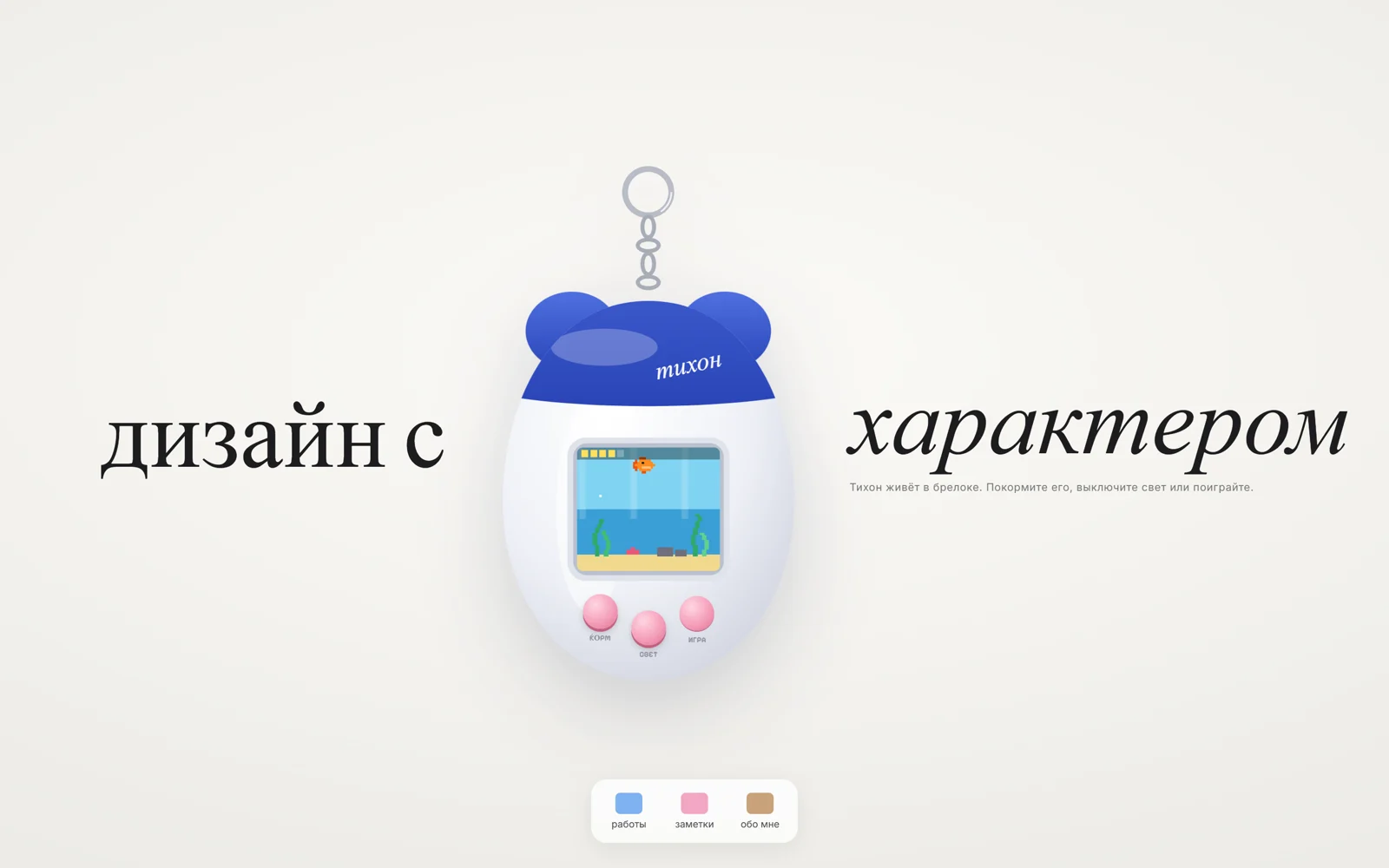
Посреди крупного заголовка «дизайн с … характером» висит на кольце пластиковое яйцо-брелок с ушками. На его экране — пиксельный аквариум: рыбка плавает, водоросли колышутся, поднимаются пузырьки. Три кнопки работают: «Корм» — сверху падают гранулы, рыбка плывёт и съедает их, над ней вспыхивает сердечко, полоска сытости растёт; «Свет» — в аквариуме ночь, рыбка опускается на дно и спит; «Игра» — рыбка кружится в пузырях. Брелок покачивается на кольце от движения мыши, его можно раскачать.
Подходит для первого экрана личного сайта, детского продукта, игрового проекта или бренда с характером: такой питомец удерживает внимание дольше любой картинки.
Как это устроено
Корпус — SVG с градиентами (глянцевый пластик, синяя крышка с ушками, цепочка и кольцо), экран — <canvas> 64×52 пикселя, растянутый с image-rendering: pixelated.
Каждый кадр аквариум рисуется заново: вода, лучи, песок, водоросли, гранулы, рыбка-спрайт 10×7 из строк, пузырьки, полоска сытости. Рыбка плывёт к ближайшей грануле, а если корма нет — к случайной точке.
Кнопки — настоящие <button> с подписями, есть клавиши F, L, P. Брелок — маятник на пружине, движение курсора добавляет скорость.
Без ввода питомец сам проходит сценарий: корм, игра, ночь, утро. При «уменьшении движения» водоросли и брелок почти не двигаются.
Код наш (MIT), идея подсмотрена в рилсе с подборкой личных сайтов (тамагочи-брелок с аквариумом посреди заголовка): взят только приём, корпус, спрайты и тексты свои.
Как получить такой же результат
Промпт содержит страницу одним файлом, она работает двойным щелчком.
Своего питомца нарисуйте строками в FISH (0 — пусто, цифры — цвета из COLORS) и поменяйте поведение в drawLcd.
Цвет корпуса — градиенты #cap и #shell, имя на крышке — текст в SVG.
Код Скопировать
<!-- MIT License. Copyright (c) 2026 Sergei Durgalian, learn.create-products.com/design. Free to use, copy and modify with this notice kept. -->
<!DOCTYPE html>
<html lang="ru">
<head>
<meta charset="UTF-8">
<meta name="viewport" content="width=device-width, initial-scale=1">
<title>Карманный питомец-аквариум</title>
<link rel="stylesheet" href="https://fonts.googleapis.com/css2?family=Instrument+Serif:ital@0;1&family=Inter:wght@400;500&family=Pixelify+Sans:wght@600&display=swap">
<style>
*, *::before, *::after { box-sizing: border-box; }
html, body { margin: 0; height: 100%; }
body { background: radial-gradient(90% 70% at 50% 40%, #fbfaf7, #ecebe6); color: #1d1d1f; font-family: "Inter", sans-serif; overflow: hidden; }
.hero { position: fixed; inset: 0; display: grid; grid-template-columns: 1fr auto 1fr; align-items: center; gap: clamp(8px, 2vw, 32px); padding: 0 clamp(12px, 3vw, 40px); }
.word { font: 400 clamp(36px, 7vw, 104px)/1 "Instrument Serif", serif; white-space: nowrap; }
.word.l { text-align: right; } .word.r { font-style: italic; }
.word small { display: block; font: 400 11px/1.5 "Inter"; letter-spacing: .04em; color: #777; margin-top: 10px; font-style: normal; }
.rig { position: relative; width: clamp(220px, 27vw, 360px); aspect-ratio: 300 / 470; transform-origin: 50% 3%; touch-action: none; cursor: grab; will-change: transform; }
.rig.drag { cursor: grabbing; }
.rig svg { position: absolute; inset: 0; width: 100%; height: 100%; filter: drop-shadow(0 30px 40px rgba(40, 40, 80, .18)); }
canvas#lcd { position: absolute; left: 29.5%; top: 52.5%; width: 41%; height: 22.6%; image-rendering: pixelated; border-radius: 6px; }
.btn { position: absolute; width: 10%; aspect-ratio: 1; border-radius: 50%; border: 0; padding: 0; cursor: pointer;
  background: radial-gradient(circle at 35% 30%, #ffd6e2, #f39ab6 60%, #d9708f); box-shadow: 0 3px 0 #c4607f, 0 5px 8px rgba(0,0,0,.18); }
.btn:active, .btn.press { transform: translateY(2px); box-shadow: 0 1px 0 #c4607f; }
.btn span { position: absolute; left: 50%; top: 115%; transform: translateX(-50%); font: 600 8px/1 "Pixelify Sans"; color: #8a8a99; white-space: nowrap; pointer-events: none; }
.b1 { left: 31%; top: 79.5%; } .b2 { left: 45%; top: 82.5%; } .b3 { left: 59%; top: 79.5%; }
.dock { position: fixed; left: 50%; bottom: 26px; transform: translateX(-50%); display: flex; gap: 6px; padding: 8px; background: rgba(255,255,255,.75); border-radius: 16px; box-shadow: 0 6px 24px rgba(0,0,0,.08); backdrop-filter: blur(8px); }
.dock a { display: grid; justify-items: center; gap: 4px; width: 62px; padding: 6px 0; border-radius: 10px; color: #444; text-decoration: none; font-size: 10px; }
.dock a:hover { background: #f0efeb; }
.dock i { width: 28px; height: 22px; border-radius: 5px; display: block; }
@media (max-width: 700px) {
  .hero { grid-template-columns: 1fr; grid-template-rows: auto auto auto; justify-items: center; align-content: center; gap: 6px; }
  .word { text-align: center !important; font-size: 44px; }
  .word small { display: none; }
  .rig { width: 56vw; }
}
</style>
</head>
<body>
<main class="hero">
  <div class="word l">дизайн с</div>
  <div class="rig" id="rig">
    <svg viewBox="0 0 300 470" aria-hidden="true">
      <defs>
        <radialGradient id="shell" cx=".38" cy=".3" r=".85"><stop offset="0" stop-color="#ffffff"/><stop offset=".55" stop-color="#eef0f6"/><stop offset="1" stop-color="#c9cddb"/></radialGradient>
        <linearGradient id="cap" x1="0" y1="0" x2="0" y2="1"><stop offset="0" stop-color="#4f6fe0"/><stop offset="1" stop-color="#2a45b8"/></linearGradient>
        <clipPath id="egg"><path d="M150 120 C238 120 276 214 276 292 C276 384 220 448 150 448 C80 448 24 384 24 292 C24 214 62 120 150 120 Z"/></clipPath>
      </defs>
      <!-- key ring and chain -->
      <circle cx="150" cy="26" r="20" fill="none" stroke="#b9bdc6" stroke-width="5"/>
      <circle cx="150" cy="26" r="20" fill="none" stroke="#fff" stroke-width="1.5" stroke-dasharray="20 120" opacity=".8"/>
      <g fill="none" stroke="#a8adb8" stroke-width="3.5">
        <ellipse cx="150" cy="56" rx="5" ry="9"/><ellipse cx="150" cy="72" rx="9" ry="5"/><ellipse cx="150" cy="88" rx="5" ry="9"/><ellipse cx="150" cy="104" rx="9" ry="5"/>
      </g>
      <!-- ears -->
      <ellipse cx="84" cy="146" rx="40" ry="34" fill="url(#cap)"/><ellipse cx="216" cy="146" rx="40" ry="34" fill="url(#cap)"/>
      <!-- body -->
      <path d="M150 120 C238 120 276 214 276 292 C276 384 220 448 150 448 C80 448 24 384 24 292 C24 214 62 120 150 120 Z" fill="url(#shell)"/>
      <g clip-path="url(#egg)">
        <path d="M0 0 H300 V196 C230 216 70 216 0 196 Z" fill="url(#cap)"/>
        <ellipse cx="112" cy="160" rx="46" ry="16" fill="#fff" opacity=".25"/>
        <ellipse cx="100" cy="300" rx="30" ry="90" fill="#fff" opacity=".5"/>
      </g>
      <text x="186" y="182" text-anchor="middle" font-family="Instrument Serif" font-style="italic" font-size="22" fill="#fff" transform="rotate(-12 186 182)">тихон</text>
      <!-- screen bezel -->
      <rect x="80" y="238" width="140" height="124" rx="16" fill="#dfe3ec"/>
      <rect x="85" y="243" width="130" height="114" rx="12" fill="#b9c0cf"/>
    </svg>
    <canvas id="lcd" width="64" height="52"></canvas>
    <button class="btn b1" id="feed" aria-label="Покормить"><span>КОРМ</span></button>
    <button class="btn b2" id="light" aria-label="Свет"><span>СВЕТ</span></button>
    <button class="btn b3" id="play" aria-label="Играть"><span>ИГРА</span></button>
  </div>
  <div class="word r">характером<small>Тихон живёт в брелоке. Покормите его, выключите свет или поиграйте.</small></div>
</main>
<nav class="dock">
  <a href="#"><i style="background:#7fb2f0"></i>работы</a>
  <a href="#"><i style="background:#f3a6c4"></i>заметки</a>
  <a href="#"><i style="background:#c9a27a"></i>обо мне</a>
</nav>

<script>
// ---- settings ----
const SWING_K = 18, SWING_D = 2.2;   // keychain pendulum
const FISH_SPEED = 14;               // pixels per second on the LCD

const AUTO = new URLSearchParams(location.search).has('auto');
const reduce = matchMedia('(prefers-reduced-motion: reduce)').matches;

// ---- LCD pixel aquarium ----
const lcd = document.getElementById('lcd'), g = lcd.getContext('2d');
const W = 64, H = 52;
const FISH = [ // 10x7 sprite: 1 body, 2 fin, 3 eye, 4 belly
  '0000222000',
  '0011111020',
  '0111131122',
  '1111111112',
  '0144441122',
  '0011111020',
  '0000220000'];
const COLORS = { 1: '#ff8a1f', 2: '#e8540f', 3: '#1b1b1b', 4: '#ffc27a' };
const fish = { x: 28, y: 22, tx: 40, ty: 20, dir: 1, full: 0, sleep: false };
let pellets = [], bubbles = [], night = false, hearts = 0, playT = 0;

function wander() { fish.tx = 6 + Math.random() * (W - 22); fish.ty = 8 + Math.random() * (H - 26); }
function feed() { for (let i = 0; i < 4; i++) pellets.push({ x: 14 + Math.random() * 36, y: -i * 4, vy: 6 + Math.random() * 3 }); }
function toggleLight() { night = !night; }
function play() { playT = 2.4; for (let i = 0; i < 8; i++) bubbles.push({ x: fish.x + 5, y: fish.y, vy: -10 - Math.random() * 10, r: Math.random() < 0.5 ? 1 : 2 }); }

function drawLcd(t, dt) {
  // water
  const top = night ? '#16234a' : '#7fd3f2', bot = night ? '#0c1531' : '#3a9fd6';
  for (let y = 0; y < H; y++) { g.fillStyle = y < H * 0.5 ? top : bot; g.fillRect(0, y, W, 1); }
  // light rays
  if (!night) { g.fillStyle = 'rgba(255,255,255,.18)'; for (let i = 0; i < 3; i++) { const x = ((t * 3 + i * 23) % (W + 20)) - 10; g.fillRect(x, 0, 3, 30); } }
  // sand and rocks
  g.fillStyle = night ? '#6d6243' : '#f2d98d'; g.fillRect(0, H - 7, W, 7);
  g.fillStyle = night ? '#4c4a52' : '#6f6f7e'; g.fillRect(36, H - 10, 7, 4); g.fillRect(44, H - 9, 5, 3);
  // seaweed sways
  for (const [x0, h, c] of [[8, 16, '#2fa86a'], [12, 11, '#3fbf74'], [52, 18, '#2fa86a'], [56, 10, '#5fd18a']]) {
    g.fillStyle = night ? '#1f5a46' : c;
    for (let k = 0; k < h; k++) { const sway = reduce ? 0 : Math.round(Math.sin(t * 2 + k * 0.35 + x0) * (k / h) * 2); g.fillRect(x0 + sway, H - 7 - k, 2, 1); }
  }
  g.fillStyle = '#e8547a'; g.fillRect(24, H - 10, 2, 3); g.fillRect(22, H - 9, 2, 2); g.fillRect(26, H - 9, 2, 2);

  // pellets fall and sink
  g.fillStyle = '#7a4a1e';
  pellets = pellets.filter((p) => { p.y = Math.min(H - 8, p.y + p.vy * dt); if (p.y >= 0) g.fillRect(Math.round(p.x), Math.round(p.y), 2, 2); return !p.eaten; });

  // fish brain
  fish.sleep = night;
  if (!night) {
    const food = pellets.filter((p) => p.y > 0).sort((a, b) => Math.hypot(a.x - fish.x - 5, a.y - fish.y - 3) - Math.hypot(b.x - fish.x - 5, b.y - fish.y - 3))[0];
    if (food) { fish.tx = food.x - (fish.dir > 0 ? 8 : 0); fish.ty = food.y - 3; if (Math.hypot(food.x - (fish.x + (fish.dir > 0 ? 9 : 0)), food.y - fish.y - 3) < 3) { food.eaten = true; fish.full = Math.min(5, fish.full + 1); hearts = 1.4; } }
    else if (Math.hypot(fish.tx - fish.x, fish.ty - fish.y) < 2) wander();
    if (playT > 0) { playT -= dt; fish.tx = fish.x + Math.cos(t * 6) * 10; fish.ty = fish.y + Math.sin(t * 6) * 6; }
    const dx = fish.tx - fish.x, dy = fish.ty - fish.y, d = Math.hypot(dx, dy) || 1;
    const sp = (playT > 0 ? 2.2 : food ? 1.8 : 1) * FISH_SPEED * dt;
    fish.x += dx / d * Math.min(sp, d); fish.y += dy / d * Math.min(sp, d);
    fish.x = Math.max(0, Math.min(W - 10, fish.x)); fish.y = Math.max(1, Math.min(H - 15, fish.y));
    if (Math.abs(dx) > 1) fish.dir = dx > 0 ? 1 : -1;
  } else { fish.y += (H - 17 - fish.y) * dt; }
  // fish sprite
  const bob = reduce ? 0 : Math.round(Math.sin(t * 4) * 0.6);
  FISH.forEach((row, yy) => [...row].forEach((ch, xx) => {
    if (ch === '0') return;
    const c = night && ch !== '3' ? '#b8693a' : COLORS[ch];
    g.fillStyle = night && ch === '3' ? '#1b1b1b' : c;
    const px = fish.dir > 0 ? xx : 9 - xx;
    g.fillRect(Math.round(fish.x) + px, Math.round(fish.y) + yy + bob, 1, night && ch === '3' ? 0.5 : 1);
  }));
  // zzz at night, hearts after a meal
  g.fillStyle = '#ffffff';
  if (night) { const z = Math.floor(t * 2) % 3; for (let i = 0; i <= z; i++) g.fillRect(Math.round(fish.x) + 10 + i * 3, Math.round(fish.y) - 2 - i * 3, 2, 1); }
  if (hearts > 0) { hearts -= dt; g.fillStyle = '#ff4d79'; const hx = Math.round(fish.x) + 3, hy = Math.round(fish.y) - 5 - Math.round((1.4 - hearts) * 3); g.fillRect(hx, hy, 1, 1); g.fillRect(hx + 2, hy, 1, 1); g.fillRect(hx, hy + 1, 3, 1); g.fillRect(hx + 1, hy + 2, 1, 1); }
  // bubbles
  g.fillStyle = 'rgba(255,255,255,.85)';
  bubbles = bubbles.filter((b) => { b.y += b.vy * dt; g.fillRect(Math.round(b.x), Math.round(b.y), b.r, b.r); return b.y > 0; });
  if (!reduce && Math.random() < dt * 0.8) bubbles.push({ x: 10, y: H - 10, vy: -8, r: 1 });
  // status bar: fullness
  g.fillStyle = 'rgba(0,0,0,.35)'; g.fillRect(0, 0, W, 5);
  for (let i = 0; i < 5; i++) { g.fillStyle = i < fish.full ? '#ffdf5e' : 'rgba(255,255,255,.25)'; g.fillRect(2 + i * 4, 1, 3, 3); }
  g.fillStyle = '#fff'; g.font = '5px monospace';
}

// ---- keychain swing ----
const rig = document.getElementById('rig');
const S = { a: 0, v: 0 };
let lastX = null, lastInput = -1e9, dragging = false;
addEventListener('pointermove', (e) => {
  if (lastX !== null) { const dx = e.clientX - lastX; S.v += dx * (dragging ? 0.02 : 0.004) * (reduce ? 0.3 : 1); }
  lastX = e.clientX; lastInput = performance.now();
});
rig.addEventListener('pointerdown', (e) => { if (e.target.closest('.btn')) return; dragging = true; rig.classList.add('drag'); rig.setPointerCapture(e.pointerId); });
addEventListener('pointerup', () => { dragging = false; rig.classList.remove('drag'); });

function press(id, fn) {
  const b = document.getElementById(id);
  b.addEventListener('click', () => { fn(); S.v += (Math.random() - 0.5) * 1.2; lastInput = performance.now(); });
  return () => { b.classList.add('press'); setTimeout(() => b.classList.remove('press'), 160); fn(); S.v += 0.6; };
}
const doFeed = press('feed', feed), doLight = press('light', toggleLight), doPlay = press('play', play);
addEventListener('keydown', (e) => { if (e.key === 'f') doFeed(); if (e.key === 'l') doLight(); if (e.key === 'p') doPlay(); });

// demo script: feed, play, lights off and on
const DEMO = [[600, doFeed], [3200, doPlay], [5600, doLight], [7600, doLight]];
let demoT0 = 0, demoIdx = 0;
function demo(t) {
  if (!AUTO && (reduce || t - lastInput < 6000)) { demoT0 = 0; return; }
  if (!demoT0) { demoT0 = t; demoIdx = 0; }
  const k = t - demoT0;
  if (demoIdx < DEMO.length && k > DEMO[demoIdx][0]) { DEMO[demoIdx][1](); demoIdx++; }
  if (k > 9000) demoT0 = 0;
  S.v += Math.sin(t / 650) * 0.02;
}

let prev = performance.now();
function frame(t) {
  const dt = Math.min(0.05, (t - prev) / 1000); prev = t;
  demo(t);
  S.v += (-SWING_K * S.a - SWING_D * S.v) * dt; S.a += S.v * dt;
  rig.style.transform = `rotate(${(S.a * 22).toFixed(2)}deg)`;
  drawLcd(t / 1000, dt);
  requestAnimationFrame(frame);
}
requestAnimationFrame(frame);
</script>
</body>
</html>