Эффекты и анимацииСветлый3DСтеклоМинимализмБесплатно
Прозрачные брелоки на цепочке
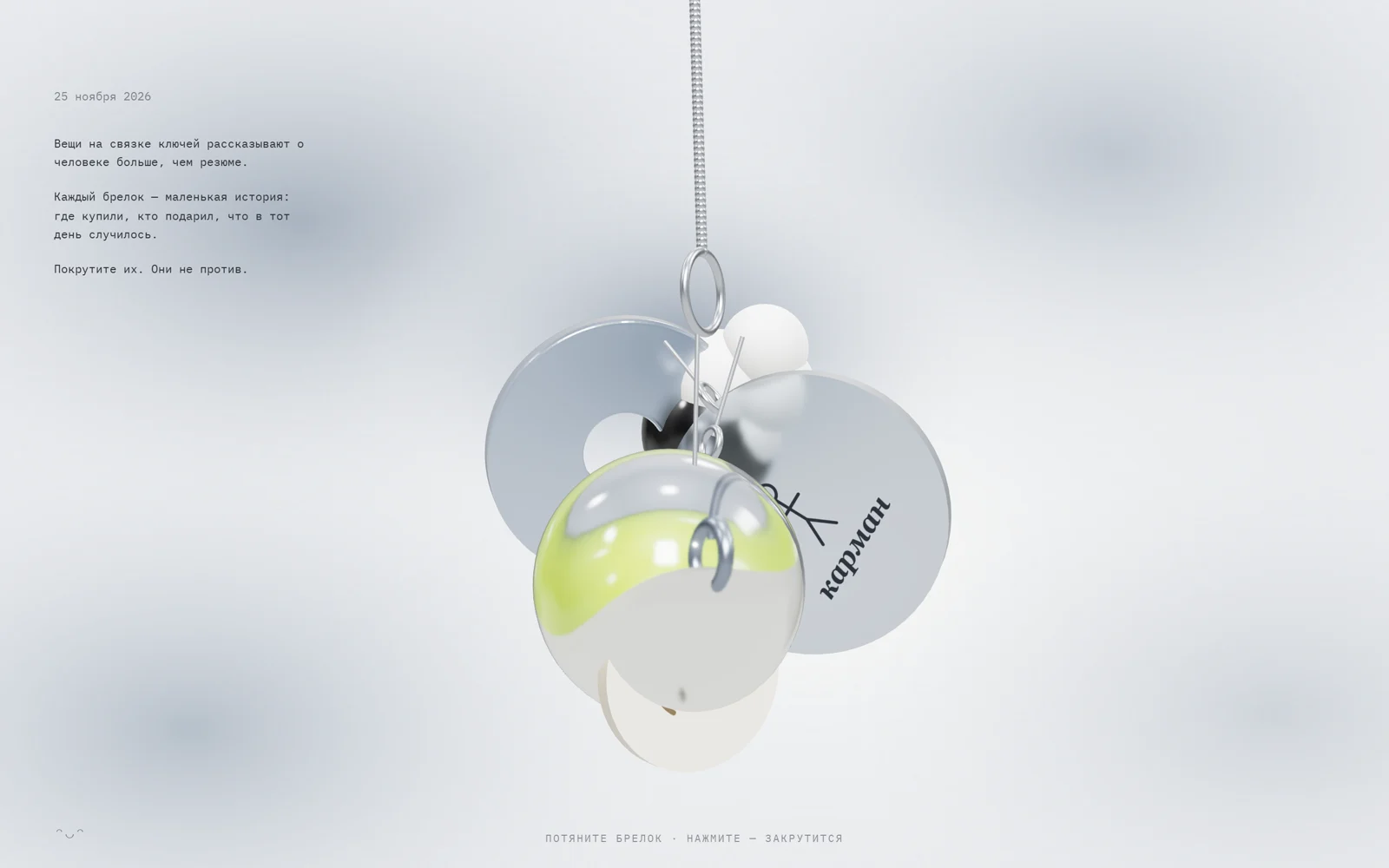
Связка стеклянных брелоков висит на шариковой цепочке: качается от курсора, крутится от клика, сквозь стекло размыт фон.
Промпт
Добавь на мою страницу эффект «Прозрачные брелоки на цепочке» (Сергей Дургалян, MIT). Ниже готовая страница на three.js 0.170.0 (jsdelivr, import map). Сначала перенеси её как есть, открой через локальный сервер и проверь: связка брелоков висит на шариковой цепочке сверху, качается, если тянуть мышью, брелок закручивается от клика, сквозь стекло размыт фон, без мыши брелоки иногда подпрыгивают сами. Потом меняй.

Как устроен код. Стекло — `MeshPhysicalMaterial` с `transmission: 1`, `thickness`, `roughness` (матовость), `attenuationColor`, `iridescence`; окружение — `RoomEnvironment` через PMREM; фон сцены — canvas-текстура с размытыми пятнами. Риг: `anchor` у верхнего края → `swing` (вся связка, маятник) → цепочка из `InstancedMesh` шариков → кольцо → `bunch` с брелоками. Каждый брелок: `pivot` (качание на кольце) → `spin` (кручение) → группа из функции в `charms`. Каждый кадр: пружина и затухание для связки (`SWING_K`, `SWING_D`), для брелоков (`CHARM_K`, `CHARM_D`, отставание `COUPLE`) и кручения (`SPIN_K`, `SPIN_D`). Курсор: `Raycaster` по `bunch`, перетаскивание раскачивает связку, клик закручивает брелок. В `resize()` цепочка подстраивается под высоту экрана, связка уменьшается на узком экране. `?auto=1` включает демо без пауз.

Что менять: состав и порядок брелоков в `LAYOUT`, их форму в `charms`, принт на диске в `facePrint`, текст заметки в HTML, жёсткость и затухание в настройках сверху. Вместо простых фигур можно загрузить свои GLB-модели через `GLTFLoader` и положить их в `spin`.

Если проект на React: держи разметку в компоненте, а запуск анимации и подписки на события — в `useEffect` с очисткой (`cancelAnimationFrame`, снять слушатели, `setAnimationLoop(null)`, `dispose()` геометрий и материалов).
Подскажи, какие брелоки на связке лучше расскажут о моём проекте.
Код скопируется вместе с промптом
С верхнего края экрана свисает шариковая цепочка, на кольце — связка брелоков: матовый стеклянный диск с принтом, прозрачный шар с зелёным существом внутри, чёрный глянцевый шарик с глазками, плоский «бублик», облачко и бумажная бирка. Потяните связку — она качается, брелоки отстают и бьются друг о друга по инерции. Клик по брелоку раскручивает его на кольце, проведённый мимо курсор слегка задевает. Сквозь стекло видно размытое туманное небо фона.
Подходит для первого экрана личного портфолио, студии, магазина аксессуаров или любого сайта, которому нужна «вещь», которую хочется потрогать.
Как это устроено
three.js: стекло — MeshPhysicalMaterial с transmission, thickness, roughness (матовость размывает то, что за ним), attenuationColor и лёгкой iridescence. Освещение — RoomEnvironment через PMREM, фон сцены — нарисованная на canvas «туманная» текстура, чтобы стеклу было что преломлять.
Физического движка нет. Вся связка — маятник на пружине (углы ax, az), каждый брелок — свой маятник на кольце, отстающий от связки (COUPLE), плюс кручение на колечке (SPIN_K, SPIN_D).
Курсор: Raycaster находит брелок под пальцем, перетаскивание раскачивает связку и крутит брелок, короткий клик — сильная закрутка.
Без мыши каждые пару секунд какой-нибудь брелок сам подпрыгивает. При «уменьшении движения» толчки слабее, самостоятельной анимации нет.
На узком экране связка уменьшается, текст уходит вниз.
Код наш (MIT), идея подсмотрена в рилсе с подборкой личных сайтов (брелоки на цепочке в портфолио): взят только приём, модели, тексты и графика свои.
Как получить такой же результат
Промпт содержит страницу одним файлом. Откройте её через локальный сервер (npx serve), с file:// браузер может не загрузить модули.
Свои брелоки собираются из простых фигур в charms — добавьте функцию, которая возвращает группу с верхом в точке 0, и строку в LAYOUT (место на кольце, глубина, угол веера, длина звена).
Свой логотип на диске — в facePrint: это обычный canvas, рисуйте на нём что угодно или вставьте картинку через drawImage.
Код
<!-- MIT License. Copyright (c) 2026 Sergei Durgalian, learn.create-products.com/design. Free to use, copy and modify with this notice kept. -->
<!DOCTYPE html>
<html lang="ru">
<head>
<meta charset="UTF-8">
<meta name="viewport" content="width=device-width, initial-scale=1">
<title>Прозрачные брелоки на цепочке</title>
<link rel="stylesheet" href="https://fonts.googleapis.com/css2?family=IBM+Plex+Mono:wght@400;500&display=swap">
<style>
*, *::before, *::after { box-sizing: border-box; }
html, body { margin: 0; height: 100%; }
body { background: #e9ebee; color: #2b2e33; font-family: "IBM Plex Mono", monospace; overflow: hidden; }
canvas#gl { position: fixed; inset: 0; width: 100%; height: 100%; display: block; touch-action: none; cursor: grab; }
canvas#gl.drag { cursor: grabbing; }
.note { position: fixed; left: clamp(16px, 4vw, 56px); top: clamp(20px, 10vh, 110px); max-width: 260px; font-size: 12px; line-height: 1.65; pointer-events: none; }
.note time { display: block; margin-bottom: 2.4em; opacity: .55; }
.note p { margin: 0 0 1.3em; }
.smile { position: fixed; left: clamp(16px, 4vw, 56px); bottom: 26px; font-size: 18px; opacity: .6; pointer-events: none; }
.hint { position: fixed; left: 50%; bottom: 24px; transform: translateX(-50%); font-size: 11px; letter-spacing: .14em; text-transform: uppercase; opacity: .5; pointer-events: none; white-space: nowrap; }
@media (max-width: 640px) {
  .note { top: auto; bottom: 64px; right: 16px; max-width: none; font-size: 11px; }
  .note p:nth-of-type(n+2), .smile { display: none; }
}
</style>
<script type="importmap">
{ "imports": {
  "three": "https://cdn.jsdelivr.net/npm/three@0.170.0/build/three.module.js",
  "three/addons/": "https://cdn.jsdelivr.net/npm/three@0.170.0/examples/jsm/"
} }
</script>
</head>
<body>
<canvas id="gl"></canvas>
<div class="note">
  <time>25 ноября 2026</time>
  <p>Вещи на связке ключей рассказывают о человеке больше, чем резюме.</p>
  <p>Каждый брелок — маленькая история: где купили, кто подарил, что в тот день случилось.</p>
  <p>Покрутите их. Они не против.</p>
</div>
<div class="smile">ᵔᴗᵔ</div>
<div class="hint">потяните брелок · нажмите — закрутится</div>

<script type="module">
import * as THREE from 'three';
import { RoomEnvironment } from 'three/addons/environments/RoomEnvironment.js';

// ---- settings ----
const SWING_K = 9;      // stiffness of the whole bundle swinging from the top
const SWING_D = 1.1;    // damping of the bundle
const CHARM_K = 14;     // stiffness of each charm on the ring
const CHARM_D = 1.6;
const SPIN_K = 2.2;     // jump ring torsion: how fast a spun charm turns back
const SPIN_D = 0.9;
const COUPLE = 0.55;    // how much charms lag behind the bundle

const AUTO = new URLSearchParams(location.search).has('auto');
const reduce = matchMedia('(prefers-reduced-motion: reduce)').matches;
const power = reduce ? 0.35 : 1;

const canvas = document.getElementById('gl');
const renderer = new THREE.WebGLRenderer({ canvas, antialias: true });
renderer.setPixelRatio(Math.min(devicePixelRatio, 2));
renderer.toneMapping = THREE.ACESFilmicToneMapping;
renderer.toneMappingExposure = 1.05;
renderer.outputColorSpace = THREE.SRGBColorSpace;

const scene = new THREE.Scene();
const camera = new THREE.PerspectiveCamera(30, 1, 0.1, 100);
camera.position.set(0, 0, 12);
const pmrem = new THREE.PMREMGenerator(renderer);
scene.environment = pmrem.fromScene(new RoomEnvironment(), 0.04).texture;
const sun = new THREE.DirectionalLight('#ffffff', 1.4);
sun.position.set(3, 5, 6);
scene.add(sun);

// Misty background: soft blobs on a canvas. Glass refracts and blurs it.
function mistTexture() {
  const c = document.createElement('canvas'); c.width = c.height = 512;
  const g = c.getContext('2d');
  g.fillStyle = '#e9ebee'; g.fillRect(0, 0, 512, 512);
  const blobs = [[110, 130, 190, '#a9b3bf'], [410, 90, 170, '#bfc7d0'], [300, 330, 230, '#fbfbf9'], [70, 430, 180, '#b7c0ca'], [470, 420, 160, '#cfd4da'], [250, 200, 120, '#9ea9b6']];
  for (const [x, y, r, col] of blobs) {
    const gr = g.createRadialGradient(x, y, 0, x, y, r);
    gr.addColorStop(0, col); gr.addColorStop(1, 'rgba(233,235,238,0)');
    g.fillStyle = gr; g.fillRect(0, 0, 512, 512);
  }
  const t = new THREE.CanvasTexture(c); t.colorSpace = THREE.SRGBColorSpace; return t;
}
scene.background = mistTexture();

// ---- materials ----
const glass = (tint = '#ffffff', roughness = 0.22) => new THREE.MeshPhysicalMaterial({
  color: tint, transmission: 1, thickness: 0.9, roughness, ior: 1.5,
  attenuationColor: '#b8c4d2', attenuationDistance: 1.4, iridescence: 0.25, iridescenceIOR: 1.3,
  clearcoat: 1, clearcoatRoughness: 0.06, specularIntensity: 1,
});
const metal = new THREE.MeshStandardMaterial({ color: '#c8ccd2', metalness: 1, roughness: 0.22 });
const gloss = (color) => new THREE.MeshPhysicalMaterial({ color, roughness: 0.35, clearcoat: 1, clearcoatRoughness: 0.1 });

function canvasTex(draw, size = 512) {
  const c = document.createElement('canvas'); c.width = c.height = size;
  draw(c.getContext('2d'), size);
  const t = new THREE.CanvasTexture(c); t.colorSpace = THREE.SRGBColorSpace; t.anisotropy = 4; return t;
}

// Print on the face of a glass disc (in front of the surface, so it is not hidden by transmission)
function facePrint(radius, z, draw) {
  const m = new THREE.Mesh(new THREE.CircleGeometry(radius, 48), new THREE.MeshBasicMaterial({
    map: canvasTex(draw), transparent: true, depthWrite: false, polygonOffset: true, polygonOffsetFactor: -2,
  }));
  m.position.z = z; return m;
}

// ---- charm builders: each returns a mesh group with its top at y = 0 ----
function jumpRing(group, y) {
  const r = new THREE.Mesh(new THREE.TorusGeometry(0.09, 0.022, 10, 24), metal);
  r.position.y = y; r.rotation.y = Math.PI / 2; group.add(r);
}
const charms = {
  disc() { // frosted disc with a printed sign
    const g = new THREE.Group();
    const d = new THREE.Mesh(new THREE.CylinderGeometry(0.78, 0.78, 0.13, 64), glass('#ffffff', 0.3));
    d.rotation.x = Math.PI / 2; d.position.y = -0.86; g.add(d);
    const p = facePrint(0.62, 0.069, (ctx, s) => {
      ctx.translate(s / 2, s / 2); ctx.rotate(-0.35);
      ctx.strokeStyle = '#3a3f47'; ctx.lineWidth = 7; ctx.lineCap = 'round';
      ctx.beginPath(); ctx.arc(0, -95, 22, 0, Math.PI * 2); ctx.stroke();
      ctx.beginPath(); ctx.moveTo(0, -72); ctx.lineTo(0, 10); ctx.moveTo(-40, -35); ctx.lineTo(40, -35);
      ctx.moveTo(0, 10); ctx.lineTo(-30, 70); ctx.moveTo(0, 10); ctx.lineTo(30, 70); ctx.stroke();
      ctx.fillStyle = '#3a3f47'; ctx.font = 'italic 600 64px Georgia, serif'; ctx.textAlign = 'center';
      ctx.fillText('карман', 0, 150);
    });
    p.position.y = -0.86; g.add(p);
    jumpRing(g, -0.05); return g;
  },
  bubble() { // clear sphere with a little creature inside
    const g = new THREE.Group();
    const s = new THREE.Mesh(new THREE.SphereGeometry(0.72, 48, 32), glass('#ffffff', 0.05));
    s.position.y = -0.82; g.add(s);
    const body = new THREE.Mesh(new THREE.SphereGeometry(0.36, 32, 24), gloss('#d7f53c'));
    body.scale.set(1, 0.9, 0.85); body.position.set(0.05, -0.92, 0); g.add(body);
    for (const x of [-0.07, 0.17]) {
      const e = new THREE.Mesh(new THREE.SphereGeometry(0.045, 16, 12), gloss('#111111'));
      e.position.set(x, -0.84, 0.3); g.add(e);
    }
    jumpRing(g, -0.05); return g;
  },
  ball() { // black glossy ball with eyes
    const g = new THREE.Group();
    const b = new THREE.Mesh(new THREE.SphereGeometry(0.42, 40, 28), gloss('#121214'));
    b.position.y = -0.5; g.add(b);
    for (const x of [-0.12, 0.12]) {
      const e = new THREE.Mesh(new THREE.SphereGeometry(0.075, 16, 12), gloss('#ffffff'));
      e.scale.set(0.7, 1, 0.5); e.position.set(x, -0.44, 0.37); g.add(e);
    }
    jumpRing(g, -0.05); return g;
  },
  ring() { // flat frosted donut
    const g = new THREE.Group();
    const shape = new THREE.Shape(); shape.absarc(0, 0, 0.74, 0, Math.PI * 2, false);
    const hole = new THREE.Path(); hole.absarc(0, 0, 0.26, 0, Math.PI * 2, true); shape.holes.push(hole);
    const geo = new THREE.ExtrudeGeometry(shape, { depth: 0.08, bevelEnabled: true, bevelThickness: 0.03, bevelSize: 0.03, bevelSegments: 4, curveSegments: 64 });
    geo.center();
    const m = new THREE.Mesh(geo, glass('#eef1f6', 0.38)); m.position.y = -0.84; g.add(m);
    jumpRing(g, -0.05); return g;
  },
  cloud() { // puffy matte cloud
    const g = new THREE.Group();
    const mat = new THREE.MeshPhysicalMaterial({ color: '#f7f5f0', roughness: 0.75, sheen: 1, sheenColor: '#ffffff' });
    for (const [x, y, r] of [[0, -0.42, 0.3], [-0.3, -0.55, 0.24], [0.3, -0.55, 0.25], [-0.12, -0.68, 0.24], [0.14, -0.7, 0.23]]) {
      const s = new THREE.Mesh(new THREE.SphereGeometry(r, 28, 20), mat); s.position.set(x, y, 0); g.add(s);
    }
    jumpRing(g, -0.05); return g;
  },
  tag() { // cream round tag with a drawn smile
    const g = new THREE.Group();
    const face = canvasTex((ctx, s) => {
      ctx.fillStyle = '#efe4cf'; ctx.fillRect(0, 0, s, s);
      ctx.strokeStyle = '#6b5a3e'; ctx.lineWidth = 14; ctx.lineCap = 'round';
      ctx.beginPath(); ctx.arc(s / 2, s / 2 + 10, 110, 0.15 * Math.PI, 0.85 * Math.PI); ctx.stroke();
      ctx.fillStyle = '#6b5a3e';
      ctx.beginPath(); ctx.arc(s / 2 - 70, s / 2 - 50, 18, 0, 7); ctx.arc(s / 2 + 70, s / 2 - 50, 18, 0, 7); ctx.fill();
    });
    const side = new THREE.MeshPhysicalMaterial({ color: '#e6d9c0', roughness: 0.5, clearcoat: 0.6 });
    const front = new THREE.MeshPhysicalMaterial({ map: face, roughness: 0.5, clearcoat: 0.6 });
    const t = new THREE.Mesh(new THREE.CylinderGeometry(0.5, 0.5, 0.1, 48), [side, front, front]);
    t.rotation.x = Math.PI / 2; t.position.y = -0.58; g.add(t);
    jumpRing(g, -0.05); return g;
  },
};

// ---- rig: anchor at the top → ball chain → ring → charms ----
const anchor = new THREE.Group(); scene.add(anchor);
const swing = new THREE.Group(); anchor.add(swing);
const BEADS = 46;
const beads = new THREE.InstancedMesh(new THREE.SphereGeometry(0.042, 12, 8), metal, BEADS);
swing.add(beads);
const ring = new THREE.Mesh(new THREE.TorusGeometry(0.3, 0.035, 14, 40), metal);
ring.rotation.y = 1.1; swing.add(ring);
const bunch = new THREE.Group(); swing.add(bunch);

// hang point x, z depth, rest fan angle, extra link length, build
const LAYOUT = [
  [-0.22, 0.1, 0.62, 0.35, 'disc'],
  [0.2, 0.3, -0.4, 0.55, 'bubble'],
  [0.0, -0.5, 0.05, 0.0, 'ball'],
  [0.28, -0.25, -0.95, 0.12, 'ring'],
  [-0.28, -0.35, 1.0, 0.0, 'cloud'],
  [-0.04, 0.6, -0.08, 1.15, 'tag'],
];
const linkMat = new THREE.MeshStandardMaterial({ color: '#c8ccd2', metalness: 1, roughness: 0.3 });
const list = LAYOUT.map(([x, z, rest, drop, kind], i) => {
  const pivot = new THREE.Group(); pivot.position.set(x, -0.12, z);
  const spin = new THREE.Group(); pivot.add(spin);
  const mesh = charms[kind](); mesh.position.y = -drop; spin.add(mesh);
  if (drop > 0) {
    const link = new THREE.Mesh(new THREE.CylinderGeometry(0.012, 0.012, drop, 6), linkMat);
    link.position.y = -drop / 2; spin.add(link);
  }
  bunch.add(pivot);
  const c = { pivot, spin, rest, bx: 0, bz: rest, vbx: 0, vbz: 0, s: 0, vs: 0, restSpin: (i % 2 ? 0.35 : -0.3) };
  mesh.traverse((o) => { if (o.isMesh) o.userData.charm = c; });
  return c;
});

const S = { ax: 0, az: 0, vax: 0, vaz: 0 };
let L = 2.3;

function resize() {
  const w = innerWidth, h = innerHeight;
  renderer.setSize(w, h, false);
  camera.aspect = w / h; camera.updateProjectionMatrix();
  const halfH = Math.tan(THREE.MathUtils.degToRad(camera.fov / 2)) * camera.position.z;
  const scale = 1.35 * Math.min(1, (w / h) / 1.1);
  anchor.position.y = halfH + 0.05;
  L = halfH - (w < h ? 0.2 : 1.0);
  bunch.scale.setScalar(Math.max(0.7, scale));
  ring.position.y = -L; bunch.position.y = -L - 0.2;
  const m = new THREE.Matrix4();
  for (let i = 0; i < BEADS; i++) { m.makeTranslation(0, -(i / (BEADS - 1)) * (L - 0.3), 0); beads.setMatrixAt(i, m); }
  beads.instanceMatrix.needsUpdate = true;
}
addEventListener('resize', resize); resize();

// ---- pointer ----
const ray = new THREE.Raycaster(), ndc = new THREE.Vector2();
let drag = null, lastMove = 0, lastX = 0, lastY = 0;
function pick(e) {
  ndc.set((e.clientX / innerWidth) * 2 - 1, -(e.clientY / innerHeight) * 2 + 1);
  ray.setFromCamera(ndc, camera);
  const hit = ray.intersectObject(bunch, true)[0];
  return hit ? hit.object.userData.charm : null;
}
canvas.addEventListener('pointerdown', (e) => {
  lastMove = performance.now();
  const c = pick(e);
  drag = { c, x0: e.clientX, y0: e.clientY, moved: 0 };
  lastX = e.clientX; lastY = e.clientY;
  canvas.setPointerCapture(e.pointerId); canvas.classList.add('drag');
});
canvas.addEventListener('pointermove', (e) => {
  lastMove = performance.now();
  const dx = e.clientX - lastX, dy = e.clientY - lastY; lastX = e.clientX; lastY = e.clientY;
  if (drag) {
    drag.moved += Math.abs(dx) + Math.abs(dy);
    S.vaz -= dx * 0.006 * power; S.vax += dy * 0.004 * power;
    if (drag.c) { drag.c.vs += dx * 0.05 * power; drag.c.vbz -= dx * 0.01 * power; drag.c.vbx += dy * 0.01 * power; }
  } else {
    const c = pick(e); // brushing past a charm nudges it
    if (c) { c.vbz -= dx * 0.006 * power; c.vs += dx * 0.012 * power; }
  }
});
function release(e) {
  if (!drag) return;
  if (drag.moved < 6) {
    if (drag.c) { drag.c.vs += 11 * power; drag.c.vbx -= 1.2 * power; }
    else S.vaz += (e.clientX < innerWidth / 2 ? 1 : -1) * 0.9 * power;
  }
  drag = null; canvas.classList.remove('drag');
}
canvas.addEventListener('pointerup', release);
canvas.addEventListener('pointercancel', release);

// ---- idle demo: random flicks while nobody touches the scene ----
let nextFlick = 0;
function demo(t) {
  if (reduce && !AUTO) return;
  if (!AUTO && t - lastMove < 3500) return;
  if (t < nextFlick) return;
  nextFlick = t + (AUTO ? 900 : 1700) + Math.random() * 600;
  const c = list[Math.floor(Math.random() * list.length)];
  c.vs += (Math.random() < 0.5 ? -1 : 1) * (6 + Math.random() * 6) * power;
  c.vbz += (Math.random() - 0.5) * 2.2 * power;
  S.vaz += (Math.random() - 0.5) * 0.7 * power;
}

// ---- simulation ----
let prev = performance.now();
renderer.setAnimationLoop(() => {
  const t = performance.now();
  const dt = Math.min(0.033, (t - prev) / 1000); prev = t;
  demo(t);
  const aAx = -SWING_K * S.ax - SWING_D * S.vax;
  const aAz = -SWING_K * S.az - SWING_D * S.vaz;
  S.vax += aAx * dt; S.vaz += aAz * dt; S.ax += S.vax * dt; S.az += S.vaz * dt;
  swing.rotation.set(S.ax, 0, S.az);
  for (const c of list) {
    const ax = -CHARM_K * c.bx - CHARM_D * c.vbx - aAx * COUPLE;
    const az = -CHARM_K * (c.bz - c.rest) - CHARM_D * c.vbz - aAz * COUPLE;
    c.vbx += ax * dt; c.vbz += az * dt; c.bx += c.vbx * dt; c.bz += c.vbz * dt;
    c.vs += (-SPIN_K * (c.s - c.restSpin) - SPIN_D * c.vs) * dt; c.s += c.vs * dt;
    c.pivot.rotation.set(c.bx, 0, c.bz); c.spin.rotation.y = c.s;
  }
  renderer.render(scene, camera);
});
</script>
</body>
</html>