Библиотека дизайна / Анимации

АнимацииТёмныйТипографикаБесплатно

Переход между страницами пиксельной волной

Клик по фото — экран волной из угла закрывают оранжевые квадраты и, рассыпаясь, открывают новую страницу. Без WebGL, на GSAP.

Переход между страницами пиксельной волной
Промпт
Добавь в мой проект эффект «Переход между страницами пиксельной волной» (Codrops Pixel Transition, демо 3, идея анимации — Niccolò Miranda, лицензия MIT). Ниже HTML, CSS и JavaScript одним файлом на GSAP 3.13.0 с jsdelivr. Сначала перенеси как есть и проверь: клик по фото закрывает экран оранжевыми квадратами из правого нижнего угла и открывает страницу, стрелка возвращает назад волной из левого верхнего угла. Потом подгоняй.

Как устроен код. В `main` (CSS Grid) в одной ячейке лежат три слоя: `.intro` (слова и фото-таблетки, их строит скрипт из массива `WORDS`), `.content-wrap` со всеми «страницами» `.content` (из массива `PAGES`, видна только та, у которой класс `content--open`) и `.overlay` — сетка `ROWS × COLUMNS` (7 × 13) из пустых `div` цвета `--color-bg-overlay`. `showOverlay({ from })` делает слой видимым и анимирует клетки от `scale: 0, opacity: 0` до `scale: 1.01, opacity: 1` (1.01 — чтобы между клетками не было щелей) за 0.3 с каждая со `stagger: { grid: [ROWS, COLUMNS], from, each: 0.035 }`. Когда экран закрыт, `openPage()` прячет интро и открывает страницу, затем `hideOverlay()` растворяет клетки той же волной, а фото на странице доезжает от `scale: 1.2` до 1. `closePage()` — то же в обратную сторону с `from: 'start'`. Флаг `isAnimating` не даёт запустить второй переход поверх первого.

Что менять: число клеток `ROWS`/`COLUMNS`, цвет волны `--color-bg-overlay`, градиент текста `--color-gr-1`/`--color-gr-2`, фон `--color-bg`, направление волны (`from`: `'start'`, `'end'`, `'center'`, `'edges'`, `'random'` или индекс клетки), шаг `each` и длительность клетки, слова в `WORDS` и тексты страниц в `PAGES`, картинки в папке `images/`. Шрифт Anybody с осями ширины и толщины можно заменить на любой вариативный.

Если проект на React: переход удобно оформить хуком `usePixelTransition()`, который рендерит сетку клеток в портале поверх приложения и возвращает функцию `run(from, onCovered)`: она вызывает `showOverlay`, в `onCovered` ты меняешь маршрут или состояние (например, `navigate('/case/3')`), затем `hideOverlay`. Клетки рисуй из массива длиной `ROWS * COLUMNS`, анимации запускай через `gsap.context()` в `useLayoutEffect` и вызывай `ctx.revert()` при размонтировании. Не убирай `pointer-events: none` у `.overlay` и проверку `isAnimating`. При `prefers-reduced-motion` экран меняется мгновенно, клетки только гаснут: оставь эту ветку.
Покажи, где на моём сайте такой переход будет к месту, и подставь мои фотографии и тексты.

Код скопируется вместе с промптом

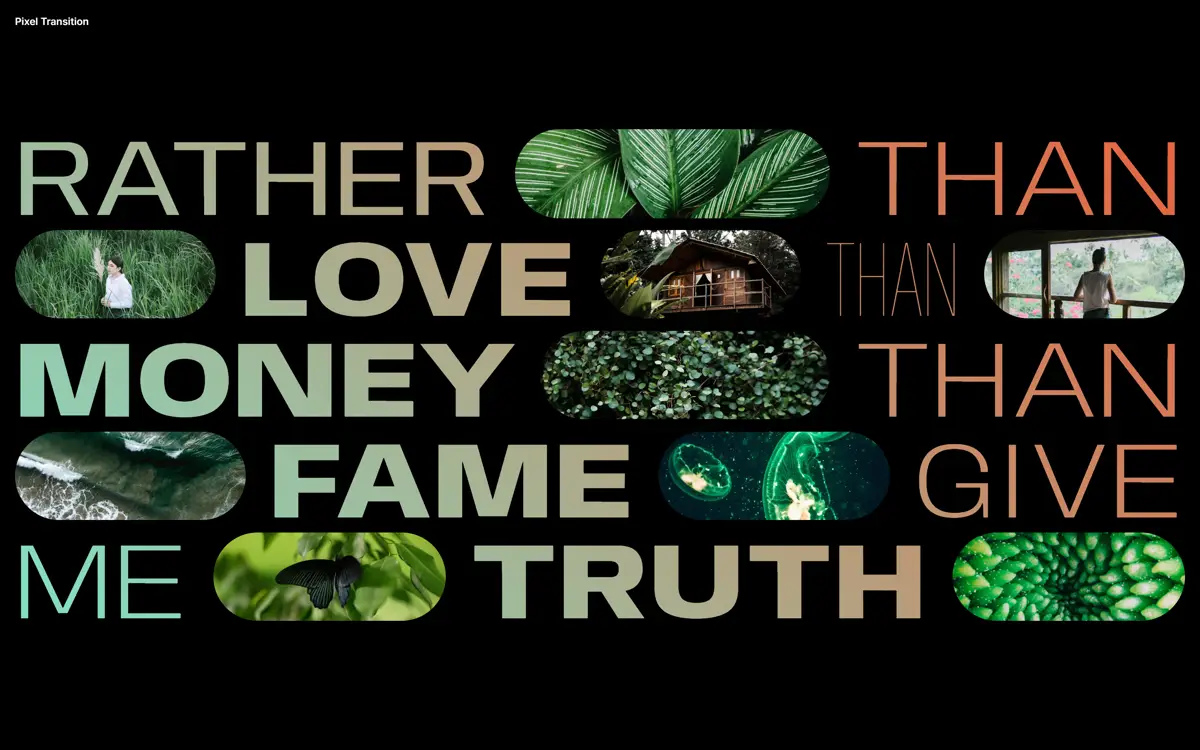
Первый экран — крупные слова с градиентом от мятного к оранжевому, а между ними фотографии-«таблетки». Нажмите на любое фото: слова чуть отъезжают вглубь, а экран волной из правого нижнего угла засыпают оранжевые квадраты. Пока экран закрыт, под ними подменяется содержимое, и квадраты так же волной тают, открывая страницу с большим фото, номером и подписью. Стрелка «назад» запускает ту же волну, но из левого верхнего угла.

Это чистые DOM и GSAP: поверх страницы лежит сетка 7×13 из обычных div (CSS Grid), и GSAP увеличивает их от нуля с задержкой по сетке (stagger с grid и from: 'end'). Никаких холстов и шейдеров, поэтому работает везде и легко переносится. В оригинале шесть вариаций переходов, здесь взята третья, с оранжевыми квадратами на чёрном. Подходит для переходов между разделами портфолио, открытия кейса или товара, смены экранов в промо-странице.
Код
<!-- Pictures: images/1.webp ... images/9.webp (replace with your own, landscape 3:2) -->
<!DOCTYPE html>
<html lang="en">
<head>
<meta charset="UTF-8">
<meta name="viewport" content="width=device-width, initial-scale=1">
<title>Pixel Page Transition</title>
<link rel="icon" href="data:,">
<link rel="stylesheet" href="https://fonts.googleapis.com/css2?family=Anybody:wdth,wght@50..150,100..900&family=Inter:wght@500;600&display=swap">
<style>
*, *::before, *::after { box-sizing: border-box; }
:root { font-size: 12px; }
body {
  margin: 0; overflow: hidden;
  --color-text: #fff; --color-gr-1: #81e2c6; --color-gr-2: #e7613c; --color-bg: #000;
  --color-back: #d23636; --color-back-hover: #df6b47; --color-bg-overlay: rgb(223, 107, 71);
  --pad: 1.5rem;
  color: var(--color-text); background: var(--color-bg); font-family: "Inter", system-ui, sans-serif;
}
.unbutton { background: none; border: 0; padding: 0; margin: 0; font: inherit; cursor: pointer; }
/* text painted with the green-to-orange gradient */
.grad { background-image: linear-gradient(45deg, var(--color-gr-1), var(--color-gr-2));
  -webkit-background-clip: text; background-clip: text; -webkit-text-fill-color: transparent; }

main { display: grid; height: 100vh; height: 100dvh; position: relative; }
.frame { grid-area: 1 / 1 / 2 / 2; align-self: start; position: relative; z-index: 100; padding: var(--pad);
  font-weight: 600; background: linear-gradient(to bottom, var(--color-bg), transparent); }

/* Screen 1: big words with pill-shaped pictures between them */
.intro { grid-area: 1 / 1 / 2 / 2; position: relative; align-self: center; max-height: 80vmax; padding: 0 var(--pad);
  display: flex; flex-wrap: wrap; column-gap: 2vw; row-gap: 1vw; white-space: nowrap;
  font-family: "Anybody", sans-serif; font-variation-settings: "wdth" 120, "wght" 300;
  font-size: 9vw; line-height: 1; text-transform: uppercase; will-change: transform; }
.intro--closed { opacity: 0; pointer-events: none; }
.intro__text { line-height: .6; padding-top: 2vw; }
.font-1 { font-variation-settings: "wdth" 75, "wght" 100; }
.font-2 { font-variation-settings: "wdth" 120, "wght" 800; }
.font-3 { font-variation-settings: "wdth" 120, "wght" 400; }
.intro__image { flex: 1; min-width: 50px; max-width: 100px; border-radius: 5vw; cursor: pointer;
  background: 50% 30% / cover no-repeat; transition: opacity .3s; }
.intro__image:hover, .intro__image:focus-visible { opacity: .8; outline: none; }

/* Screen 2: one of the "pages", all stacked in the same grid cell */
.content-wrap { grid-area: 1 / 1 / 2 / 2; display: grid; pointer-events: none; }
.content { grid-area: 1 / 1 / -1 / -1; display: grid; grid-template-rows: 70% 1fr; gap: 5vh; height: 100%;
  padding: 8rem var(--pad) 2rem; opacity: 0; pointer-events: none; }
.content--open { opacity: 1; pointer-events: auto; }
.content__img { position: relative; display: grid; overflow: hidden; border-radius: 1.85rem; will-change: transform; }
.content__img-inner { background: 50% 20% / cover no-repeat; }
.content__text { display: grid; grid-template-areas: 'back number title' '. . title' 'meta meta meta';
  grid-template-columns: auto 1fr auto; grid-template-rows: auto 1fr auto; column-gap: 2rem; }
.content__title { grid-area: title; margin: 0; max-width: 15ch; text-align: right; line-height: 1;
  font-family: "Anybody", sans-serif; font-variation-settings: "wdth" 120, "wght" 100; font-size: clamp(2rem, 6vw, 5rem); }
.content__number { grid-area: number; align-self: start; margin-top: -1vw; line-height: 1; font-size: clamp(3rem, 6vw, 10rem); }
.content__back { grid-area: back; align-self: center; }
.content__back svg { width: max(4vw, 24px); height: max(4.85vw, 29px); fill: var(--color-back); transition: fill .2s; }
.content__back:hover svg, .content__back:focus-visible svg { fill: var(--color-back-hover); }
.content__meta { grid-area: meta; display: flex; justify-content: space-between; text-transform: uppercase;
  font-size: clamp(.75rem, 3vw, 1.5rem); line-height: 1; }

/* The overlay: a grid of square-ish cells that cover the screen between the two states */
.overlay { grid-area: 1 / 1 / -1 / -1; position: relative; z-index: 1000; display: grid; pointer-events: none; opacity: 0;
  grid-template-columns: repeat(var(--columns), 1fr); }
.overlay div { background: var(--color-bg-overlay); will-change: opacity, transform; }

@media (min-width: 53em) {
  .intro__image { min-width: 200px; max-width: 30%; }
  .content { padding-top: 5rem; }
}
</style>
</head>
<body>
<svg width="0" height="0" style="position:absolute" aria-hidden="true">
  <symbol id="icon-arrow" viewBox="0 0 562 980"><path d="M561.4 0H421.2v138.7h140.2zM421.2 138.7H281v140.2h140.2zM281 278.9H140.8v140.2H281zM281 559.4H140.8v140.2H281zM421.2 699.6H281v140.2h140.2zM561.4 839.8H421.2V980h140.2zM140.8 419.1H.6v140.2h140.2z"/></symbol>
</svg>
<main>
  <div class="frame">Pixel Transition</div>
  <div class="intro grad"></div>
  <section class="content-wrap"></section>
  <div class="overlay"></div>
</main>

<script src="https://cdn.jsdelivr.net/npm/gsap@3.13.0/dist/gsap.min.js"></script>
<script>
// Based on Codrops PixelTransition, demo 3 (MIT, Copyright (c) 2009-2023 Codrops), https://github.com/codrops/PixelTransition
// Idea: animation by Niccolò Miranda. Pictures: images/1.webp ... images/9.webp
const reduceMotion = matchMedia('(prefers-reduced-motion: reduce)').matches;

// Screen 1 words and screen 2 pages. Each picture opens the page with the same number
const WORDS = [['Rather', 'font-3'], 1, ['than'], 2, ['love', 'font-2'], 3, ['than', 'font-1'], 4, ['money', 'font-2'], 5,
  ['than'], 6, ['fame', 'font-2'], 7, ['give'], ['me'], 8, ['truth', 'font-2'], 9];
const PAGES = [
  ['Guard your time and attention.', 'M36', 'Frank Luck', '1982', 'Ground Day'],
  ['Seek simplicity and nature.', 'B13', 'Lora Black', '1985', 'Lost in Love'],
  ['Avoid accumulating needless things.', 'G98', 'Lady B.', '1989', 'Club Byna'],
  ['Be conscious of the stories you tell.', 'K06', 'Harry D. Walters', '2023', 'Mad Wanderer'],
  ['Rest, reflect, and play.', 'W02', 'Cathy Brown', '1992', 'Free Ride'],
  ['Your actions have consequences.', 'T67', 'Sarah Zola', '1996', 'Roundhouse'],
  ["Don't compromise your integrity.", 'X49', 'Dana Belucci', '2000', 'Rising Star'],
  ['Seek greater wisdom and compassion.', 'G05', 'Gerry Ronald', '2001', 'Messy Luck'],
  ['Value experiences over material possessions.', 'K16', 'Diana Cohen', '2002', 'Simple Thing']
];
const img = n => `images/${n}.webp`;

const intro = document.querySelector('.intro');
intro.innerHTML = WORDS.map(w => typeof w === 'number'
  ? `<div class="intro__image" role="button" tabindex="0" aria-label="Open page ${w}" style="background-image:url(${img(w)})"></div>`
  : `<div class="intro__text ${w[1] || ''}">${w[0]}</div>`).join('');
document.querySelector('.content-wrap').innerHTML = PAGES.map(([title, num, ...meta], i) => `
  <div class="content">
    <div class="content__img"><div class="content__img-inner" style="background-image:url(${img(i + 1)})"></div></div>
    <div class="content__text">
      <h2 class="content__title grad">${title}</h2>
      <span class="content__number grad">${num}</span>
      <button class="content__back unbutton" aria-label="Back"><svg aria-hidden="true" focusable="false"><use href="#icon-arrow"></use></svg></button>
      <div class="content__meta">${meta.map(m => `<span>${m}</span>`).join('')}</div>
    </div>
  </div>`).join('');

// The overlay: ROWS x COLUMNS cells that grow in and shrink out with a stagger across the grid
const ROWS = 7, COLUMNS = 13;
const overlayEl = document.querySelector('.overlay');
overlayEl.style.setProperty('--columns', COLUMNS);
const cells = Array.from({ length: ROWS * COLUMNS }, () => overlayEl.appendChild(document.createElement('div')));

function showOverlay({ from }) {
  return new Promise(resolve => {
    gsap.set(overlayEl, { opacity: 1 });
    gsap.fromTo(cells, { scale: 0, opacity: 0, transformOrigin: '50% 50%' }, {
      scale: 1.01, opacity: 1, duration: reduceMotion ? 0 : 0.3, ease: 'power1.inOut',
      stagger: reduceMotion ? 0 : { grid: [ROWS, COLUMNS], from, each: 0.035 }, onComplete: resolve
    });
  });
}
function hideOverlay({ from }) {
  return new Promise(resolve => {
    gsap.to(cells, {
      scale: 0, opacity: 0, duration: 0.3, ease: 'power3',
      stagger: reduceMotion ? 0 : { grid: [ROWS, COLUMNS], from, each: 0.035 }, onComplete: resolve
    });
  });
}

const images = [...intro.querySelectorAll('.intro__image')];
const pages = [...document.querySelectorAll('.content')];
let isAnimating = false;

// Picture -> page: the intro shrinks, cells cover the screen from the bottom right corner, the page appears under them
function openPage(position) {
  if (isAnimating) return;
  isAnimating = true;
  gsap.to(intro, { duration: reduceMotion ? 0 : 0.7, ease: 'power2.in', scale: 0.75 });
  showOverlay({ from: 'end' }).then(() => {
    intro.classList.add('intro--closed');
    pages[position].classList.add('content--open');
    hideOverlay({ from: 'end' }).then(() => { isAnimating = false; pages[position].querySelector('.content__back').focus({ preventScroll: true }); });
    gsap.fromTo(pages[position].querySelector('.content__img'), { scale: reduceMotion ? 1 : 1.2 }, { duration: 0.9, ease: 'expo', scale: 1 });
  });
}

// Back arrow -> intro: the same cells, now starting from the top left corner
function closePage(page, position) {
  if (isAnimating) return;
  isAnimating = true;
  gsap.to(page.querySelector('.content__img'), { duration: reduceMotion ? 0 : 0.7, ease: 'power2.in', scale: reduceMotion ? 1 : 1.2 });
  showOverlay({ from: 'start' }).then(() => {
    intro.classList.remove('intro--closed');
    page.classList.remove('content--open');
    hideOverlay({ from: 'start' }).then(() => { isAnimating = false; images[position].focus({ preventScroll: true }); });
    gsap.to(intro, { duration: reduceMotion ? 0 : 0.9, ease: 'expo', scale: 1 });
  });
}

images.forEach((image, position) => {
  image.addEventListener('click', () => openPage(position));
  image.addEventListener('keydown', e => { if (e.key === 'Enter' || e.key === ' ') { e.preventDefault(); openPage(position); } });
});
pages.forEach((page, position) => page.querySelector('.content__back').addEventListener('click', () => closePage(page, position)));
</script>
</body>
</html>

Похожие