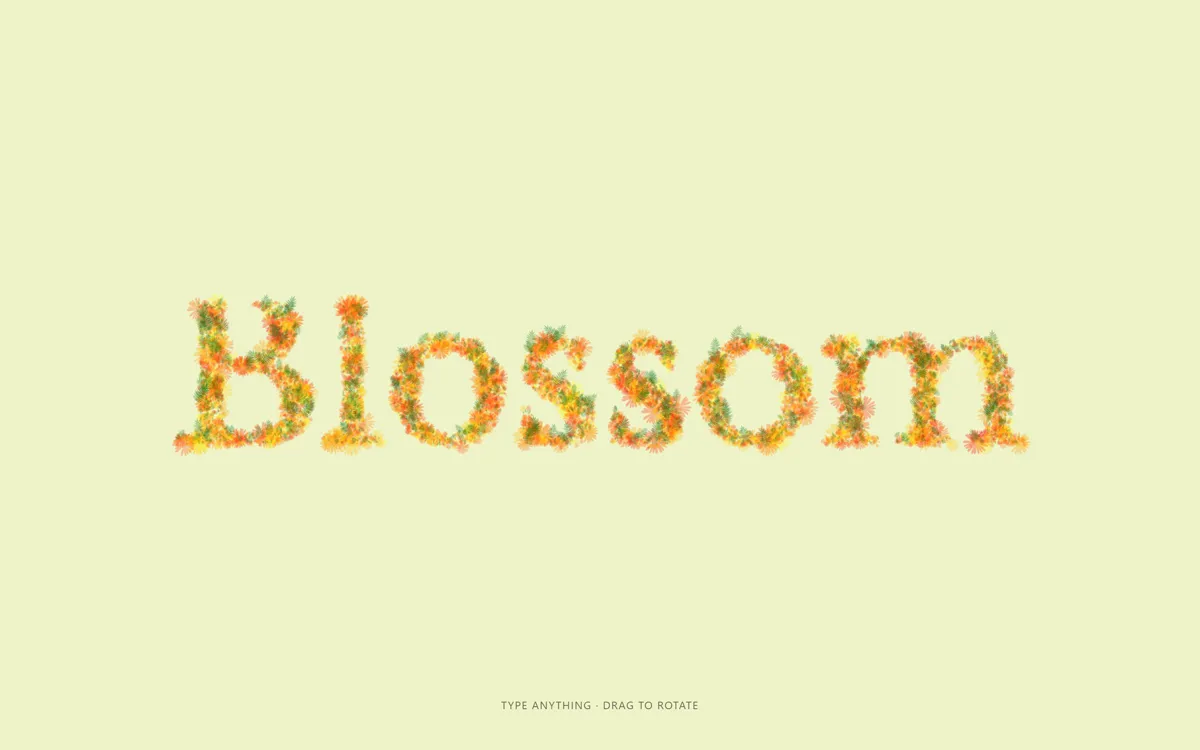
Набранные буквы прорастают тысячами цветов и листьев в 3D: новые распускаются, стёртые вянут, текст можно вращать мышью.
Промпт
Добавь в мой проект эффект «Текст, который расцветает, пока вы печатаете» (по мотивам 3D Typing Effects with Three.js, вариант «Flowers», автор Ksenia Kondrashova для Codrops, лицензия MIT). Ниже готовая страница одним файлом: three.js 0.184.0 с OrbitControls через importmap с jsdelivr и шрифт Libre Baskerville из Google Fonts. Рядом со страницей нужны две картинки из репозитория автора, `img/flower.png` и `img/leaf.png` (https://github.com/uuuulala/WebGL-typing-tutorial/tree/master/img, та же лицензия MIT). Открывай через локальный сервер, а не как файл: с адреса `file://` браузер не загрузит текстуры. Сначала перенеси как есть, напечатай пару букв и сотри их, убедись, что цветы прорастают и вянут, и только потом подгоняй.

Как устроен код. `#text-input` — невидимое поле `contenteditable` в левом верхнем углу с тем же шрифтом, что и холст; фокус всегда возвращается в него, а тап по экрану на телефоне открывает клавиатуру. На `keyup` (и `input` для мобильных клавиатур) `handleInput` читает текст и координаты каретки из выделения, `refreshText` вызывает `sampleCoordinates`: текст рисуется на скрытом 2D-холсте, закрашенные пиксели превращаются в массив `textureCoordinates`. Старые координаты, которые остались закрашенными, сохраняют свою частицу (`old`), пропавшие помечаются `toDelete` и уменьшаются до нуля, новые получают свежий `Flower` или `Leaf`. У каждой частицы своя логика роста в `grow()`: цветы растут, потом «дышат» синусом и чуть вращаются, листья растут один раз вверх от своего пикселя. `recreateInstancedMesh` пересобирает два `InstancedMesh` (`PlaneGeometry` 1.2×1.2, `MeshBasicMaterial` с `alphaMap` из PNG, прозрачность 0.3 и 0.35, `depthTest: false`) и раздаёт цвета по `hsl`: цветы от красного до жёлтого, листья тёмно-зелёные. Каждый кадр `updateParticlesMatrices` разворачивает все частицы к камере и задаёт им масштаб. `makeTextFitScreen` отодвигает камеру, если текст перестал помещаться, а курсор — тонкий чёрный `BoxGeometry`, который мигает функцией `pulse`. Цветовое управление three.js выключено (`ColorManagement.enabled = false`, вывод в `LinearSRGBColorSpace`), чтобы цвета совпали с оригиналом на старом three.js. Пока не нажата ни одна клавиша, функция `autoplay` стирает и печатает слова из массива `DEMO`.

Что менять: начальное слово (`string` и `DEMO`), шрифт (`fontName`, подключи любой из Google Fonts и дождись его загрузки через `document.fonts.load`), размер и плотность (`textureFontSize`: больше значит больше частиц, `fontScaleFactor` — масштаб сцены), фон `body`, оттенки цветов и листьев (числа в `color` у `Flower` и `Leaf` и строки `hsl(...)`), долю листьев (`Math.random() > .2`), размер цветов (`maxScale`, степень 20 делает крупные цветки редкими), прозрачность материалов, картинки цветка и листа (любая белая форма на прозрачном фоне подойдёт как маска). Подсказку `.hint` перепиши своими словами.

Если проект на React: сцену создавай в `useEffect` с пустым списком зависимостей, поле ввода оставь обычным элементом с `ref`, при размонтировании вызови `renderer.setAnimationLoop(null)`, `renderer.dispose()`, `clearTimeout` для автодемо и сними слушатели `keydown`, `keyup` и `resize`. Не превращай поле в управляемый React-компонент: код сам читает `innerHTML` и выделение. Не убирай пересборку `InstancedMesh` при смене текста и проверку `c.old`: на них держится то, что старые цветы не перерождаются при каждой букве. При `prefers-reduced-motion` частицы появляются сразу в полный размер, курсор не мигает, автодемо выключено: оставь эту ветку.
Покажи, где на моём сайте использовать этот эффект, и подставь моё слово или название бренда.
Код скопируется вместе с промптом
Слово на светлом фисташковом фоне, собранное не из линий, а из тысяч полупрозрачных цветков и листиков. Начните печатать, и новая буква прорастает: цветы распускаются из точки, листья тянутся вверх, а уже стоящие цветки медленно «дышат» и поворачиваются. Стёртая буква вянет и исчезает, мигающий курсор едет следом за текстом. Сцена настоящая трёхмерная: текст можно повернуть и приблизить мышью, при этом цветы всегда смотрят в камеру.
Устроено так: на странице лежит невидимое поле contenteditable, в которое и идёт ввод. После каждой клавиши текст рисуется на скрытом 2D-холсте, и каждый закрашенный пиксель становится цветком (80%) или листом (20%). Пиксели, которые остались закрашенными, сохраняют свой цветок, новые прорастают, пропавшие увядают. Все частицы — два InstancedMesh в three.js с картинками цветка и листа в роли маски прозрачности и своим цветом у каждого экземпляра. Подходит для первого экрана с именем бренда, открытки, поздравительной страницы, весенней акции, поля «введите своё имя». В оригинале автора четыре вариации (облака, пузыри, цветы, глаза), здесь взяты цветы. Пока посетитель ничего не нажал, слово само стирается и печатается заново.
Код
<!-- Textures: img/flower.png and img/leaf.png from https://github.com/uuuulala/WebGL-typing-tutorial/tree/master/img (MIT). Serve over http, not file:// -->
<!DOCTYPE html>
<html lang="en">
<head>
<meta charset="UTF-8">
<meta name="viewport" content="width=device-width, initial-scale=1">
<title>3D Typing: Flowers</title>
<link rel="icon" href="data:,">
<link rel="stylesheet" href="https://fonts.googleapis.com/css2?family=Libre+Baskerville&display=swap">
<script type="importmap">{ "imports": {
"three": "https://cdn.jsdelivr.net/npm/three@0.184.0/build/three.module.js",
"three/addons/": "https://cdn.jsdelivr.net/npm/three@0.184.0/examples/jsm/"
} }</script>
<style>
*, *::before, *::after { box-sizing: border-box; }
html, body { margin: 0; height: 100%; overflow: hidden; }
body { background: #eef3c7; color: #111; font: 13px/1.4 -apple-system, BlinkMacSystemFont, "Segoe UI", Helvetica, Arial, sans-serif; }
.container { position: fixed; inset: 0; touch-action: none; }
.container canvas { display: block; }
/* The real input: an invisible contenteditable in the top-left corner. The canvas copies its text and caret */
#text-input { position: fixed; top: 0; left: 0; opacity: 0; pointer-events: none; white-space: pre; outline: none; }
.hint { position: fixed; left: 0; right: 0; bottom: 2rem; text-align: center; text-transform: uppercase; letter-spacing: .08em; pointer-events: none; opacity: .6; }
</style>
</head>
<body>
<div id="text-input" contenteditable="true" spellcheck="false" aria-label="Type your text"></div>
<div class="container"></div>
<p class="hint">Type anything · drag to rotate</p>
<script type="module">
// Based on "3D Typing Effects with Three.js" (Flowers demo) by Ksenia Kondrashova for Codrops
// MIT License, Copyright (c) 2009 - 2021 Codrops, https://github.com/uuuulala/WebGL-typing-tutorial
import * as THREE from 'three';
import { OrbitControls } from 'three/addons/controls/OrbitControls.js';
const containerEl = document.querySelector('.container');
const textInputEl = document.querySelector('#text-input');
THREE.ColorManagement.enabled = false;
const reduceMotion = matchMedia('(prefers-reduced-motion: reduce)').matches;
// Settings
const fontName = '"Libre Baskerville", serif';
const textureFontSize = 100; // px of the hidden text; every filled pixel becomes a flower or a leaf
const fontScaleFactor = .085; // texture px -> scene units
textInputEl.style.font = `400 ${textureFontSize}px ${fontName}`;
textInputEl.style.lineHeight = .9 * textureFontSize + 'px';
let scene, camera, renderer, textCanvas, textCtx, particleGeometry, dummy, cursorMesh;
let focusTime = performance.now(); // the caret blink restarts on focus
let flowerMesh, leafMesh, flowerMaterial, leafMaterial;
let string = 'Blossom';
let textureCoordinates = []; // sampled pixels of the text
let particles = []; // one object per pixel, same index as textureCoordinates
const stringBox = { wTexture: 0, wScene: 0, hTexture: 0, hScene: 0, caretPosScene: [0, 0] };
await document.fonts.load(`${textureFontSize}px ${fontName}`);
textInputEl.textContent = string;
textInputEl.focus();
init();
createEvents();
setCaretToEnd();
handleInput();
refreshText();
renderer.setAnimationLoop(render);
function init() {
camera = new THREE.PerspectiveCamera(45, innerWidth / innerHeight, .1, 1000);
camera.position.z = 35;
scene = new THREE.Scene();
renderer = new THREE.WebGLRenderer({ alpha: true, antialias: true });
renderer.outputColorSpace = THREE.LinearSRGBColorSpace; // colours as in the original (three r133, no colour management)
renderer.setPixelRatio(Math.min(devicePixelRatio, 2));
renderer.setSize(innerWidth, innerHeight);
containerEl.appendChild(renderer.domElement);
const orbit = new OrbitControls(camera, renderer.domElement);
orbit.enablePan = false;
textCanvas = document.createElement('canvas');
textCtx = textCanvas.getContext('2d', { willReadFrequently: true });
// every particle is a camera-facing square; the PNG is used as an alpha mask, the colour comes per instance
particleGeometry = new THREE.PlaneGeometry(1.2, 1.2);
const loader = new THREE.TextureLoader();
flowerMaterial = new THREE.MeshBasicMaterial({ alphaMap: loader.load('img/flower.png'), opacity: .3, depthTest: false, transparent: true });
leafMaterial = new THREE.MeshBasicMaterial({ alphaMap: loader.load('img/leaf.png'), opacity: .35, depthTest: false, transparent: true });
dummy = new THREE.Object3D();
const cursorGeometry = new THREE.BoxGeometry(.09, 6.5, .03);
cursorGeometry.translate(0, -4.4, 0);
cursorMesh = new THREE.Mesh(cursorGeometry, new THREE.MeshBasicMaterial({ color: 0x000000, transparent: true }));
scene.add(cursorMesh);
}
function createEvents() {
document.addEventListener('keydown', stopAutoplay);
document.addEventListener('keyup', () => { handleInput(); refreshText(); });
textInputEl.addEventListener('input', () => { handleInput(); refreshText(); }); // mobile keyboards
textInputEl.addEventListener('blur', () => setTimeout(() => textInputEl.focus()));
textInputEl.addEventListener('focus', () => { focusTime = performance.now(); });
// a tap without dragging opens the keyboard on phones
let down = null;
containerEl.addEventListener('pointerdown', e => { down = [e.clientX, e.clientY]; });
containerEl.addEventListener('pointerup', e => {
if (down && Math.hypot(e.clientX - down[0], e.clientY - down[1]) < 6) { textInputEl.focus(); setCaretToEnd(); }
});
addEventListener('resize', () => {
camera.aspect = innerWidth / innerHeight;
camera.updateProjectionMatrix();
renderer.setSize(innerWidth, innerHeight);
});
}
function setCaretToEnd() {
let node = textInputEl; // the deepest last text node, so the caret has a measurable position
while (node.lastChild) node = node.lastChild;
const range = document.createRange();
if (node.nodeType === Node.TEXT_NODE) range.setStart(node, node.length); else range.selectNodeContents(node);
range.collapse(true);
const sel = getSelection();
sel.removeAllRanges();
sel.addRange(range);
}
// Read the text and the caret position from the hidden input
function handleInput() {
const isNewLine = el => el?.tagName && /^(DIV|P)$/i.test(el.tagName) && el.innerHTML === '<br>';
if (isNewLine(textInputEl.firstChild)) textInputEl.firstChild.remove();
if (isNewLine(textInputEl.lastChild) && isNewLine(textInputEl.lastChild.previousSibling)) textInputEl.lastChild.remove();
string = textInputEl.innerHTML
.replaceAll('<p>', '\n').replaceAll('</p>', '').replaceAll('<div>', '\n').replaceAll('</div>', '')
.replaceAll('<br>', '').replaceAll('<br/>', '').replaceAll(' ', ' ')
.replaceAll('&', '&').replaceAll('<', '<').replaceAll('>', '>');
stringBox.wTexture = textInputEl.clientWidth;
stringBox.wScene = stringBox.wTexture * fontScaleFactor;
stringBox.hTexture = textInputEl.clientHeight;
stringBox.hScene = stringBox.hTexture * fontScaleFactor;
stringBox.caretPosScene = getCaretCoordinates().map(c => c * fontScaleFactor);
function getCaretCoordinates() {
const sel = getSelection();
if (!sel.rangeCount) return [0, 0];
const range = sel.getRangeAt(0);
if (range.startContainer.nodeName.toLowerCase() === 'div' && range.startOffset === 0 && range.startContainer !== textInputEl) {
return [range.startContainer.offsetLeft, range.startContainer.offsetTop]; // caret on an empty new line
}
const rect = range.getClientRects()[0];
return rect ? [rect.left, rect.top] : [0, 0];
}
}
function render() {
updateParticlesMatrices();
const pulse = t => Math.sign(Math.sin(t * Math.PI)) * Math.pow(Math.sin((t % 1) * 3.14), .2);
cursorMesh.material.opacity = document.activeElement === textInputEl ? (reduceMotion ? 1 : pulse(2 * (performance.now() - focusTime) / 1000)) : 0;
renderer.render(scene, camera);
}
function refreshText() {
sampleCoordinates();
particles = textureCoordinates.map((c, i) => {
const x = c.x * fontScaleFactor, y = c.y * fontScaleFactor;
const p = (c.old && particles[i]) ? particles[i] : Math.random() > .2 ? new Flower(x, y) : new Leaf(x, y);
if (c.toDelete) { p.toDelete = true; p.scale = p.maxScale; }
return p;
});
recreateInstancedMesh();
makeTextFitScreen();
cursorMesh.position.x = -.5 * stringBox.wScene + stringBox.caretPosScene[0];
cursorMesh.position.y = .4 * stringBox.hScene - stringBox.caretPosScene[1];
}
// Draw the text on a 2D canvas and turn every filled pixel into a coordinate.
// Pixels that stay filled keep their particle, new ones grow, missing ones fade out
function sampleCoordinates() {
const lines = string.split('\n');
textCanvas.width = stringBox.wTexture;
textCanvas.height = stringBox.hTexture;
textCtx.font = `400 ${textureFontSize}px ${fontName}`;
textCtx.fillStyle = '#2a9d8f';
textCtx.clearRect(0, 0, textCanvas.width, textCanvas.height);
lines.forEach((line, i) => textCtx.fillText(line, 0, (i + .8) * stringBox.hTexture / lines.length));
if (stringBox.wTexture === 0) { textureCoordinates = []; return; }
const { data, width, height } = textCtx.getImageData(0, 0, textCanvas.width, textCanvas.height);
const mask = Array.from({ length: height }, (_, i) => Array.from({ length: width }, (_, j) => data[(j + i * width) * 4] > 0));
if (textureCoordinates.length) {
textureCoordinates = textureCoordinates.filter(c => !c.toDelete);
particles = particles.filter(p => !p.toDelete);
textureCoordinates.forEach(c => {
if (mask[c.y]?.[c.x]) { c.old = true; if (!c.toDelete) mask[c.y][c.x] = false; }
else c.toDelete = true;
});
}
for (let i = 0; i < height; i++) for (let j = 0; j < width; j++) {
if (mask[i][j]) textureCoordinates.push({ x: j, y: i, old: false, toDelete: false });
}
}
// Flowers: rare big ones, many tiny ones; they grow, then breathe and slowly turn
function Flower(x, y) {
Object.assign(this, {
type: 0, x: x + .2 * (Math.random() - .5), y: y + .2 * (Math.random() - .5), z: 0,
color: Math.random() * 60, isGrowing: true, toDelete: false, scale: 0,
maxScale: .9 * Math.pow(Math.random(), 20), deltaScale: .03 + .1 * Math.random(),
age: Math.PI * Math.random(), ageDelta: .01 + .02 * Math.random(), rotationZ: .5 * Math.random() * Math.PI
});
this.grow = function () {
this.age += this.ageDelta;
if (reduceMotion) { this.scale = this.toDelete ? 0 : this.maxScale; return; }
if (this.isGrowing) {
this.deltaScale *= .99; this.scale += this.deltaScale;
if (this.scale >= this.maxScale) this.isGrowing = false;
} else if (this.toDelete) {
this.deltaScale *= 1.1; this.scale -= this.deltaScale;
if (this.scale <= 0) { this.scale = 0; this.deltaScale = 0; }
} else {
this.scale = this.maxScale + .2 * Math.sin(this.age);
this.rotationZ += .001 * Math.cos(this.age);
}
};
}
// Leaves: green, grow once and stay
function Leaf(x, y) {
Object.assign(this, {
type: 1, x, y, z: 0, rotationZ: .6 * (Math.random() - .5) * Math.PI,
color: 100 + Math.random() * 50, isGrowing: true, toDelete: false, scale: 0,
maxScale: .1 + .7 * Math.pow(Math.random(), 7), deltaScale: .03 + .03 * Math.random()
});
this.grow = function () {
if (reduceMotion) { this.scale = this.toDelete ? 0 : this.maxScale; return; }
if (this.isGrowing) {
this.deltaScale *= .99; this.scale += this.deltaScale;
if (this.scale >= this.maxScale) this.isGrowing = false;
}
if (this.toDelete) {
this.deltaScale *= 1.1; this.scale -= this.deltaScale;
if (this.scale <= 0) this.scale = 0;
}
};
}
// Two InstancedMeshes (flowers, leaves), rebuilt on every change of the text
function recreateInstancedMesh() {
scene.remove(flowerMesh, leafMesh);
flowerMesh?.dispose(); leafMesh?.dispose();
flowerMesh = new THREE.InstancedMesh(particleGeometry, flowerMaterial, particles.filter(p => p.type === 0).length);
leafMesh = new THREE.InstancedMesh(particleGeometry, leafMaterial, particles.filter(p => p.type === 1).length);
scene.add(flowerMesh, leafMesh);
const color = new THREE.Color();
let f = 0, l = 0;
particles.forEach(p => {
if (p.type === 0) flowerMesh.setColorAt(f++, color.setStyle(`hsl(${p.color}, 100%, 50%)`));
else leafMesh.setColorAt(l++, color.setStyle(`hsl(${p.color}, 100%, 20%)`));
});
leafMesh.position.x = flowerMesh.position.x = -.5 * stringBox.wScene;
leafMesh.position.y = flowerMesh.position.y = -.6 * stringBox.hScene;
}
function updateParticlesMatrices() {
let f = 0, l = 0;
particles.forEach(p => {
p.grow();
dummy.quaternion.copy(camera.quaternion); // always face the camera
dummy.rotation.z += p.rotationZ;
dummy.scale.setScalar(p.scale);
dummy.position.set(p.x, stringBox.hScene - p.y, p.z);
if (p.type === 1) dummy.position.y += .5 * p.scale; // leaves grow upwards from their pixel
dummy.updateMatrix();
(p.type === 0 ? flowerMesh : leafMesh).setMatrixAt(p.type === 0 ? f++ : l++, dummy.matrix);
});
flowerMesh.instanceMatrix.needsUpdate = true;
leafMesh.instanceMatrix.needsUpdate = true;
}
// Move the camera back if the text no longer fits the screen
function makeTextFitScreen() {
const fov = camera.fov * Math.PI / 180;
const fovH = 2 * Math.atan(Math.tan(fov / 2) * camera.aspect);
const dx = Math.abs(.7 * stringBox.wScene / Math.tan(.5 * fovH));
const dy = Math.abs(.6 * stringBox.hScene / Math.tan(.5 * fov));
const factor = Math.max(dx, dy) / camera.position.length();
if (factor > 1) camera.position.multiplyScalar(factor);
}
// Autoplay until the first key press: the word is erased and retyped letter by letter
const DEMO = ['Blossom', 'Bloom'];
let demoTimer = null, demoStep = 0;
function stopAutoplay() { clearTimeout(demoTimer); demoTimer = null; }
function autoplay() {
const text = textInputEl.textContent, target = DEMO[(demoStep + 1) % DEMO.length];
let delay = 160;
if (text === target) { demoStep = (demoStep + 1) % DEMO.length; delay = 1600; }
else if (target.startsWith(text)) textInputEl.textContent = target.slice(0, text.length + 1); // type
else { textInputEl.textContent = text.slice(0, -1); delay = 110; } // erase
setCaretToEnd(); handleInput(); refreshText();
demoTimer = setTimeout(autoplay, delay);
}
if (!reduceMotion) demoTimer = setTimeout(autoplay, 1400);
</script>
</body>
</html>