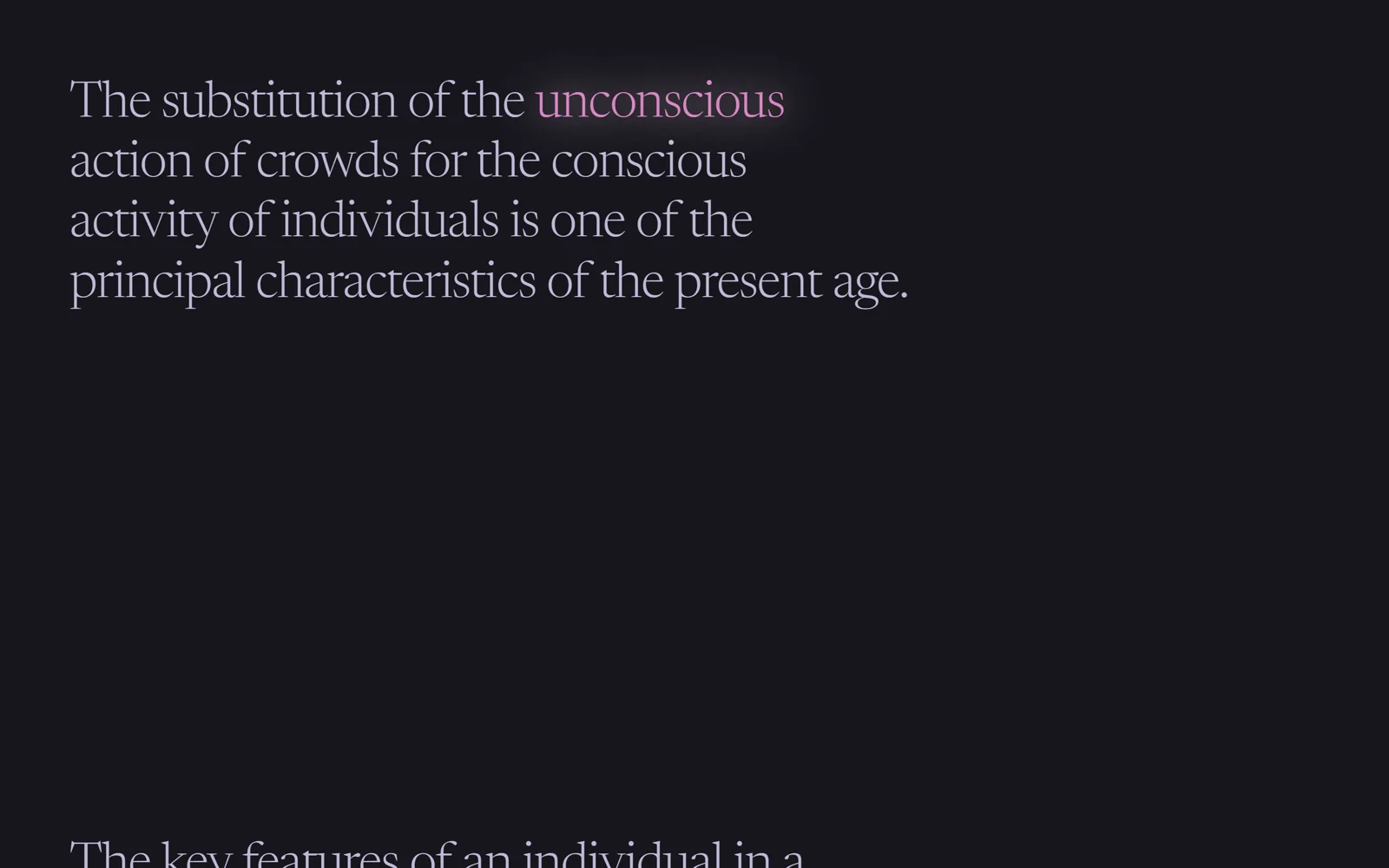
Выделенные слова, которые вспыхивают при появлении в тексте
Важное слово в абзаце появляется по буквам: переворот в 3D, свечение, плашка, полоса или маркер вырастает под ним.
Промпт
Добавь на мою страницу эффект «Выделенные слова вспыхивают при появлении в тексте» (по мотивам Codrops OnScrollTextHighlight, MIT). Ниже готовая страница на GSAP 3.13.0 и ScrollTrigger (jsdelivr), буквы режет простая функция. Сначала перенеси её как есть и проверь: при появлении выделенных слов на экране проигрывается анимация, при уходе она сбрасывается. Потом меняй.

Как устроен код. Выделенное слово это `mark.hx` с атрибутом `data-fx`. Скрипт режет его на `span.char`. В объекте `fx` пять функций: `flip` (буквы летят из глубины с `rotationX`), `glow` (буквы гаснут и возвращаются с розовой тенью), `pill` (буквы появляются, за ними вырастает плашка), `bar` (под словом прочерчивается полоса) и `rise` (буквы растут от линии строки, маркер заливает слово). Плашка, полоса и маркер это `::after`, ими управляют CSS-переменные `--s`, `--w`, `--h`, которые GSAP анимирует напрямую. ScrollTrigger запускает эффект при входе слова в экран (в обе стороны), а при выходе сбрасывает его функцией `reset`.

Что менять: слова и тип эффекта на каждом (`data-fx`), цвета плашек, шрифт, время и ease в `D`, момент запуска (`start: 'top bottom'`).

Если проект на React: слово оберни в компонент, который сам режет текст на буквы, эффекты запускай в `useEffect`. Для скринридеров оставь исходное слово в `aria-label`, а буквы скрой через `aria-hidden`: иначе слово прочитается по буквам.
Покажи, где на моём сайте такие выделения будут работать лучше всего.
Код скопируется вместе с промптом
Тёмная страница с крупными абзацами текста. В каждом абзаце одно слово отмечено тегом mark. Когда оно появляется на экране, анимация проигрывается именно на нём: буквы вылетают из глубины, вспыхивают розовым свечением, выскакивают на фиолетовой плашке, оранжевая полоса прочерчивается под ними или зелёный маркер заливает слово снизу вверх. Прокрутите назад и анимация сбросится и сыграет снова.
Здесь пять вариантов из тринадцати оригинальных. Все делаются одним приёмом: слово режется на буквы, а плашка рисуется псевдоэлементом ::after, которым управляют CSS-переменные. Хорошо подходит для статей, манифестов, лендингов с «громкими» словами.
Код
<!-- Pictures come from picsum.photos as placeholders: replace the URLs with your own images. -->
<!DOCTYPE html>
<html lang="en">
<head>
<meta charset="UTF-8">
<meta name="viewport" content="width=device-width, initial-scale=1">
<title>Text Highlight Scroll</title>
<link rel="stylesheet" href="https://fonts.googleapis.com/css2?family=Newsreader:ital,opsz,wght@0,6..72,300;1,6..72,300&display=swap">
<style>
*, *::before, *::after { box-sizing: border-box; }
html, body { margin: 0; }
body { background: #17161d; color: #bfb9d6; font-family: "Newsreader", serif; font-weight: 300; overflow-x: hidden; }
.intro { min-height: 70vh; display: grid; padding: 0 5vw; }
.intro h2 { margin: 0; align-self: end; font-size: clamp(2.4rem, 7vw, 6.5rem); line-height: .9; font-weight: 300; text-transform: uppercase; color: #efeaff; }
.content { padding: 30vh 5vw 40vh; font-size: clamp(1.8rem, 5.2vw, 3.25rem); line-height: 1.2; letter-spacing: -.02em; }
.content p { margin: 0 0 60vh; max-width: 900px; text-wrap: balance; }
.hx { display: inline-block; position: relative; white-space: nowrap; background: none; color: #efeaff; }
.char { display: inline-block; }
.hx { perspective: 600px; }

/* a coloured marker behind the word: a scaled rounded rectangle, width bar or height bar, driven through CSS variables */
.hx--pill  { --s: 1; display: inline-flex; color: #e1def4; }
.hx--pill::after  { content: ""; position: absolute; z-index: -1; left: -2.5%; top: 10%; bottom: -7.5%; width: 105%; background: #6a5ace; border-radius: 8px; transform: scale(var(--s)); }
.hx--bar   { --w: 0%; display: inline-flex; color: #fadabd; }
.hx--bar::after   { content: ""; position: absolute; z-index: -1; left: -2.5%; top: 15%; bottom: -10.5%; width: var(--w); background: #dc764c; border-radius: 8px; }
.hx--rise  { --h: 0%; color: #d2f2d3; }
.hx--rise::after  { content: ""; position: absolute; z-index: -1; left: -2.5%; top: 10%; width: 105%; height: var(--h); background: #437745; border-radius: 8px; }
.end { min-height: 40vh; display: grid; place-items: center; opacity: .5; }
</style>
</head>
<body>
<div class="intro"><h2>On-scroll<br>animations for<br>highlighted text</h2></div>
<div class="content">
  <p>Organised crowds have always played an <mark class="hx" data-fx="flip">important</mark> part in the life of peoples, but this part has never been of such moment as at present.</p>
  <p>The substitution of the <mark class="hx" data-fx="glow">unconscious</mark> action of crowds for the conscious activity of individuals is one of the principal characteristics of the present age.</p>
  <p>The key features of an individual in a crowd are the <mark class="hx hx--pill" data-fx="pill">vanishing</mark> of the conscious personality and the rise of the unconscious.</p>
  <p>Whatever the nature of the individuals that compose it, they are <mark class="hx hx--bar" data-fx="bar">transformed</mark> into a collective mind by the mere fact of being a crowd.</p>
  <p>Ideas, feelings and emotions in the crowd are <mark class="hx hx--rise" data-fx="rise">contagious</mark> to such a degree that a person readily gives up his personal interest.</p>
</div>
<div class="end">End</div>

<script src="https://cdn.jsdelivr.net/npm/gsap@3.13.0/dist/gsap.min.js"></script>
<script src="https://cdn.jsdelivr.net/npm/gsap@3.13.0/dist/ScrollTrigger.min.js"></script>
<script>
// Based on Codrops OnScrollTextHighlight (MIT), https://github.com/codrops/OnScrollTextHighlight
gsap.registerPlugin(ScrollTrigger);

// Each highlighted word is cut into letters; every effect is a function that animates them when the word scrolls in.
const D = { duration: 0.8, ease: 'power2' };
const fx = {
  // letters swing in from the front, one after another
  flip: (el, c) => gsap.timeline({ defaults: D }).fromTo(c, { opacity: 0, z: 300, rotationX: -45 }, { stagger: 0.04, opacity: 1, z: 0, rotationX: 0 }),
  // letters blink out, then come back one by one with a pink glow
  glow: (el, c) => gsap.timeline({ defaults: { duration: 0.5, ease: 'power1' } })
    .to(c, { stagger: 0.06, opacity: 0, scale: 0.8 })
    .to(c, { stagger: 0.06, opacity: 1, scale: 1, color: '#d686c1', startAt: { filter: 'drop-shadow(0 0 0 #ffdbf5)' }, filter: 'drop-shadow(0 0 20px #ffdbf5)' }, 0.5),
  // letters pop in while a rounded marker grows behind the word
  pill: (el, c) => gsap.timeline({ defaults: D })
    .fromTo(c, { scale: 1.3, opacity: 0 }, { stagger: (i) => 0.1 + 0.05 * i, scale: 1, opacity: 1 })
    .fromTo(el, { '--s': 0 }, { duration: 0.8, ease: 'expo', '--s': 1 }, 0),
  // a bar draws itself from left to right behind the letters
  bar: (el, c) => gsap.timeline({ defaults: D })
    .fromTo(c, { opacity: 0 }, { stagger: 0.05, opacity: 1 })
    .fromTo(el, { '--w': '0%' }, { duration: 0.9, ease: 'expo.inOut', '--w': '105%' }, 0),
  // letters grow up from the baseline while the marker fills the word from the top
  rise: (el, c) => gsap.timeline({ defaults: D })
    .fromTo(c, { transformOrigin: '50% 80%', scaleY: 0 }, { stagger: (i) => 0.2 + 0.05 * i, scaleY: 1 })
    .fromTo(el, { '--h': '0%' }, { duration: 0.7, ease: 'sine.inOut', '--h': '100%' }, '<')
};
const resetTo = { flip: { opacity: 1, z: 0, rotationX: 0 }, glow: { opacity: 1, scale: 1, color: '', filter: 'none' }, pill: { opacity: 1, scale: 1 }, bar: { opacity: 1 }, rise: { scaleY: 1 } };

document.querySelectorAll('.hx').forEach((el) => {
  const name = el.dataset.fx;
  el.innerHTML = [...el.textContent].map((ch) => `<span class="char">${ch}</span>`).join('');   // letters
  const chars = el.querySelectorAll('.char');
  const reset = () => {
    gsap.killTweensOf([chars, el]);
    gsap.set(chars, resetTo[name]);
    gsap.set(el, { '--s': 0, '--w': '0%', '--h': '0%' });
  };
  reset();
  ScrollTrigger.create({
    trigger: el, start: 'top bottom',
    onEnter: () => fx[name](el, chars), onEnterBack: () => fx[name](el, chars),
    onLeave: reset, onLeaveBack: reset
  });
});
</script>
</body>
</html>