Эффекты и шейдерыТёмныйРетро и пиксельТипографикаБесплатно
Строки текста, которые разъезжаются и «расшифровываются» при скролле
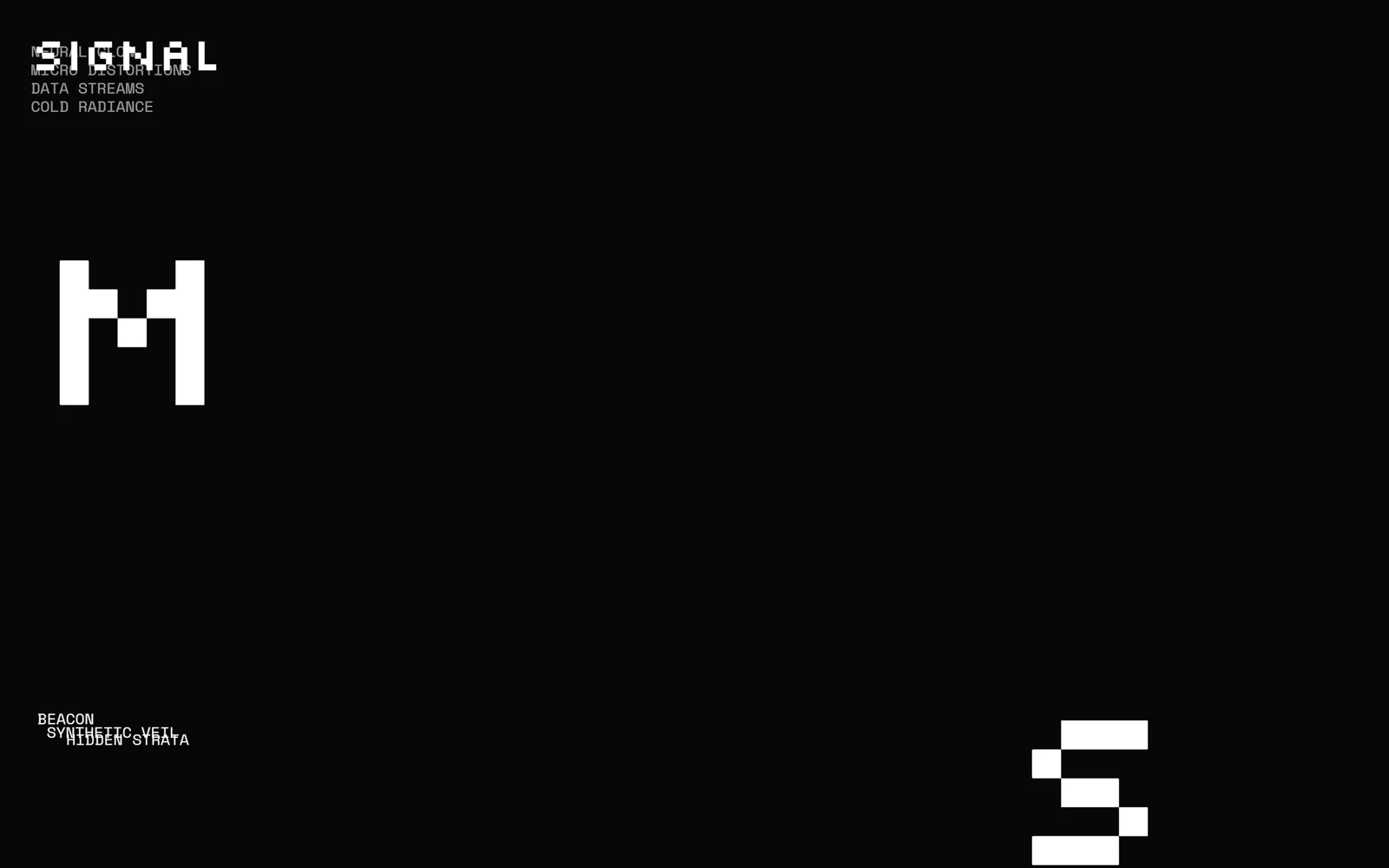
Короткие строки сами смещаются по сетке при скролле, а при появлении на экране буквы перемешиваются и собираются в слово.
Промпт
Добавь на мою страницу эффект «Строки текста разъезжаются и расшифровываются при скролле» (по мотивам Codrops ScrollTextMotion, MIT). Ниже готовая страница на GSAP 3.13.0 с ScrollTrigger, Flip и ScrambleTextPlugin (jsdelivr). Сначала перенеси её как есть и проверь: строки смещаются при скролле, а при появлении буквы перемешиваются и собираются в слово. Потом меняй.

Как устроен код. У каждой строки `.el` есть класс положения вида `pos-N` («домой») и запасной в атрибуте `data-alt-pos`. Функция `initFlips` временно меняет класс на запасной, запоминает состояние через `Flip.getState`, возвращает назад и создаёт две анимации со scrub: `Flip.to` едет в запасное положение к середине экрана, `Flip.from` возвращается к верхнему краю. Функция `scramble` через `scrambleText` стирает слово и собирает его заново; её вызывает ScrollTrigger при входе строки в экран, в обе стороны. Длительность можно задать на элементе через `data-scramble-duration`, для огромных букв она дольше.

Что менять: слова и количество групп, положения `pos-1`…`pos-9` (это просто отступы), размер огромных букв `.el--xl`, шрифты, цвета, набор символов в `scramble` (`upperAndLowerCase`, можно свои).

Если проект на React: запоминай элементы через `ref`, `initFlips` и `initScramble` вызывай в `useLayoutEffect` и откатывай `ScrollTrigger.getAll().forEach(t => t.kill())` при размонтировании. Не меняй текст строк вручную во время анимации: `scrambleText` сам его возвращает.
Покажи, где на моём сайте такая типографика будет работать лучше всего.
Код скопируется вместе с промптом
Тёмная страница с набором коротких строк и несколькими огромными буквами. У каждой строки есть «домашнее» положение и запасное. По мере скролла строка плавно уезжает с одного места на другое и возвращается: так колонки текста не стоят на месте, а перестраиваются вокруг вас. Когда строка входит в экран, её буквы перемешиваются и собираются в слово, как при расшифровке.
Движение даёт плагин GSAP Flip (положение меняется простой сменой класса, а перелёт считает сам плагин), расшифровку даёт ScrambleTextPlugin. Оба бесплатны с версии 3.13. Эффект хорошо смотрится на технологических лендингах, в ретро и пиксельных стилях, на страницах про данные, игры, безопасность.
Код
<!-- Pictures come from picsum.photos as placeholders: replace the URLs with your own images. -->
<!DOCTYPE html>
<html lang="en">
<head>
<meta charset="UTF-8">
<meta name="viewport" content="width=device-width, initial-scale=1">
<title>Scroll Text Motion</title>
<link rel="stylesheet" href="https://fonts.googleapis.com/css2?family=Silkscreen:wght@400&family=Space+Mono&display=swap">
<style>
*, *::before, *::after { box-sizing: border-box; }
html, body { margin: 0; }
body { background: #07070a; color: #fff; font-family: "Space Mono", monospace; font-size: 16px; text-transform: uppercase; overflow-x: hidden; }
.logo { position: fixed; top: 1.5rem; left: 2rem; z-index: 5; font: 400 clamp(1.6rem, 6vw, 3rem) "Silkscreen", sans-serif; }
.content { padding: 30vh 2rem 25vh; }
.group { display: flex; flex-direction: column; margin-bottom: 10vh; }
.el { white-space: nowrap; opacity: .6; }
.el--xl { font: 400 clamp(2rem, 20vw, 15rem) "Silkscreen", sans-serif; opacity: 1; line-height: 1; }
/* positions: each line has a "home" class and an "alt" class (data-alt-pos); scrolling Flips it between the two */
.pos-1 { margin-left: 0; }
.pos-2 { margin-left: 25vw; }
.pos-3 { margin-left: 70vw; }
.pos-4 { margin-left: auto; }
.pos-5 { margin-top: 200px; opacity: 1; }
.pos-9 { margin-left: 25vw; margin-top: 250px; }
.cursor { display: inline-block; animation: blink .7s linear infinite; }
@keyframes blink { 50% { opacity: 0; } }
.end { height: 60vh; display: grid; place-items: center; font: 400 clamp(1.5rem, 6vw, 3rem) "Silkscreen", sans-serif; }
</style>
</head>
<body>
<div class="logo"><span>Signal</span></div>
<main class="content">
  <div class="group">
    <div class="el pos-4" data-alt-pos="pos-2">Signal</div>
    <div class="el pos-4" data-alt-pos="pos-2">Vacant orbit</div>
    <div class="el pos-4" data-alt-pos="pos-2">Quantum waves</div>
  </div>
  <div class="group">
    <div class="el pos-1" data-alt-pos="pos-3">Neural glow</div>
    <div class="el pos-1" data-alt-pos="pos-3">Micro distortions</div>
    <div class="el pos-1" data-alt-pos="pos-3">Data streams</div>
    <div class="el pos-1" data-alt-pos="pos-3">Cold radiance</div>
  </div>
  <div class="group"><div class="el el--xl pos-1" data-alt-pos="pos-3" data-scramble-duration="2.5">M</div></div>
  <div class="group">
    <div class="el pos-2" data-alt-pos="pos-5">Beacon</div>
    <div class="el pos-2" data-alt-pos="pos-5">Synthetic veil</div>
    <div class="el pos-2" data-alt-pos="pos-5">Hidden strata</div>
  </div>
  <div class="group"><div class="el el--xl pos-3" data-alt-pos="pos-9" data-scramble-duration="2.5">S</div></div>
  <div class="group">
    <div class="el pos-3" data-alt-pos="pos-2">Nebula</div>
    <div class="el pos-3" data-alt-pos="pos-2">Digital scatter</div>
    <div class="el pos-3" data-alt-pos="pos-2">Orbital drift</div>
    <div class="el pos-3" data-alt-pos="pos-2">Photon shards</div>
  </div>
  <div class="group"><div class="el el--xl pos-1" data-alt-pos="pos-3" data-scramble-duration="2.5">A</div></div>
  <div class="group">
    <div class="el pos-1" data-alt-pos="pos-3" data-scramble-duration="0">Access denied</div>
    <div class="el pos-1 cursor" data-alt-pos="pos-3" data-scramble-duration="0">█</div>
  </div>
</main>
<div class="end">End of signal</div>

<script src="https://cdn.jsdelivr.net/npm/gsap@3.13.0/dist/gsap.min.js"></script>
<script src="https://cdn.jsdelivr.net/npm/gsap@3.13.0/dist/ScrollTrigger.min.js"></script>
<script src="https://cdn.jsdelivr.net/npm/gsap@3.13.0/dist/Flip.min.js"></script>
<script src="https://cdn.jsdelivr.net/npm/gsap@3.13.0/dist/ScrambleTextPlugin.min.js"></script>
<script>
// Based on Codrops ScrollTextMotion (MIT), https://github.com/codrops/ScrollTextMotion
gsap.registerPlugin(ScrollTrigger, Flip, ScrambleTextPlugin);

const els = [...document.querySelectorAll('.el')];
const logo = document.querySelector('.logo > span');
els.forEach((el) => (el.dataset.text = el.textContent));
logo.dataset.text = logo.textContent;

// 1) Flip: the line slides from its home position to the alt one as it reaches the middle, then to home-out as it leaves
function initFlips() {
  els.forEach((el) => {
    const home = [...el.classList].find((c) => c.startsWith('pos-'));
    const alt = el.dataset.altPos;
    el.classList.replace(home, alt);                   // jump to the target layout...
    const state = Flip.getState(el, { props: 'opacity, filter, width' }); // ...record it...
    el.classList.replace(alt, home);                   // ...and come back
    Flip.to(state,   { ease: 'expo.inOut', scrollTrigger: { trigger: el, start: 'clamp(bottom bottom-=10%)', end: 'clamp(center center)', scrub: true } });
    Flip.from(state, { ease: 'expo.inOut', scrollTrigger: { trigger: el, start: 'clamp(center center)', end: 'clamp(top top)', scrub: true } });
  });
}

// 2) Scramble: every time a line enters the screen its letters shuffle and settle into the text
function scramble(el, delay = 0) {
  const d = el.dataset.scrambleDuration ? parseFloat(el.dataset.scrambleDuration) : 1;
  gsap.killTweensOf(el);
  gsap.fromTo(el, { scrambleText: { text: '', chars: '' } },
    { scrambleText: { text: el.dataset.text, chars: 'upperAndLowerCase', revealDelay: delay }, duration: d });
}
function initScramble() {
  els.forEach((el) => ScrollTrigger.create({
    trigger: el, start: 'top bottom', end: 'bottom top',
    onEnter: () => scramble(el), onEnterBack: () => scramble(el)
  }));
  scramble(logo, 0.5);
}

initFlips();
initScramble();
</script>
</body>
</html>