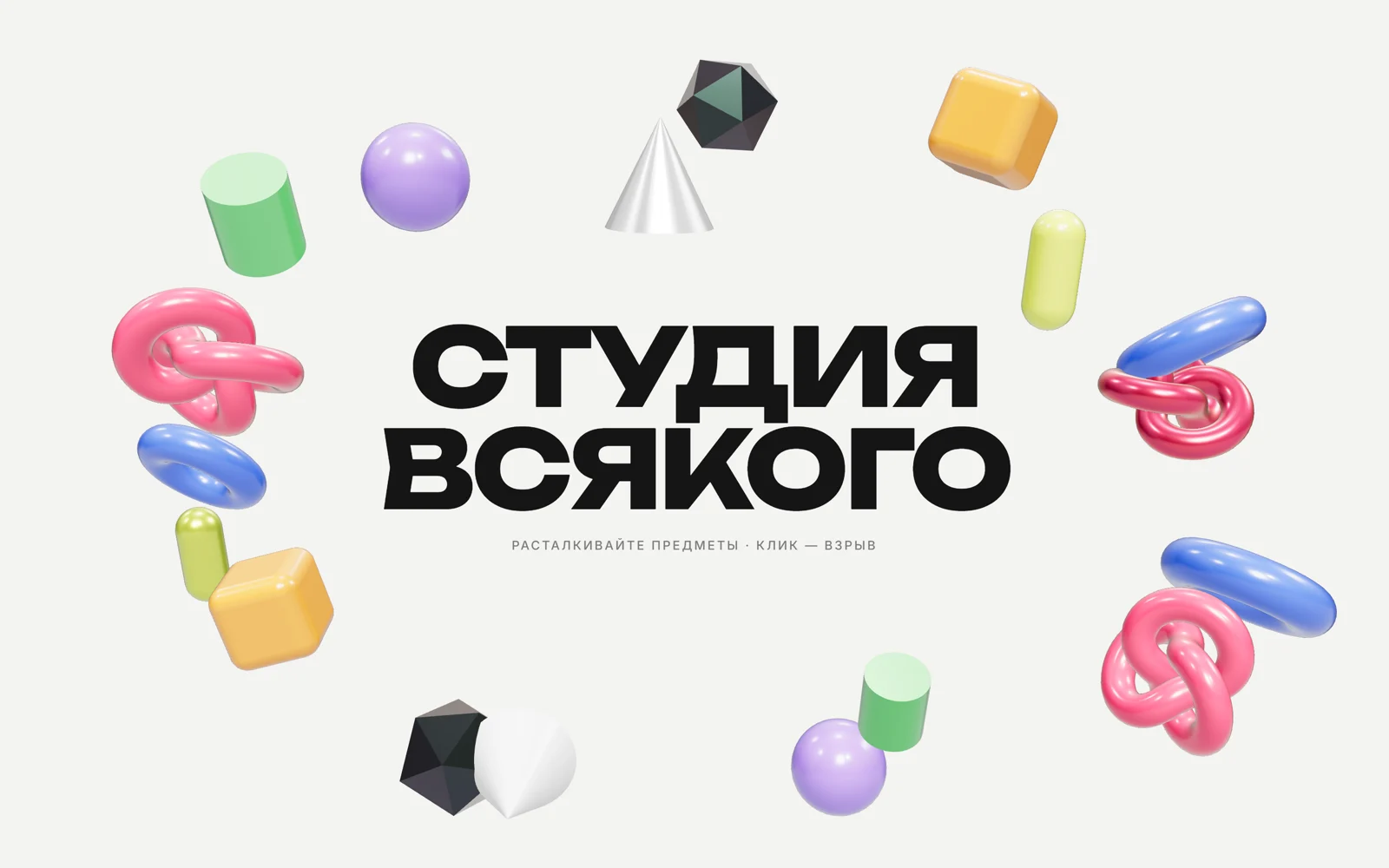
Облако 3D-предметов, которые расталкиваются курсором
Глянцевые игрушечные фигуры вокруг заголовка разлетаются от курсора, крутятся и пружинят на место; клик — маленький взрыв.
Промпт
Добавь на мою страницу эффект «Облако 3D-предметов, которые расталкиваются курсором» (Сергей Дургалян, MIT). Ниже готовая страница на three.js 0.170.0 (jsdelivr, import map). Сначала перенеси её как есть и проверь: фигуры разлетаются от курсора и возвращаются на место, клик их расшвыривает, без мыши сцена двигается сама, заголовок читается и на телефоне. Потом меняй.

Как устроен код. 18 мешей из 8 геометрий (`TorusKnot`, `Torus`, `Capsule`, `RoundedBoxGeometry` из addons, `Icosahedron`, `Cone`, `Sphere`, `Cylinder`) с `MeshPhysicalMaterial` (clearcoat, у части metalness и iridescence), освещение `RoomEnvironment` через PMREM. У каждой фигуры есть угол на эллипсе, «дом» и скорость. В `resize()` дома пересчитываются от видимой области при z = 0, на узком экране фигуры уходят в полосы над заголовком и под ним и становятся мельче. Курсор переводится на плоскость z = 0 через `Raycaster`. Каждый кадр: отталкивание в радиусе `RADIUS`, сильнее при быстром курсоре, затем пружина к дому (`SPRING`) и затухание (`DAMP`). Вращение складывается из медленного собственного и пинка, пропорционального скорости. `burst()` даёт радиальный импульс от точки клика.

Что менять: цвета в `COLORS`, набор геометрий в `GEOS`, количество `COUNT`, силу и радиус толчка (`PUSH`, `RADIUS`), упругость (`SPRING`, `DAMP`), заголовок в HTML. Вместо простых фигур можно загрузить свои GLB-модели (например, товары) через `GLTFLoader`, остальная логика не меняется.

Если проект на React: сцену держи в компоненте с `useRef` на canvas, создание и очистку делай в `useEffect` (`setAnimationLoop(null)`, `dispose()`, снять слушатели). С @react-three/fiber ту же физику удобно писать в `useFrame`.
Подскажи, какие предметы в облаке лучше всего передадут характер моего продукта.
Код скопируется вместе с промптом
Вокруг крупного заголовка висят глянцевые фигуры: бублики, узлы, капсулы, кубики со скруглёнными гранями, конусы. Курсор их расталкивает, и чем быстрее он движется, тем сильнее толчок. Задетые фигуры закручиваются и на пружине возвращаются на место. Клик устраивает маленький взрыв, а без мыши по облаку бродит невидимый «курсор», и сцена не замирает.
Физического движка нет. Каждая фигура привязана пружиной к своему месту, курсор переводится в точку на плоскости сцены, дальше несколько строк математики: отталкивание, пружина, затухание. Места фигур рассчитываются от видимой области, так что на телефоне облако не уезжает за край и не закрывает заголовок. Подходит для первого экрана студии, агентства, магазина игрушек или детского продукта.
Код
<!-- MIT License. Copyright (c) 2026 Sergei Durgalian, learn.create-products.com/design. Free to use, copy and modify with this notice kept. -->
<!DOCTYPE html>
<html lang="ru">
<head>
<meta charset="UTF-8">
<meta name="viewport" content="width=device-width, initial-scale=1">
<title>Object Cloud Push</title>
<link rel="stylesheet" href="https://fonts.googleapis.com/css2?family=Unbounded:wght@800&family=Inter:wght@500&display=swap">
<style>
*, *::before, *::after { box-sizing: border-box; }
html, body { margin: 0; height: 100%; }
body { background: #f3f3f1; color: #151515; font-family: "Inter", sans-serif; overflow: hidden; }
.title { position: fixed; inset: 0; display: grid; place-items: center; text-align: center; pointer-events: none; }
.title h1 { margin: 0; font: 800 clamp(2.4rem, 8vw, 7rem)/0.95 "Unbounded", sans-serif; letter-spacing: -0.04em; text-transform: uppercase; }
.title p { margin: 1.2rem 0 0; font-size: .8rem; letter-spacing: .16em; text-transform: uppercase; opacity: .55; }
canvas#gl { position: fixed; inset: 0; width: 100%; height: 100%; display: block; touch-action: none; }
</style>
</head>
<body>
<div class="title"><div><h1>Студия<br>всякого</h1><p>Расталкивайте предметы · клик — взрыв</p></div></div>
<canvas id="gl" aria-hidden="true"></canvas>

<script type="importmap">{ "imports": {
  "three": "https://cdn.jsdelivr.net/npm/three@0.170.0/build/three.module.js",
  "three/addons/": "https://cdn.jsdelivr.net/npm/three@0.170.0/examples/jsm/"
} }</script>
<script type="module">
// A cloud of glossy toy objects. Each one sits on a spring tied to its "home" spot.
// The pointer (projected onto the z = 0 plane) pushes nearby objects away; a click adds a radial impulse.
// Objects spin according to how fast they move. No physics engine, ~100 lines of maths.
import * as THREE from 'three';
import { RoomEnvironment } from 'three/addons/environments/RoomEnvironment.js';
import { RoundedBoxGeometry } from 'three/addons/geometries/RoundedBoxGeometry.js';

const reduce = matchMedia('(prefers-reduced-motion: reduce)').matches;
const canvas = document.getElementById('gl');
const renderer = new THREE.WebGLRenderer({ canvas, antialias: true, alpha: true });
renderer.setPixelRatio(Math.min(devicePixelRatio, 2));
renderer.toneMapping = THREE.ACESFilmicToneMapping;
const scene = new THREE.Scene();
scene.environment = new THREE.PMREMGenerator(renderer).fromScene(new RoomEnvironment(), 0.04).texture;
const camera = new THREE.PerspectiveCamera(35, 1, 0.1, 100);
camera.position.z = 16;
const sun = new THREE.DirectionalLight('#fff', 1.6); sun.position.set(3, 6, 8); scene.add(sun);

const COLORS = ['#ff3d6e', '#2f6bff', '#e8ff3a', '#ff9a1f', '#151515', '#ffffff', '#9b7bff', '#3ddc6a'];
const GEOS = [
  new THREE.TorusKnotGeometry(0.55, 0.2, 160, 24),
  new THREE.TorusGeometry(0.6, 0.24, 32, 96),
  new THREE.CapsuleGeometry(0.35, 0.9, 12, 32),
  new RoundedBoxGeometry(1.1, 1.1, 1.1, 6, 0.22),
  new THREE.IcosahedronGeometry(0.75, 0),
  new THREE.ConeGeometry(0.6, 1.2, 48),
  new THREE.SphereGeometry(0.65, 48, 32),
  new THREE.CylinderGeometry(0.45, 0.45, 1, 48),
];

// Place objects on a loose ellipse around the title so the text stays readable
const objects = [];
const COUNT = 18;
for (let i = 0; i < COUNT; i++) {
  const a = (i / COUNT) * Math.PI * 2 + (Math.random() - 0.5) * 0.3;
  const r = 0.82 + Math.random() * 0.3;
  const home = new THREE.Vector3(0, 0, (Math.random() - 0.5) * 2);   // x/y are set in resize() from the visible area
  const mat = new THREE.MeshPhysicalMaterial({
    color: COLORS[i % COLORS.length], roughness: 0.25, clearcoat: 1, clearcoatRoughness: 0.1,
    metalness: i % 5 === 0 ? 0.6 : 0, iridescence: i % 4 === 0 ? 0.6 : 0,
  });
  const mesh = new THREE.Mesh(GEOS[i % GEOS.length], mat);
  mesh.rotation.set(Math.random() * 6, Math.random() * 6, 0);
  const s = 0.75 + Math.random() * 0.5; mesh.scale.setScalar(s);
  scene.add(mesh);
  objects.push({ mesh, home, a, r, s, vel: new THREE.Vector3(), spin: new THREE.Vector3((Math.random() - 0.5) * 0.01, (Math.random() - 0.5) * 0.01, 0) });
}

// Pointer -> point on the z = 0 plane
const ray = new THREE.Raycaster(), ndc = new THREE.Vector2(9, 9), plane = new THREE.Plane(new THREE.Vector3(0, 0, 1), 0);
const cursor = new THREE.Vector3(999, 999, 0), prevCursor = new THREE.Vector3();
let lastInput = -1e9;
function setCursor(x, y) {
  ndc.set((x / innerWidth) * 2 - 1, -(y / innerHeight) * 2 + 1);
  ray.setFromCamera(ndc, camera); ray.ray.intersectPlane(plane, cursor);
}
addEventListener('pointermove', (e) => { lastInput = performance.now(); setCursor(e.clientX, e.clientY); }, { passive: true });
addEventListener('pointerleave', () => cursor.set(999, 999, 0));
canvas.addEventListener('pointerdown', (e) => {
  lastInput = performance.now(); setCursor(e.clientX, e.clientY); burst(cursor, 0.9);
});
function burst(at, power) {
  objects.forEach((o) => {
    const d = o.mesh.position.clone().sub(at); const len = Math.max(d.length(), 0.5);
    if (len < 7) o.vel.add(d.normalize().multiplyScalar(power * (1 - len / 7) * 1.4));
  });
}

const view = { w: 7, h: 4 };
function resize() {
  renderer.setSize(innerWidth, innerHeight, false);
  camera.aspect = innerWidth / innerHeight;
  camera.updateProjectionMatrix();
  // Fit the ellipse of "home" spots into what the camera actually sees at z = 0
  const halfH = Math.tan(THREE.MathUtils.degToRad(camera.fov / 2)) * camera.position.z;
  const halfW = halfH * camera.aspect;
  const narrow = camera.aspect < 1;
  view.w = halfW; view.h = halfH;
  objects.forEach((o) => {
    o.home.x = Math.cos(o.a) * halfW * o.r * 0.8;
    // phones: the title fills the width, so keep objects in bands above and below it
    o.home.y = narrow
      ? Math.sign(Math.sin(o.a) || 1) * halfH * (0.4 + 0.42 * Math.abs(Math.sin(o.a)))
      : Math.sin(o.a) * halfH * o.r * 0.75;
    o.mesh.scale.setScalar(o.s * (narrow ? 0.62 : 1));
  });
}
addEventListener('resize', resize); resize();
objects.forEach((o) => o.mesh.position.copy(o.home));

const RADIUS = 2.6, PUSH = 0.05, SPRING = 0.018, DAMP = 0.9;
const clock = new THREE.Clock();
let nextBurst = 3;
renderer.setAnimationLoop(() => {
  const t = clock.getElapsedTime();
  // Idle demo: a virtual cursor wanders through the cloud, with an occasional burst
  if (performance.now() - lastInput > 3000 && !reduce) {
    cursor.set(Math.sin(t * 0.7) * view.w * 0.8, Math.sin(t * 1.1) * view.h * 0.75, 0);
    if (t > nextBurst) { burst(cursor, 0.6); nextBurst = t + 3.5; }
  }
  const cursorSpeed = cursor.distanceTo(prevCursor); prevCursor.copy(cursor);
  objects.forEach((o) => {
    const p = o.mesh.position;
    if (!reduce) {
      // push away from the cursor, stronger when it is closer and moving faster
      const d = p.clone().sub(cursor); d.z = 0;
      const dist = d.length();
      if (dist < RADIUS && dist > 0.001) o.vel.add(d.normalize().multiplyScalar(PUSH * (1 - dist / RADIUS) * (1 + Math.min(cursorSpeed, 1) * 6)));
    }
    // spring back home + damping
    o.vel.add(o.home.clone().sub(p).multiplyScalar(SPRING));
    o.vel.multiplyScalar(DAMP);
    p.add(o.vel);
    // spin: base idle rotation plus a kick proportional to speed
    const v = o.vel.length();
    o.mesh.rotation.x += o.spin.x + o.vel.y * 0.35;
    o.mesh.rotation.y += o.spin.y + o.vel.x * 0.35;
    o.mesh.rotation.z += v * 0.1;
    // gentle bobbing so the scene never looks frozen
    if (!reduce) p.y += Math.sin(t * 1.2 + o.home.x) * 0.0025;
  });
  renderer.render(scene, camera);
});
</script>
</body>
</html>