Библиотека дизайна / Эффекты и шейдеры

Эффекты и шейдерыТёмныйЯркийМинимализмБесплатно

Плитки, которые перестраиваются на пружинах: выбранная становится главной

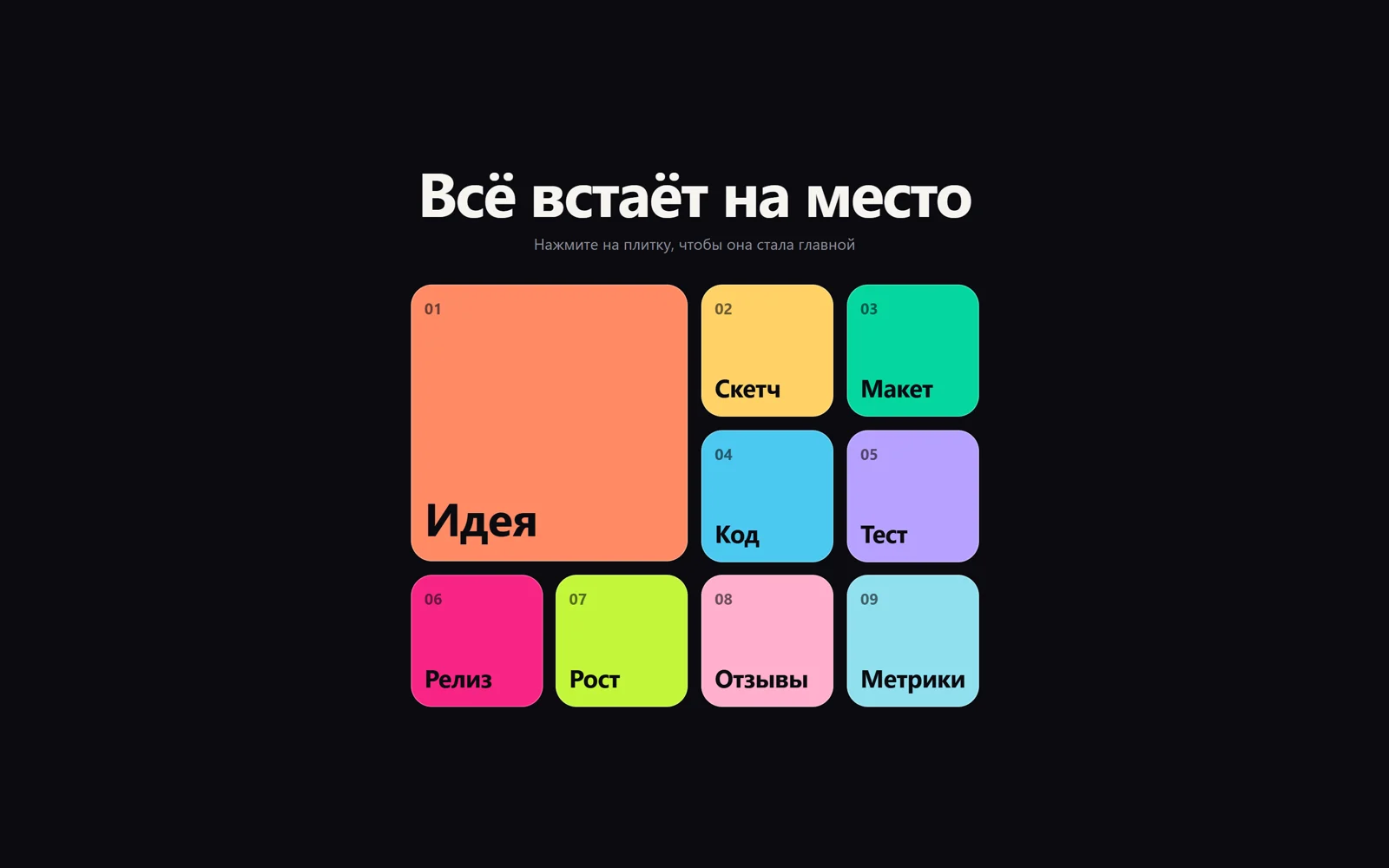
Сетка цветных плиток: нажатая плитка вырастает в большую 2×2, остальные разъезжаются по новым местам на пружине, без искажения текста.

Плитки, которые перестраиваются на пружинах: выбранная становится главной
Промпт
Добавь на мою страницу эффект «Плитки, которые перестраиваются на пружинах» (layout-анимация по приёму FLIP на открытом API Motion, бывший Framer Motion, лицензия MIT; платные примеры Motion+ не используются). Ниже готовая страница одним файлом: Motion 14.14.0 подключён скриптом с jsdelivr и доступен как глобальный объект `Motion` (`animate`, `spring`). Сначала перенеси её как есть и проверь: плитки сами перестраиваются, а по клику выбранная становится большой. Потом подгоняй.

Как устроен код. Скрипт создаёт в `ul.grid` плитки `li.tile` из массивов `WORDS` и `COLORS`; первая получает класс `big` (`grid-column` и `grid-row: span 2`). Сетка на десктопе 4 колонки, на телефоне 3; плиток 9, чтобы большая и 8 маленьких ровно заполнили 4 × 3 и 3 × 4. Главная функция `layout(change)`: запоминает `getBoundingClientRect` каждой плитки, вызывает `change()` (переставить DOM, перенести класс `big`), измеряет заново и для каждой плитки запускает `animate` от разницы старой и новой рамки к нулю: `x`, `y`, `scaleX`, `scaleY` с `transformOrigin: 0 0`. Детям плитки тот же пружинный `animate` даёт обратный масштаб `1 / scale`, поэтому подписи не растягиваются. Пружина задана «на глаз»: `SPRING = { type: 'spring', visualDuration: 0.55, bounce: 0.32 }`, плюс задержка 0.025 с на каждую следующую плитку. `promote(el)` делает плитку главной, `shuffle()` перемешивает все; по клику или Enter вызывается `promote` и короткий пружинный отклик подписи. Автодемо по очереди вызывает `promote` и `shuffle` раз в `AUTO_EVERY` мс и замолкает на `IDLE_AFTER_CLICK` после настоящего клика.

Что менять: тексты `WORDS` и цвета `COLORS`, число колонок (`grid-template-columns`, следи, чтобы плиток хватало на ровные ряды), скругление и отступы `--gap`, упругость (`bounce` 0 — без перелёта, 0.5 — заметный отскок) и время `visualDuration`, задержку между плитками, частоту автодемо. Вместо слов в плитки можно положить картинки, превью проектов или карточки товаров: обратный масштаб нужен только тексту и элементам, которые не должны искажаться.

Если проект на React: всё это даёт сам Motion для React. Плитки рендери из массива в состоянии, каждой дай `<motion.li layout key={id} transition={{ type: 'spring', visualDuration: 0.55, bounce: 0.32 }}>`, а подписи оберни в `<motion.span layout>`, чтобы Motion сам скомпенсировал масштаб. Клик меняет порядок массива и id главной плитки — Motion измерит и анимирует перестановку. Автодемо — `setInterval` в `useEffect` с очисткой. Не забудь `MotionConfig reducedMotion="user"`: тогда при `prefers-reduced-motion` перестановка будет мгновенной, как в этой странице.
Покажи, где на моём сайте пригодится такая сетка, и подставь мои карточки.

Код скопируется вместе с промптом

Девять цветных плиток в сетке, одна из них большая, 2×2. Нажмите на любую маленькую: она растёт и переезжает в угол, бывшая главная сжимается, а остальные плитки разъезжаются по новым местам с лёгким пружинным перелётом и небольшим запаздыванием друг за другом. Подписи при этом не растягиваются. Без кликов сетка сама то выбирает новую главную плитку, то полностью перетасовывается.

Это layout-анимация по приёму FLIP, на которой построен layout в Motion для React: запомнить положение элементов, поменять DOM (порядок и класс), снова измерить и анимировать от старой рамки к новой. Здесь она собрана на открытом API Motion: animate двигает x, y, scaleX и scaleY пружиной с visualDuration и bounce, а дочерние элементы получают обратный масштаб, чтобы текст не плющило. Подойдёт для портфолио, фильтров каталога, дашбордов, переключения тарифов и любых карточек, которые меняют порядок.
Код
<!-- Motion © 2024 Motion B.V., MIT License (https://github.com/motiondivision/motion) · layout-анимация (FLIP) на пружине по мотивам примеров motion.dev · адаптация: learn.create-products.com/design -->
<!DOCTYPE html>
<html lang="ru">
<head>
<meta charset="UTF-8">
<meta name="viewport" content="width=device-width, initial-scale=1">
<title>Spring shuffle grid</title>
<script src="https://cdn.jsdelivr.net/npm/motion@14.14.0/dist/motion.js"></script>
<style>
  :root { --bg: #0b0b10; --text: #f5f4f0; --muted: #8e8d99; --gap: 14px; }
  *, *::before, *::after { box-sizing: border-box; }
  html, body { height: 100%; margin: 0; }
  body {
    overflow: hidden; background: var(--bg); color: var(--text);
    font-family: system-ui, -apple-system, "Segoe UI", sans-serif;
    display: grid; place-content: center; justify-items: center; gap: 2rem; padding: 1.5rem 1rem;
  }
  .head { text-align: center; }
  h1 { margin: 0; font-size: clamp(1.9rem, 5.4vw, 4rem); line-height: 1; letter-spacing: -0.03em; font-weight: 760; }
  .head p { margin: 0.7rem 0 0; color: var(--muted); }
  .grid {
    list-style: none; margin: 0; padding: 0;
    display: grid; grid-template-columns: repeat(4, minmax(0, 1fr)); gap: var(--gap);
    width: min(760px, 100%);
  }
  .tile {
    position: relative; aspect-ratio: 1; border-radius: 22px; padding: 14px;
    display: flex; flex-direction: column; justify-content: space-between;
    color: #0b0b10; font-weight: 700; cursor: pointer; user-select: none;
    background: var(--c); box-shadow: inset 0 0 0 1px rgb(255 255 255 / 0.25);
    will-change: transform;
  }
  .tile:focus-visible { outline: 3px solid var(--text); outline-offset: 3px; }
  .tile .n { font-size: clamp(0.8rem, 1.4vw, 1rem); opacity: 0.6; }
  .tile .w { font-size: clamp(1rem, 2.6vw, 1.6rem); letter-spacing: -0.02em; }
  .tile.big { grid-column: span 2; grid-row: span 2; aspect-ratio: auto; }
  .tile.big .w { font-size: clamp(1.6rem, 5vw, 3rem); }
  @media (max-width: 560px) {
    :root { --gap: 10px; }
    .grid { grid-template-columns: repeat(3, minmax(0, 1fr)); }
    .tile { border-radius: 16px; padding: 10px; }
  }
</style>
</head>
<body>
<header class="head">
  <h1>Всё встаёт на место</h1>
  <p>Нажмите на плитку, чтобы она стала главной</p>
</header>
<ul class="grid" aria-label="Плитки"></ul>

<script>
// settings
const WORDS = ['Идея', 'Скетч', 'Макет', 'Код', 'Тест', 'Релиз', 'Рост', 'Отзывы', 'Метрики']; // 9 tiles: big 2×2 + 8 fill 4×3 and 3×4 grids evenly
const COLORS = ['#ff8a65', '#ffd166', '#06d6a0', '#4cc9f0', '#b8a1ff', '#f72585', '#c3f73a', '#ffafcc', '#90e0ef', '#fca311'];
const SPRING = { type: 'spring', visualDuration: 0.55, bounce: 0.32 }; // Motion spring by feel, not by physics
const AUTO_EVERY = 1700;           // autodemo interval, ms
const IDLE_AFTER_CLICK = 6000;     // autodemo pauses this long after a real click

const { animate, spring } = Motion;
const reduceMotion = matchMedia('(prefers-reduced-motion: reduce)').matches;
const grid = document.querySelector('.grid');

WORDS.forEach((w, i) => {
  const li = document.createElement('li');
  li.className = 'tile' + (i === 0 ? ' big' : '');
  li.tabIndex = 0;
  li.style.setProperty('--c', COLORS[i % COLORS.length]);
  li.innerHTML = `<span class="n">${String(i + 1).padStart(2, '0')}</span><span class="w">${w}</span>`;
  grid.appendChild(li);
});
const tiles = () => [...grid.children];

/**
 * FLIP layout animation: measure → change the DOM → measure → animate from the old box to the new one.
 * Inside the box the text is counter-scaled, so a tile can grow without stretching its content.
 */
function layout(change) {
  const before = new Map(tiles().map((el) => [el, el.getBoundingClientRect()]));
  change();
  if (reduceMotion) return;
  tiles().forEach((el, i) => {
    const a = before.get(el), b = el.getBoundingClientRect();
    const dx = a.left - b.left, dy = a.top - b.top;
    const sx = a.width / b.width, sy = a.height / b.height;
    if (!dx && !dy && sx === 1 && sy === 1) return;
    el.style.transformOrigin = '0 0';
    animate(el, { x: [dx, 0], y: [dy, 0], scaleX: [sx, 1], scaleY: [sy, 1] }, { ...SPRING, delay: i * 0.025 });
    // keep the label undistorted while the tile scales
    for (const child of el.children) {
      child.style.transformOrigin = '0 0';
      animate(child, { scaleX: [1 / sx, 1], scaleY: [1 / sy, 1] }, { ...SPRING, delay: i * 0.025 });
    }
  });
}

function promote(el) {
  layout(() => {
    grid.querySelector('.big')?.classList.remove('big');
    el.classList.add('big');
    grid.prepend(el);
  });
}

function shuffle() {
  layout(() => {
    const list = tiles();
    for (let i = list.length - 1; i > 0; i--) {
      const j = Math.floor(Math.random() * (i + 1));
      [list[i], list[j]] = [list[j], list[i]];
    }
    grid.replaceChildren(...list);
    grid.querySelector('.big')?.classList.remove('big');
    list[0].classList.add('big');
  });
}

let busyUntil = 0;
function onPick(e) {
  const el = e.target.closest('.tile');
  if (!el) return;
  busyUntil = performance.now() + IDLE_AFTER_CLICK;
  promote(el);
  // tap feedback: a quick spring squash on the picked tile's label
  if (!reduceMotion) animate(el.querySelector('.w'), { scale: [0.85, 1] }, { type: spring, stiffness: 500, damping: 12 });
}
grid.addEventListener('click', onPick);
grid.addEventListener('keydown', (e) => {
  if (e.key === 'Enter' || e.key === ' ') { e.preventDefault(); onPick(e); }
});

// autodemo: alternate "promote a random tile" and "full shuffle"
let step = 0;
setInterval(() => {
  if (performance.now() < busyUntil) return;
  const list = tiles();
  if (step++ % 2) shuffle();
  else promote(list[1 + Math.floor(Math.random() * (list.length - 1))]);
}, reduceMotion ? AUTO_EVERY * 2 : AUTO_EVERY);
</script>
</body>
</html>

Похожие