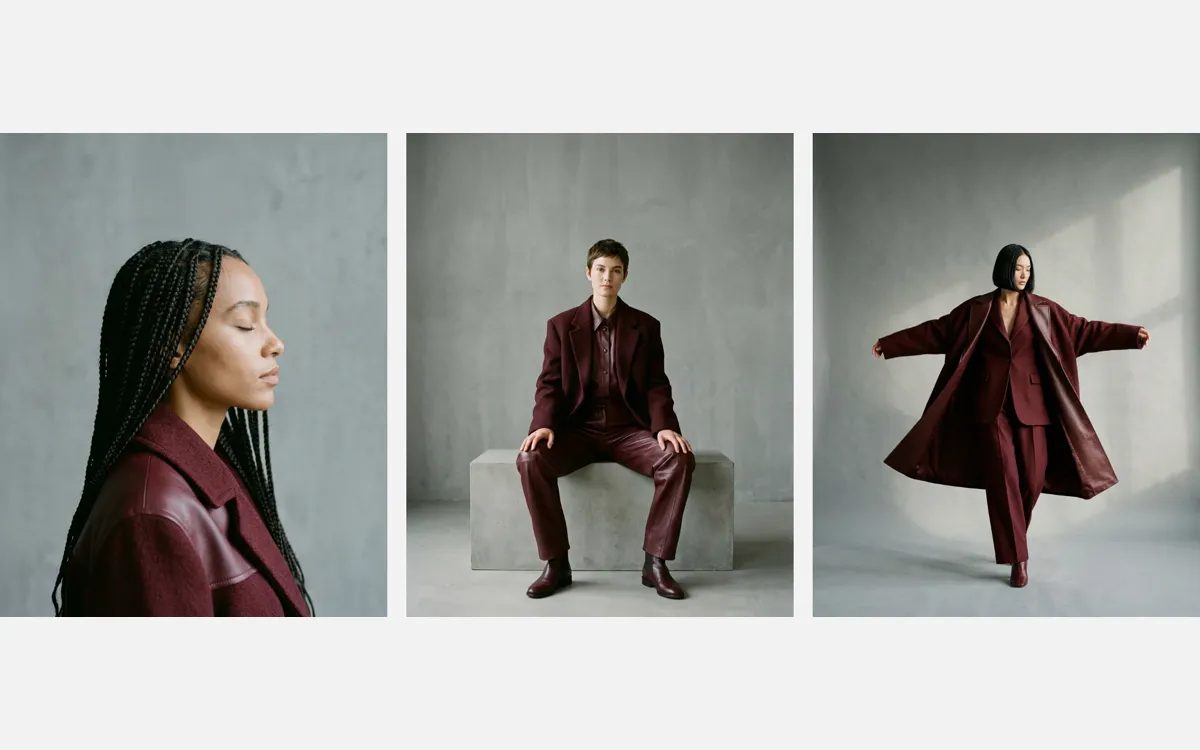
Ряд фотографий в стиле лукбука. Когда курсор заходит на снимок, с той стороны, откуда он пришёл, въезжает цветная карточка с номером образа и составом: её край следует за указателем. Край состоит из восьми точек, и у каждой своя скорость: пока мышь движется, быстрые точки убегают вперёд, и край получается рваным, зубчатым; остановишься, и медленные догоняют, он выпрямляется. Дошёл курсором до середины, и карточка заливает весь снимок. Уходишь через дальнюю половину, она уезжает за курсором, через ближнюю, втягивается обратно. Работает на CSS clip-path: polygon(...) и GSAP quickTo, без WebGL. Подходит для каталогов, лукбуков, портфолио, карточек товаров и команды. На телефоне вместо наведения работает тап.
Библиотека дизайна / Эффекты и шейдеры
Карточка, которая тянется за курсором
Наводишь на фото, и цветная карточка с описанием тянется за курсором рваным краем, а когда он замирает, край выравнивается.
Промпт
Добавь в мой проект эффект «Карточка, которая тянется за курсором» (Codrops, Lookbook Hover Effects, вариация Reach, автор Pedro Botelho, лицензия MIT; идея навеяна меню сайта monument.tv). Ниже HTML, CSS и JavaScript одним файлом на GSAP 3.13. Структура одного снимка: `<figure class="look">` с фотографией `.look__img` и поверх неё `<figcaption class="look__card">` на всю площадь, залитой цветом `--card`. По умолчанию карточка вырезана в ничто через `clip-path: polygon(0 0, 0 0, 0 0)`, а JavaScript в процессе наведения переписывает `clip-path` каждый кадр. Размеры текста в карточке заданы в `cqw` (проценты ширины контейнера, `container-type: inline-size` у `.look`), поэтому карточка масштабируется вместе с фото.

Как это работает: для каждого снимка создаются две линии из 8 точек: «передний» край (`lead`) и «задний» (`trail`). Каждая точка это объект `{d}` с глубиной от 0 (сторона, откуда карточка вошла) до 1 (противоположная сторона) и своей функцией `gsap.quickTo(point, 'd', {duration, ease: 'expo'})`. Длительность у каждой точки разная (от `QUICKEST` 0.4 до `SLOWEST` 1 секунды, случайная, усреднённая с соседними точками, чтобы получились неровные зубцы, а не пила). На `pointerenter` определяется сторона входа (`locate`), на `pointermove` передний край идёт к глубине курсора (`inward`), за точкой `FILL` 0.5 карточка заливает снимок целиком. На выходе: через дальнюю половину обе линии уходят на 1, через ближнюю передний край откатывается на 0. `clip-path: polygon()` собирается из точек обоих краёв (функция `corner` для четырёх сторон) в `gsap.ticker`, пока точки двигаются. Когда они все остановились, `rest()` сбрасывает состояние, и следующая карточка может прийти с любой стороны.

Что менять: фотографии (формат 4:5, в примере три, добавь сколько нужно, `.look` находятся по селектору автоматически), цвет карточки и текста (`--card`, `--card-text`, можно задать свой цвет каждому `.look` через `style`), тексты, шрифт цифры (`--display`), число точек (`POINTS`: больше значит мельче зубцы), скорости (`QUICKEST`, `SLOWEST`), `FILL`. Если проект на React: оформи `.look` компонентом, обработчики `pointerenter`/`pointermove`/`pointerleave` повесь в `useEffect` с очисткой, при размонтировании останавливай `gsap.ticker.remove(tick)` и `gsap.killTweensOf` для точек; `clip-path` пиши через `ref`, а не через state, чтобы не перерисовывать компонент 60 раз в секунду. Класс `no-js` на body нужен, чтобы без JavaScript карточка показывалась обычным `:hover`, не убирай его до запуска скрипта. Не меняй порядок слоёв: карточка лежит поверх фото и не должна перехватывать указатель раньше снимка.
Покажи, где на моей странице использовать этот эффект, и подставь мои фотографии.
Код скопируется вместе с промптом
Код
<!DOCTYPE html>
<html lang="ru">
<head>
<meta charset="UTF-8">
<meta name="viewport" content="width=device-width, initial-scale=1">
<title>Lookbook reach hover</title>
<link rel="preconnect" href="https://fonts.googleapis.com">
<link href="https://fonts.googleapis.com/css2?family=Inter+Tight:wght@400;600&family=Cormorant+Garamond:wght@300&display=swap" rel="stylesheet">
<style>
  :root { --bg: #f2f2f2; --text: #0f0e0e; --card: #5c1822; --card-text: #f4efe6;
          --font: "Inter Tight", system-ui, sans-serif; --display: "Cormorant Garamond", Georgia, serif; }
  *, *::before, *::after { box-sizing: border-box; }
  body { margin: 0; min-height: 100vh; display: grid; place-items: center; padding: 4vh 24px;
         background: var(--bg); color: var(--text); font: 400 15px/1.3 var(--font); }
  .looks { --look: min(24vw, 40svh); display: grid; grid-template-columns: repeat(3, var(--look));
           gap: 1.2vw; margin: 0; padding: 0; list-style: none; }
  .look { position: relative; aspect-ratio: 4 / 5; container-type: inline-size; margin: 0; }
  .look__img { display: block; width: 100%; height: 100%; object-fit: cover; }

  /* The card the effect brings in over the photograph: cut down to nothing until hover */
  .look__card { position: absolute; inset: 0; display: flex; flex-direction: column; padding: 7cqw;
                background: var(--card); color: var(--card-text); clip-path: polygon(0 0, 0 0, 0 0); }
  /* Without JavaScript the card simply shows on hover */
  .no-js .look:hover .look__card { clip-path: none; }
  .look__label { text-transform: uppercase; letter-spacing: 0.08em; font-size: 4cqw; }
  .look__num { font-size: 38cqw; font-family: var(--display); font-weight: 300; line-height: 0.8; margin-top: 2cqw; }
  .look__pieces { margin-top: auto; font-size: 5cqw; }
</style>
</head>
<body class="no-js">
  <ul class="looks">
    <li>
      <figure class="look">
        <!-- Replace with your photographs: /images/1.webp, 4:5 -->
        <img class="look__img" src="/images/1.webp" width="960" height="1200" alt="Модель в бордовом пальто с кожаными вставками">
        <figcaption class="look__card">
          <span class="look__label">Образ</span>
          <span class="look__num">01</span>
          <span class="look__pieces">Пальто с кожаными вставками<br>Бордовая шерсть</span>
        </figcaption>
      </figure>
    </li>
    <li>
      <figure class="look">
        <img class="look__img" src="/images/2.webp" width="960" height="1200" alt="Модель в бордовом жакете и кожаных брюках">
        <figcaption class="look__card">
          <span class="look__label">Образ</span>
          <span class="look__num">02</span>
          <span class="look__pieces">Шерстяной жакет<br>Кожаные брюки</span>
        </figcaption>
      </figure>
    </li>
    <li>
      <figure class="look">
        <img class="look__img" src="/images/3.webp" width="960" height="1200" alt="Модель в длинном бордовом кожаном пальто">
        <figcaption class="look__card">
          <span class="look__label">Образ</span>
          <span class="look__num">03</span>
          <span class="look__pieces">Длинное кожаное пальто<br>Шерстяной костюм</span>
        </figcaption>
      </figure>
    </li>
  </ul>

  <script src="https://cdn.jsdelivr.net/npm/gsap@3.13.0/dist/gsap.min.js"></script>
  <script>
    // Based on Codrops LookbookHoverEffects (MIT), https://github.com/codrops/LookbookHoverEffects
    document.body.classList.remove('no-js');

    const POINTS = 8;      // points along the card edge
    const QUICKEST = 0.4;  // seconds the quickest point takes to catch up with the pointer
    const SLOWEST = 1;     // seconds the slowest one takes
    const FILL = 0.5;      // how far in the pointer goes (share of the photo) before the card fills it

    // Polygon corner at depth d (0 = the side the card comes in by, 1 = far side), a along the edge
    const corner = {
      left: (d, a) => `${d * 100}% ${a * 100}%`,
      right: (d, a) => `${(1 - d) * 100}% ${a * 100}%`,
      top: (d, a) => `${a * 100}% ${d * 100}%`,
      bottom: (d, a) => `${a * 100}% ${(1 - d) * 100}%`
    };

    // Where the pointer is on a look (0..1) and the side it is nearest to
    function locate(look, e) {
      const r = look.getBoundingClientRect();
      const x = gsap.utils.clamp(0, 1, (e.clientX - r.left) / r.width);
      const y = gsap.utils.clamp(0, 1, (e.clientY - r.top) / r.height);
      const gaps = { left: x, right: 1 - x, top: y, bottom: 1 - y };
      const side = Object.keys(gaps).reduce((a, b) => (gaps[b] < gaps[a] ? b : a));
      return { x, y, side };
    }
    const inward = ({ x, y }, side) => ({ left: x, right: 1 - x, top: y, bottom: 1 - y })[side];

    function reach(look) {
      const card = look.querySelector('.look__card');

      // Each point of the edge follows the pointer at its own speed: move, and the quick ones get there first
      // and the edge turns jagged; keep still, and the slow ones catch up and it straightens.
      // Speeds are random, averaged with the neighbours so the edge has a few uneven teeth, not a saw.
      const random = Array.from({ length: POINTS }, () => Math.random());
      const speeds = random.map((r, i) => {
        const near = (random[i - 1] ?? r) + r + (random[i + 1] ?? r);
        return gsap.utils.interpolate(QUICKEST, SLOWEST, gsap.utils.clamp(0, 1, gsap.utils.normalize(0.5, 2.5, near)));
      });
      // an edge is a line of points; the card is drawn between the leading and the trailing edge
      const edge = () => Array.from({ length: POINTS }, (_, i) => {
        const point = { d: 0 };
        point.to = gsap.quickTo(point, 'd', { duration: speeds[i], ease: 'expo', onUpdate: request });
        return point;
      });
      const lead = edge(), trail = edge();

      let from = null;     // the side the card came in by
      let shown = false;   // is the card on its way in?
      let full = false;    // has the pointer gone far enough for the card to fill the photo?

      // clip-path: down the leading edge and back up the trailing one
      const render = () => {
        const at = (p, i) => corner[from](p.d, i / (POINTS - 1));
        card.style.clipPath = `polygon(${[...lead.map(at), ...trail.map(at).reverse()].join(', ')})`;
      };
      // once the card is gone, the next one can come in by any side
      const rest = () => {
        if (!from || (!trail.every((p) => p.d >= 1) && !lead.every((p) => p.d <= 0))) return;
        [...lead, ...trail].forEach((p) => p.to(0, 0));
        from = null; full = false;
        card.style.clipPath = '';
      };
      // draw once a frame while the points move
      let ticking = false;
      function request() { if (!ticking) { ticking = true; gsap.ticker.add(tick); } }
      function tick() {
        if (from) render();
        if (gsap.isTweening([...lead, ...trail])) return;
        gsap.ticker.remove(tick); ticking = false; rest();
      }

      const follow = (e) => {
        if (!shown) return;
        const depth = inward(locate(look, e), from);
        if (depth > FILL) full = true;
        lead.forEach((p) => p.to(full ? 1 : depth));
      };
      const enter = (e, fill = false) => {
        shown = true;
        if (!from) from = locate(look, e).side;
        full ||= fill;
        trail.forEach((p) => p.to(0));
        follow(e);
      };
      // leave by the far half: the card follows the pointer off; by the near half: it pulls back
      const leave = (e) => {
        shown = false;
        if (!from) return;
        if (inward(locate(look, e), from) > 0.5) [...lead, ...trail].forEach((p) => p.to(1));
        else lead.forEach((p) => p.to(0));
      };

      look.addEventListener('pointerenter', (e) => e.pointerType !== 'touch' && enter(e));
      look.addEventListener('pointermove', (e) => e.pointerType !== 'touch' && follow(e));
      look.addEventListener('pointerleave', (e) => e.pointerType !== 'touch' && leave(e));
      // touch has no hover: a tap brings the whole card in, the next one sends it off
      look.addEventListener('pointerup', (e) => {
        if (e.pointerType !== 'touch') return;
        if (shown) leave(e); else enter(e, true);
      });
    }

    document.querySelectorAll('.look').forEach(reach);
  </script>
</body>
</html>