Эффекты и шейдерыСветлый3DТипографикаЯркийБесплатно
Надувное 3D-слово, которое пружинит от клика
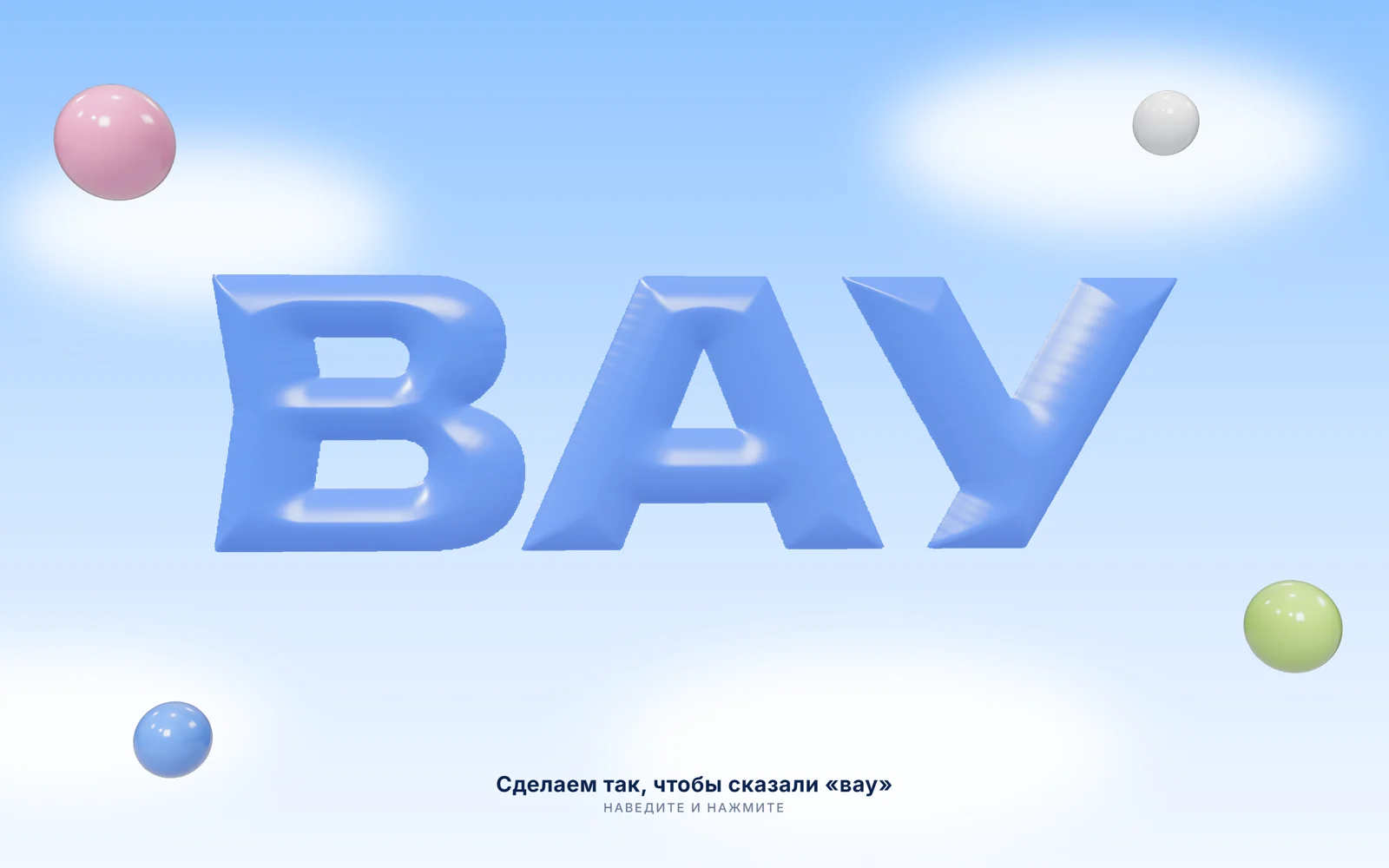
Глянцевые «воздушные» буквы на фоне неба: следят за курсором и сминаются от клика, как шарик. Без 3D-модели — из любого слова.
Промпт
Добавь на мою страницу эффект «Надувное 3D-слово» (Сергей Дургалян, MIT). Ниже готовая страница на three.js 0.170.0 (jsdelivr, import map). Сначала перенеси её как есть и проверь: слово «ВАУ» выглядит надутым и глянцевым, поворачивается за курсором, от клика сминается и пружинит, без мыши плавно покачивается само. Потом меняй.

Как устроен код. Слово рисуется белым на чёрном canvas 1024×512, перед этим шрифт грузится через `document.fonts.load(шрифт, WORD)`: текст передавать обязательно, иначе подгрузится только латиница. Дальше точное евклидово distance transform (алгоритм Felzenszwalb) даёт для каждого пикселя расстояние до края буквы; профиль «подушки» `1 - (1 - t)^3`, где `t = расстояние / PILLOW`. Из этой высоты собираются три текстуры: displacement (выдавливает плоскость 768×384 сегментов), normal map (блики) и alpha map (обрезает всё вне букв, `alphaTest: 0.5`). Материал `MeshPhysicalMaterial` с clearcoat и iridescence, освещение из `RoomEnvironment` через PMREM, тонмаппинг AgX. Клик толкает пружину `squish`: слово сплющивается и выпрямляется с перелётом.

Что менять: слово в `WORD`, цвет в `color` материала, «надутость» в `PILLOW` (больше — круглее) и `displacementScale`, наклон за курсором в обработчике `pointermove`, фон неба и облака в CSS. Длинное слово автоматически уменьшается, чтобы влезть в текстуру; камера отъезжает, чтобы слово целиком помещалось на телефоне.

Если проект на React: вынеси сцену в компонент с `useRef` на canvas, всё создание three.js делай в `useEffect` и в функции очистки вызывай `renderer.setAnimationLoop(null)`, `renderer.dispose()` и снимай слушатели. Можно и через @react-three/fiber: карты высот, нормалей и прозрачности те же, меняется только обвязка.
Покажи, где на моём сайте такое слово будет смотреться лучше всего, и предложи 2–3 слова под мой продукт.
Код скопируется вместе с промптом
Крупное слово выглядит как надутый глянцевый шарик: мягкие округлые края, блики, лёгкий перелив. Слово плавает, поворачивается за курсором, а от клика сминается и пружинит обратно. Вокруг летают маленькие пузыри, по небу ползут облака.
Главная хитрость в том, что 3D-модели нет. Слово рисуется на обычном canvas, для каждого пикселя считается расстояние до края буквы, и из этого получается карта высот «подушки»: у края низко, к середине выше. По ней плоскость выдавливается в объём, а из той же карты строится карта нормалей для бликов. Поэтому подходит любое слово и любой шрифт с кириллицей. Хорошо смотрится на первом экране лендинга, в промо и на заглушке «скоро открытие».
Код
<!-- MIT License. Copyright (c) 2026 Sergei Durgalian, learn.create-products.com/design. Free to use, copy and modify with this notice kept. -->
<!DOCTYPE html>
<html lang="ru">
<head>
<meta charset="UTF-8">
<meta name="viewport" content="width=device-width, initial-scale=1">
<title>Inflated 3D Text</title>
<link rel="stylesheet" href="https://fonts.googleapis.com/css2?family=Unbounded:wght@900&family=Inter:wght@500;700&display=swap">
<style>
*, *::before, *::after { box-sizing: border-box; }
html, body { margin: 0; height: 100%; }
body { overflow: hidden; font-family: "Inter", sans-serif; color: #0d2350;
  background: linear-gradient(180deg, #8fc3ff 0%, #cfe5ff 55%, #f3f8ff 100%); }
/* soft drifting clouds made of blurred radial gradients */
.clouds { position: fixed; inset: -10%; pointer-events: none; filter: blur(28px); opacity: .9;
  background:
    radial-gradient(18% 12% at 20% 30%, #fff 0 60%, transparent 70%),
    radial-gradient(22% 14% at 75% 22%, #fff 0 55%, transparent 70%),
    radial-gradient(26% 16% at 60% 80%, #fff 0 50%, transparent 70%),
    radial-gradient(20% 12% at 12% 78%, #fff 0 55%, transparent 70%);
  animation: drift 40s linear infinite alternate; }
@keyframes drift { to { transform: translateX(6%) translateY(-2%); } }
canvas#gl { position: fixed; inset: 0; width: 100%; height: 100%; display: block; cursor: pointer; }
.copy { position: fixed; left: 0; right: 0; bottom: 6vh; text-align: center; pointer-events: none; }
.copy b { display: block; font-size: clamp(1rem, 2.2vw, 1.4rem); letter-spacing: .02em; }
.copy span { font-size: .8rem; letter-spacing: .14em; text-transform: uppercase; opacity: .6; }
@media (prefers-reduced-motion: reduce) { .clouds { animation: none; } }
</style>
</head>
<body>
<div class="clouds"></div>
<canvas id="gl" aria-label="Надувное слово ВАУ"></canvas>
<div class="copy"><b>Сделаем так, чтобы сказали «вау»</b><span>Наведите и нажмите</span></div>

<script type="importmap">{ "imports": {
  "three": "https://cdn.jsdelivr.net/npm/three@0.170.0/build/three.module.js",
  "three/addons/": "https://cdn.jsdelivr.net/npm/three@0.170.0/examples/jsm/"
} }</script>
<script type="module">
// Inflated ("balloon") letters without a 3D model:
// text mask -> distance to the letter edge -> rounded "pillow" height map -> normal map.
// A subdivided plane is displaced by the height map and shaded with a glossy physical material.
import * as THREE from 'three';
import { RoomEnvironment } from 'three/addons/environments/RoomEnvironment.js';

const WORD = 'ВАУ';
const TW = 1024, TH = 512;     // texture size
const PILLOW = 70;             // how far (px) from the edge the letters keep rising
const reduce = matchMedia('(prefers-reduced-motion: reduce)').matches;

await document.fonts.load('900 300px Unbounded', WORD); // pass the text: otherwise only the Latin subset loads

// 1) Mask: white letters on black
const mask = document.createElement('canvas'); mask.width = TW; mask.height = TH;
const mctx = mask.getContext('2d');
mctx.fillStyle = '#000'; mctx.fillRect(0, 0, TW, TH);
mctx.fillStyle = '#fff'; mctx.textAlign = 'center'; mctx.textBaseline = 'middle';
let size = 400; mctx.font = `900 ${size}px Unbounded`;
while (mctx.measureText(WORD).width > TW * 0.86) { size -= 8; mctx.font = `900 ${size}px Unbounded`; }
mctx.fillText(WORD, TW / 2, TH / 2 + size * 0.04);
const m = mctx.getImageData(0, 0, TW, TH).data;
const inside = new Uint8Array(TW * TH);
for (let i = 0; i < TW * TH; i++) inside[i] = m[i * 4] > 127 ? 1 : 0;

// 2) Exact Euclidean distance transform (Felzenszwalb & Huttenlocher): for each inside pixel,
//    the distance to the nearest outside pixel
function edt1d(f, n, d, v, z) {
  let k = 0; v[0] = 0; z[0] = -1e20; z[1] = 1e20;
  for (let q = 1; q < n; q++) {
    let s = ((f[q] + q * q) - (f[v[k]] + v[k] * v[k])) / (2 * q - 2 * v[k]);
    while (s <= z[k]) { k--; s = ((f[q] + q * q) - (f[v[k]] + v[k] * v[k])) / (2 * q - 2 * v[k]); }
    k++; v[k] = q; z[k] = s; z[k + 1] = 1e20;
  }
  k = 0;
  for (let q = 0; q < n; q++) { while (z[k + 1] < q) k++; d[q] = (q - v[k]) * (q - v[k]) + f[v[k]]; }
}
const INF = 1e20, grid = new Float64Array(TW * TH);
for (let i = 0; i < TW * TH; i++) grid[i] = inside[i] ? INF : 0;
{
  const n = Math.max(TW, TH), f = new Float64Array(n), d = new Float64Array(n), v = new Int32Array(n), z = new Float64Array(n + 1);
  for (let x = 0; x < TW; x++) { for (let y = 0; y < TH; y++) f[y] = grid[y * TW + x]; edt1d(f, TH, d, v, z); for (let y = 0; y < TH; y++) grid[y * TW + x] = d[y]; }
  for (let y = 0; y < TH; y++) { for (let x = 0; x < TW; x++) f[x] = grid[y * TW + x]; edt1d(f, TW, d, v, z); for (let x = 0; x < TW; x++) grid[y * TW + x] = d[x]; }
}

// 3) Pillow profile: rises fast from the edge and rounds off on top -> looks blown up
const height = new Float32Array(TW * TH);
for (let i = 0; i < TW * TH; i++) {
  const t = Math.min(Math.sqrt(grid[i]) / PILLOW, 1);
  height[i] = inside[i] ? 1 - (1 - t) * (1 - t) * (1 - t) : 0;   // soft dome, finite slope at the edge
}
// light box blur to remove pixel terracing
function blur(src, r) {
  const tmp = new Float32Array(src.length), out = new Float32Array(src.length);
  for (let y = 0; y < TH; y++) for (let x = 0; x < TW; x++) { let s = 0, c = 0; for (let k = -r; k <= r; k++) { const xx = x + k; if (xx >= 0 && xx < TW) { s += src[y * TW + xx]; c++; } } tmp[y * TW + x] = s / c; }
  for (let y = 0; y < TH; y++) for (let x = 0; x < TW; x++) { let s = 0, c = 0; for (let k = -r; k <= r; k++) { const yy = y + k; if (yy >= 0 && yy < TH) { s += tmp[yy * TW + x]; c++; } } out[y * TW + x] = s / c; }
  return out;
}
const h = blur(height, 3);

// 4) Height, normal and alpha textures
function toTexture(fill) {
  const c = document.createElement('canvas'); c.width = TW; c.height = TH;
  const ctx = c.getContext('2d'), img = ctx.createImageData(TW, TH);
  for (let i = 0; i < TW * TH; i++) fill(img.data, i);
  ctx.putImageData(img, 0, 0);
  const t = new THREE.CanvasTexture(c); t.colorSpace = THREE.NoColorSpace; return t;
}
const STRENGTH = 9;
const heightTex = toTexture((d, i) => { const v = h[i] * 255; d[i * 4] = d[i * 4 + 1] = d[i * 4 + 2] = v; d[i * 4 + 3] = 255; });
const alphaTex = toTexture((d, i) => { const v = inside[i] ? 255 : 0; d[i * 4] = d[i * 4 + 1] = d[i * 4 + 2] = v; d[i * 4 + 3] = 255; });
const normalTex = toTexture((d, i) => {
  const x = i % TW, y = (i / TW) | 0;
  const hl = h[y * TW + Math.max(x - 1, 0)], hr = h[y * TW + Math.min(x + 1, TW - 1)];
  const hu = h[Math.max(y - 1, 0) * TW + x], hd = h[Math.min(y + 1, TH - 1) * TW + x];
  // canvas y grows downward, texture v grows upward -> flip the vertical slope
  let nx = -(hr - hl) * STRENGTH, ny = (hd - hu) * STRENGTH, nz = 1;
  const l = Math.hypot(nx, ny, nz); nx /= l; ny /= l; nz /= l;
  d[i * 4] = (nx * 0.5 + 0.5) * 255; d[i * 4 + 1] = (ny * 0.5 + 0.5) * 255; d[i * 4 + 2] = (nz * 0.5 + 0.5) * 255; d[i * 4 + 3] = 255;
});

// 5) Scene
const canvas = document.getElementById('gl');
const renderer = new THREE.WebGLRenderer({ canvas, antialias: true, alpha: true });
renderer.setPixelRatio(Math.min(devicePixelRatio, 2));
renderer.toneMapping = THREE.AgXToneMapping;
const scene = new THREE.Scene();
scene.environment = new THREE.PMREMGenerator(renderer).fromScene(new RoomEnvironment(), 0.04).texture;
const camera = new THREE.PerspectiveCamera(32, 1, 0.1, 100);
camera.position.set(0, 0, 13);
const key = new THREE.DirectionalLight('#ffffff', 2.2); key.position.set(-3, 5, 6); scene.add(key);
scene.add(new THREE.HemisphereLight('#dff0ff', '#5d7cc8', 0.8));

const balloon = new THREE.MeshPhysicalMaterial({
  color: '#1446ff', roughness: 0.2, metalness: 0, clearcoat: 1, clearcoatRoughness: 0.05,
  iridescence: 0.25, iridescenceIOR: 1.3,
  displacementMap: heightTex, displacementScale: 0.75, normalMap: normalTex,
  alphaMap: alphaTex, alphaTest: 0.5, side: THREE.DoubleSide,
});
const word = new THREE.Mesh(new THREE.PlaneGeometry(10, 5, 768, 384), balloon);
const group = new THREE.Group(); group.add(word); scene.add(group);

// a few glossy bubbles around the word for depth
const bubbles = [];
[['#ff7ab6', -4.6, 2.1, 0.45], ['#9be22e', 4.9, -1.9, 0.38], ['#ffffff', 3.8, 2.4, 0.26], ['#2f6bff', -4.2, -2.3, 0.3]].forEach(([c, x, y, r]) => {
  const b = new THREE.Mesh(new THREE.SphereGeometry(r, 48, 32), new THREE.MeshPhysicalMaterial({ color: c, roughness: 0.12, clearcoat: 1, iridescence: 0.3 }));
  b.position.set(x, y, 0.8); b.userData.base = b.position.clone(); group.add(b); bubbles.push(b);
});

// 6) Interaction: tilt toward the pointer, squish on press, float when idle
let tx = 0, ty = 0, lastInput = -1e9, squish = 0, squishV = 0;
addEventListener('pointermove', (e) => { lastInput = performance.now(); tx = (e.clientX / innerWidth - 0.5) * 0.45; ty = (e.clientY / innerHeight - 0.5) * 0.3; }, { passive: true });
canvas.addEventListener('pointerdown', () => { squishV -= 0.09; lastInput = performance.now(); });

function resize() {
  renderer.setSize(innerWidth, innerHeight, false);
  camera.aspect = innerWidth / innerHeight;
  // keep the 10-unit-wide word (plus margins) inside the view on any screen
  camera.position.z = Math.max(13, 11.5 / (2 * Math.tan(THREE.MathUtils.degToRad(camera.fov / 2)) * camera.aspect));
  camera.updateProjectionMatrix();
}
addEventListener('resize', resize); resize();

const clock = new THREE.Clock();
renderer.setAnimationLoop(() => {
  const t = clock.getElapsedTime();
  const idle = performance.now() - lastInput > 2500;
  if (idle && !reduce) { tx = Math.sin(t * 0.6) * 0.22; ty = Math.sin(t * 0.8) * 0.1; if (Math.sin(t * 1.3) > 0.995) squishV -= 0.05; }
  // spring for the squish: pushes in, overshoots, settles (like pressing a balloon)
  squishV += (-squish * 0.12) - squishV * 0.12; squish += squishV;
  group.rotation.y += (tx - group.rotation.y) * 0.06;
  group.rotation.x += (ty - group.rotation.x) * 0.06;
  group.position.y = reduce ? 0 : Math.sin(t * 1.1) * 0.12;
  squish = Math.max(-0.25, Math.min(0.25, squish));
  word.scale.set(1 - squish * 0.6, 1 + squish, Math.max(0.2, 1 + squish * 3));
  balloon.displacementScale = 0.75 * Math.max(0.3, 1 + squish * 3);
  bubbles.forEach((b, i) => { b.position.y = b.userData.base.y + (reduce ? 0 : Math.sin(t * (0.9 + i * 0.2) + i) * 0.25); });
  renderer.render(scene, camera);
});
</script>
</body>
</html>