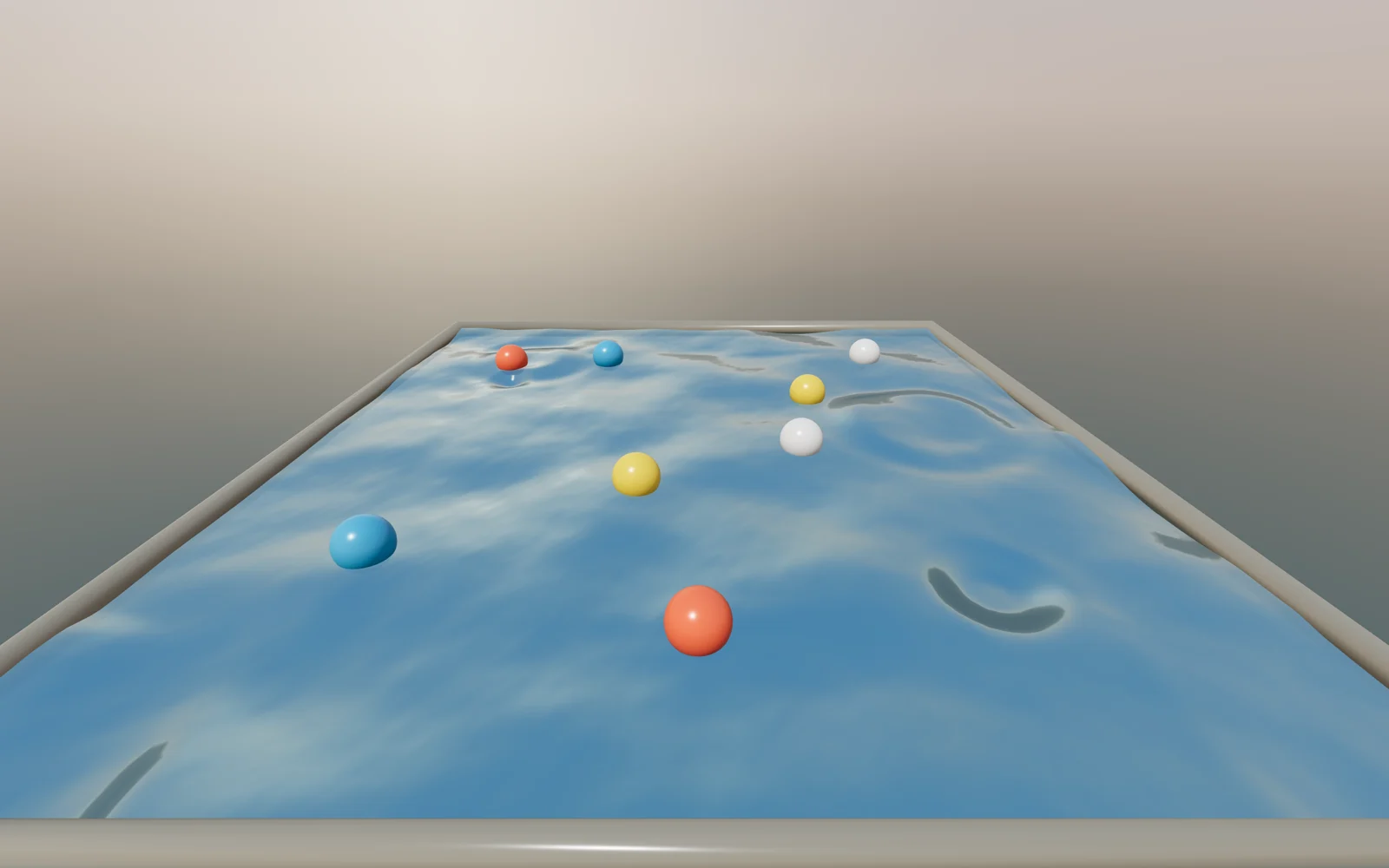
Бассейн с голубой водой под мягким рассветным небом. Стоит провести мышью над водой, и за курсором тянется кильватер, а от него расходятся настоящие волны: они отражаются от бортов, сталкиваются и постепенно затухают. По воде качаются цветные шары: каждый поднимается на гребне и сползает с волны вниз по склону. Если к воде никто не прикасается, в неё сами падают капли, поэтому картинка не замирает. Это официальный пример three.js webgl_gpgpu_water: волновое уравнение считается на видеокарте (GPUComputationRenderer) в текстуре 128×128, а поверхность воды — обычный PBR-материал, вершины которого поднимает эта карта высот. В стенде утки из оригинала заменены шарами, HDR-небо — небом из шейдера, вместо клика и OrbitControls рябь идёт от наведения, добавлены автокапли. Подойдёт для первого экрана бассейна, спа, отеля, летнего лагеря, приложения для медитации или как игровой интерактив в блоке «о нас».
Библиотека дизайна / Эффекты и шейдеры
Бассейн, по которому курсор пускает рябь
Живая вода в бассейне: курсор или палец оставляет кильватер, капли расходятся кругами, по воде качаются цветные шары.
Промпт
Добавь на мою страницу эффект «Бассейн, по которому курсор пускает рябь» (по мотивам официального примера three.js `webgl_gpgpu_water`, MIT, https://github.com/mrdoob/three.js/blob/dev/examples/webgl_gpgpu_water.html). Ниже готовая страница одним файлом: three.js 0.170.0 и дополнения `GPUComputationRenderer`, `SimplexNoise` через importmap с jsdelivr. Внешних картинок и моделей нет. Сначала перенеси её как есть, открой через локальный сервер и проверь, что вода рябит за курсором и сама ловит капли, и только потом подгоняй.

Как устроен код. Симуляция: `GPUComputationRenderer` хранит текстуру `WIDTH × WIDTH` (128), в канале x высота воды сейчас, в y — шагом раньше. Шейдер `heightmapShader` на каждом шаге считает новую высоту по соседям (волновое уравнение), умножает на `viscosity` (затухание) и продавливает воду в точке `mousePos` на глубину `deep` в радиусе `mouseSize`. Начальная рябь берётся из `SimplexNoise`. Отрисовка: `MeshStandardMaterial` воды через `onBeforeCompile` поднимает вершины плоскости по карте высот и пересчитывает нормали, поэтому вода отражает небо и солнце как настоящая. Небо — сфера с градиентным шейдером, запечённая `PMREMGenerator` в карту окружения (и фон с размытием). Шары: шейдер `readLevelShader` упаковывает высоту и наклон воды под шаром в байты цели 4×1, `readRenderTargetPixels` читает их, и шар встаёт на уровень воды и скатывается по склону. Курсор: луч из камеры в невидимую плоскость `rayPlane` даёт точку на воде, она передаётся в `mousePos` 120 мс после последнего движения. Через 3 секунды без ввода включаются автокапли (каждые `DROP_EVERY` мс, сильнее курсора в 3 раза).

Что менять: цвет воды `SETTINGS.waterColor`, ширину следа `mouseSize`, силу `mouseDeep`, затухание волн `viscosity` (ближе к 1 — дольше живут волны, больше 0.99 не ставь), число и цвета шаров `NUM_BALLS` и `BALL_COLORS` (`NUM_BALLS = 0` уберёт их), частоту капель `DROP_EVERY`, цвета неба (`zenith`, `horizon`, `deep` и направление солнца в шейдере неба), фон страницы. `WIDTH` больше 128 даёт мелкую рябь, но дороже на слабых телефонах. На портретном экране камера смотрит круче сверху (`fitCamera`).

Если проект на React или React Three Fiber: перенеси код в `useEffect` с пустым списком зависимостей, канвас бери через `ref`. При размонтировании вызови `renderer.setAnimationLoop(null)`, `gpu.dispose()`, `readTarget.dispose()`, `pmrem.dispose()`, `envMap.dispose()`, `dispose()` у геометрий и материалов, `renderer.dispose()` и сними слушатели `pointermove`, `pointerdown`, `resize`. В R3F симуляцию держи в `useFrame`, а `gl` бери из `useThree`. Не трогай пары `WIDTH`/`BOUNDS` в `defines` (их используют три шейдера сразу), кодирование float в байты в `readLevelShader` и `touch-action: none` на канвасе (без него палец будет прокручивать страницу вместо ряби). Ветка `prefers-reduced-motion` реже считает волны и реже роняет капли: оставь её.
Покажи, где на моём сайте этот бассейн смотрится лучше всего, и подбери цвета воды и неба под мой бренд.
Код скопируется вместе с промптом
Код
<!DOCTYPE html>
<html lang="en">
<head>
<meta charset="UTF-8">
<meta name="viewport" content="width=device-width, initial-scale=1">
<title>GPGPU Water Ripples</title>
<link rel="icon" href="data:,">
<script type="importmap">{ "imports": {
  "three": "https://cdn.jsdelivr.net/npm/three@0.170.0/build/three.module.js",
  "three/addons/": "https://cdn.jsdelivr.net/npm/three@0.170.0/examples/jsm/"
} }</script>
<style>
html, body { margin: 0; height: 100%; background: #0d2a36; overflow: hidden; }
canvas.water { position: fixed; inset: 0; width: 100%; height: 100%; display: block; touch-action: none; }
</style>
</head>
<body>
<canvas class="water"></canvas>
<script type="module">
// Based on the three.js example webgl_gpgpu_water, Copyright © 2010–2026 three.js authors, MIT
// https://github.com/mrdoob/three.js/blob/dev/examples/webgl_gpgpu_water.html
import * as THREE from 'three';
import { GPUComputationRenderer } from 'three/addons/misc/GPUComputationRenderer.js';
import { SimplexNoise } from 'three/addons/math/SimplexNoise.js';

const WIDTH = 128;              // simulation texture size (cells per side)
const BOUNDS = 6;               // water size in scene units
const HALF = BOUNDS / 2;
const SETTINGS = { mouseSize: 0.25, mouseDeep: 0.012, viscosity: 0.96, waterColor: 0x9bd2ec };
const NUM_BALLS = 8;            // floating balls instead of the original duck model
const BALL_COLORS = [0xff6b4a, 0xffd23f, 0xf4f1ea, 0x3fa7d6];
const reduceMotion = matchMedia('(prefers-reduced-motion: reduce)').matches;

const canvas = document.querySelector('canvas.water');
const renderer = new THREE.WebGLRenderer({ canvas, antialias: true });
renderer.setPixelRatio(Math.min(devicePixelRatio, 2));
renderer.setSize(innerWidth, innerHeight);
renderer.toneMapping = THREE.ACESFilmicToneMapping;
renderer.toneMappingExposure = 0.75;

const scene = new THREE.Scene();
const camera = new THREE.PerspectiveCamera(75, innerWidth / innerHeight, 0.1, 100);
const sun = new THREE.DirectionalLight(0xffffff, 3.5);
sun.position.set(-1, 2.6, 1.4);
scene.add(sun);

// Procedural sunrise sky instead of the HDR texture: a gradient sphere baked into an environment map
const skyScene = new THREE.Scene();
skyScene.add(new THREE.Mesh(new THREE.SphereGeometry(10, 48, 24), new THREE.ShaderMaterial({
  side: THREE.BackSide,
  vertexShader: /* glsl */`varying vec3 vDir; void main() { vDir = normalize(position); gl_Position = projectionMatrix * modelViewMatrix * vec4(position, 1.0); }`,
  fragmentShader: /* glsl */`
    varying vec3 vDir;
    void main() {
      float h = vDir.y;
      vec3 zenith = vec3(0.16, 0.36, 0.62), horizon = vec3(1.0, 0.72, 0.52), deep = vec3(0.02, 0.12, 0.16);
      vec3 col = h > 0.0 ? mix(horizon, zenith, pow(h, 0.55)) : mix(horizon * 0.5, deep, pow(-h, 0.4));
      float sunGlow = max(dot(vDir, normalize(vec3(-0.35, 0.18, -1.0))), 0.0);
      col += vec3(1.0, 0.8, 0.55) * (pow(sunGlow, 600.0) * 6.0 + pow(sunGlow, 12.0) * 0.6);
      gl_FragColor = vec4(col, 1.0);
    }`
})));
const pmrem = new THREE.PMREMGenerator(renderer);
const envMap = pmrem.fromScene(skyScene, 0.02).texture;
scene.environment = envMap;
scene.background = envMap;
scene.backgroundBlurriness = 0.25;

// Height field simulation: x = height now, y = height one step ago (wave equation on the GPU)
const heightmapShader = /* glsl */`
  #include <common>
  uniform vec2 mousePos;
  uniform float mouseSize, viscosity, deep;
  void main() {
    vec2 cell = 1.0 / resolution.xy;
    vec2 uv = gl_FragCoord.xy * cell;
    vec4 h = texture2D(heightmap, uv);
    vec4 n = texture2D(heightmap, uv + vec2(0.0, cell.y));
    vec4 s = texture2D(heightmap, uv - vec2(0.0, cell.y));
    vec4 e = texture2D(heightmap, uv + vec2(cell.x, 0.0));
    vec4 w = texture2D(heightmap, uv - vec2(cell.x, 0.0));
    float newHeight = ((n.x + s.x + e.x + w.x) * 0.5 - h.y) * viscosity;
    float phase = clamp(length((uv - 0.5) * BOUNDS - vec2(mousePos.x, -mousePos.y)) * PI / mouseSize, 0.0, PI);
    newHeight -= (cos(phase) + 1.0) * deep;
    gl_FragColor = vec4(newHeight, h.x, 0.0, 1.0);
  }`;

// Reads the height and slope under one point and packs the floats into RGBA bytes (4×1 target)
const readLevelShader = /* glsl */`
  uniform vec2 point1;
  uniform sampler2D levelTexture;
  float shift_right(float v, float amt) { v = floor(v) + 0.5; return floor(v / exp2(amt)); }
  float shift_left(float v, float amt) { return floor(v * exp2(amt) + 0.5); }
  float mask_last(float v, float bits) { return mod(v, shift_left(1.0, bits)); }
  float extract_bits(float num, float from, float to) { from = floor(from + 0.5); to = floor(to + 0.5); return mask_last(shift_right(num, from), to - from); }
  vec4 encode_float(float val) {
    if (val == 0.0) return vec4(0.0);
    float sign = val > 0.0 ? 0.0 : 1.0; val = abs(val);
    float exponent = floor(log2(val)); float biased = exponent + 127.0;
    float fraction = ((val / exp2(exponent)) - 1.0) * 8388608.0;
    float t = biased / 2.0; float lastBit = fract(t) * 2.0; float rest = floor(t);
    return vec4(extract_bits(fraction, 0.0, 8.0) / 255.0, extract_bits(fraction, 8.0, 16.0) / 255.0,
      (lastBit * 128.0 + extract_bits(fraction, 16.0, 23.0)) / 255.0, (sign * 128.0 + rest) / 255.0);
  }
  void main() {
    vec2 cell = 1.0 / resolution.xy;
    float level = texture2D(levelTexture, point1).x;
    vec2 normal = vec2(
      (texture2D(levelTexture, point1 - vec2(cell.x, 0.0)).x - texture2D(levelTexture, point1 + vec2(cell.x, 0.0)).x) * WIDTH / BOUNDS,
      (texture2D(levelTexture, point1 - vec2(0.0, cell.y)).x - texture2D(levelTexture, point1 + vec2(0.0, cell.y)).x) * WIDTH / BOUNDS);
    float v = gl_FragCoord.x < 1.5 ? level : gl_FragCoord.x < 2.5 ? normal.x : gl_FragCoord.x < 3.5 ? normal.y : 0.0;
    gl_FragColor = encode_float(v);
  }`;

const gpu = new GPUComputationRenderer(WIDTH, WIDTH, renderer);
const height0 = gpu.createTexture();
const simplex = new SimplexNoise();
const px = height0.image.data;
for (let j = 0, p = 0; j < WIDTH; j++) for (let i = 0; i < WIDTH; i++, p += 4) {
  let r = 0, amp = 0.1, freq = 0.025;
  for (let k = 0; k < 15; k++) { r += amp * simplex.noise(i * freq, j * freq); amp *= 0.53 + 0.025 * k; freq *= 1.25; }
  px[p] = px[p + 1] = r; px[p + 3] = 1;
}
const heightVar = gpu.addVariable('heightmap', heightmapShader, height0);
gpu.setVariableDependencies(heightVar, [heightVar]);
const simUniforms = heightVar.material.uniforms;
simUniforms.mousePos = { value: new THREE.Vector2(10000, 10000) };
simUniforms.mouseSize = { value: SETTINGS.mouseSize };
simUniforms.viscosity = { value: SETTINGS.viscosity };
simUniforms.deep = { value: SETTINGS.mouseDeep };
heightVar.material.defines.BOUNDS = BOUNDS.toFixed(1);
const err = gpu.init();
if (err !== null) console.error(err);

const readShader = gpu.createShaderMaterial(readLevelShader, { point1: { value: new THREE.Vector2() }, levelTexture: { value: null } });
readShader.defines.WIDTH = WIDTH.toFixed(1);
readShader.defines.BOUNDS = BOUNDS.toFixed(1);
const readTarget = new THREE.WebGLRenderTarget(4, 1, { minFilter: THREE.NearestFilter, magFilter: THREE.NearestFilter, type: THREE.UnsignedByteType, depthBuffer: false });
const readBytes = new Uint8Array(16);

// Water surface: a standard PBR material whose vertices are lifted by the height map
const water = new THREE.MeshStandardMaterial({ color: SETTINGS.waterColor, metalness: 0.9, roughness: 0, transparent: true, opacity: 0.85, side: THREE.DoubleSide });
water.defines = { STANDARD: '', USE_UV: '', WIDTH: WIDTH.toFixed(1), BOUNDS: BOUNDS.toFixed(1) };
const waterUniforms = { heightmap: { value: null } };
water.onBeforeCompile = (shader) => {
  shader.uniforms.heightmap = waterUniforms.heightmap;
  shader.vertexShader = shader.vertexShader
    .replace('#include <common>', '#include <common>\nuniform sampler2D heightmap;')
    .replace('#include <beginnormal_vertex>', `
      vec2 cellSize = vec2(1.0 / WIDTH);
      vec3 objectNormal = vec3(
        (texture2D(heightmap, uv - vec2(cellSize.x, 0.0)).x - texture2D(heightmap, uv + vec2(cellSize.x, 0.0)).x) * WIDTH / BOUNDS,
        (texture2D(heightmap, uv - vec2(0.0, cellSize.y)).x - texture2D(heightmap, uv + vec2(0.0, cellSize.y)).x) * WIDTH / BOUNDS,
        1.0);`)
    .replace('#include <begin_vertex>', 'vec3 transformed = vec3(position.x, position.y, texture2D(heightmap, uv).x);');
};
const waterMesh = new THREE.Mesh(new THREE.PlaneGeometry(BOUNDS, BOUNDS, WIDTH - 1, WIDTH - 1), water);
waterMesh.rotation.x = -Math.PI / 2;
scene.add(waterMesh);

const borderGeom = new THREE.TorusGeometry(4.2, 0.1, 12, 4).rotateX(Math.PI / 2).rotateY(Math.PI / 4);
scene.add(new THREE.Mesh(borderGeom, new THREE.MeshStandardMaterial({ color: 0x908877, roughness: 0.2 })));
const rayPlane = new THREE.Mesh(new THREE.PlaneGeometry(BOUNDS, BOUNDS), new THREE.MeshBasicMaterial({ visible: false }));
rayPlane.rotation.x = -Math.PI / 2;
rayPlane.updateMatrixWorld();

// Floating balls: each one reads the water level and slope under itself and drifts downhill
const ballGeom = new THREE.SphereGeometry(0.16, 32, 16);
const balls = Array.from({ length: NUM_BALLS }, (_, i) => {
  const ball = new THREE.Mesh(ballGeom, new THREE.MeshStandardMaterial({ color: BALL_COLORS[i % BALL_COLORS.length], roughness: 0.25, metalness: 0.05 }));
  ball.position.set((Math.random() - 0.5) * BOUNDS * 0.7, 0, (Math.random() - 0.5) * BOUNDS * 0.7);
  ball.userData.velocity = new THREE.Vector3();
  scene.add(ball);
  return ball;
});
const slope = new THREE.Vector3();
function floatBalls(heightTexture) {
  readShader.uniforms.levelTexture.value = heightTexture;
  const limit = HALF - 0.2;
  for (const ball of balls) {
    readShader.uniforms.point1.value.set(0.5 * ball.position.x / HALF + 0.5, 1 - (0.5 * ball.position.z / HALF + 0.5));
    gpu.doRenderTarget(readShader, readTarget);
    renderer.readRenderTargetPixels(readTarget, 0, 0, 4, 1, readBytes);
    const [level, nx, nz] = new Float32Array(readBytes.buffer);
    const p = ball.position, v = ball.userData.velocity;
    p.y = level + 0.06;
    v.add(slope.set(nx, 0, -nz).multiplyScalar(0.01)).multiplyScalar(0.998);
    p.add(v);
    if (Math.abs(p.x) > limit) { p.x = Math.sign(p.x) * (limit - 0.001); v.x *= -0.3; }
    if (Math.abs(p.z) > limit) { p.z = Math.sign(p.z) * (limit - 0.001); v.z *= -0.3; }
  }
}

// Pointer: the water is pushed under the cursor (mouse hover or finger), no click needed
const pointer = new THREE.Vector2();
const raycaster = new THREE.Raycaster();
let lastInput = -1e9;
function onPointer(e) {
  pointer.set((e.clientX / innerWidth) * 2 - 1, -(e.clientY / innerHeight) * 2 + 1);
  lastInput = performance.now();
}
canvas.addEventListener('pointermove', onPointer);
canvas.addEventListener('pointerdown', onPointer);

// Auto demo: when nobody touches the water, a drop falls every DROP_EVERY ms
const DROP_EVERY = reduceMotion ? 4000 : 1400;
let nextDrop = 600, dropUntil = 0;
const drop = new THREE.Vector2();

function fitCamera() {
  camera.aspect = innerWidth / innerHeight;
  // Landscape: the original view. Portrait: look down more steeply and step back so the pool fits the width
  const halfH = Math.atan(Math.tan(THREE.MathUtils.degToRad(camera.fov / 2)) * camera.aspect);
  if (camera.aspect >= 1) camera.position.set(0, 2, 4);
  else camera.position.set(0, 0.8, 0.6).setLength(Math.max(4.5, 3.6 / Math.tan(halfH)));
  camera.lookAt(0, 0, 0);
  camera.updateProjectionMatrix();
  renderer.setSize(innerWidth, innerHeight);
}
fitCamera();
addEventListener('resize', fitCamera);

let frame = 0;
renderer.setAnimationLoop((t) => {
  let target = null;
  if (t - lastInput < 120) {
    raycaster.setFromCamera(pointer, camera);
    const hit = raycaster.intersectObject(rayPlane)[0];
    if (hit) target = [hit.point.x, hit.point.z];
  } else if (t - lastInput > 3000) {
    if (t > nextDrop) {
      drop.set((Math.random() - 0.5) * BOUNDS * 0.7, (Math.random() - 0.5) * BOUNDS * 0.7);
      dropUntil = t + 90; nextDrop = t + DROP_EVERY * (0.6 + Math.random() * 0.8);
    }
    if (t < dropUntil) target = [drop.x, drop.y];
  }
  if (target) simUniforms.mousePos.value.set(target[0], target[1]);
  else simUniforms.mousePos.value.set(10000, 10000);
  // Auto drops hit harder than the cursor so the rings stay visible
  simUniforms.deep.value = t < dropUntil ? SETTINGS.mouseDeep * 3 : SETTINGS.mouseDeep;

  // Simulation step every 2nd frame (every 4th with reduced motion)
  if (++frame >= (reduceMotion ? 4 : 2)) {
    frame = 0;
    gpu.compute();
    const tex = gpu.getCurrentRenderTarget(heightVar).texture;
    floatBalls(tex);
    waterUniforms.heightmap.value = tex;
  }
  renderer.render(scene, camera);
});
</script>
</body>
</html>