Эффекты и шейдерыСветлыйТипографикаМинимализмБесплатно
Заголовок, в котором слово раскрывается во фото на весь блок
Внутри заголовка спрятана картинка: при скролле она растёт между словами до полной ширины, а слово рядом наклоняется.
Промпт
Добавь в мои заголовки эффект «Слово раскрывается во фото на весь блок» (по мотивам Codrops ImageExpansionTypography, MIT). Ниже готовая страница на GSAP 3.13.0 с ScrollTrigger и Flip (jsdelivr). Сначала перенеси её как есть и проверь: при скролле картинка в заголовке растёт до полной ширины, слова расходятся. Потом меняй.

Как устроен код. В заголовке `h2[data-expand]` лежит `.expand` с картинкой `.expand__img` (ширина 0, внутри картинка шириной 100vw) и словами `.anim`. В CSS есть второе состояние `.type--open`: картинка шириной 100%, слово наклонено, между элементами зазор. Скрипт на загрузке временно включает `type--open`, запоминает положение картинки и слов через `Flip.getState`, возвращает класс и запускает `Flip.to` со scrub: плагин сам считает переход от закрытого вида к открытому. Параллельно абзац под заголовком уезжает на `-150%`, бледнеет и наклоняется.

Что менять: слова, картинки (горизонтальные 16 к 9), радиус `border-radius: 4rem`, шрифт, наклон `skewX(-20deg)`, длину прокрутки (`end: '+=135%'`). Можно расположить картинку в начале, в середине или в конце строки: проверь, как переносятся слова.

Если проект на React: делай компонент заголовка, запоминай элементы через `ref`, считай Flip в `useLayoutEffect` после загрузки шрифтов и картинок (иначе размеры будут неверными), откатывай `ctx.revert()`. При изменении размера окна пересчитай Flip.
Покажи, где на моём сайте такой заголовок будет работать лучше всего.
Код скопируется вместе с промптом
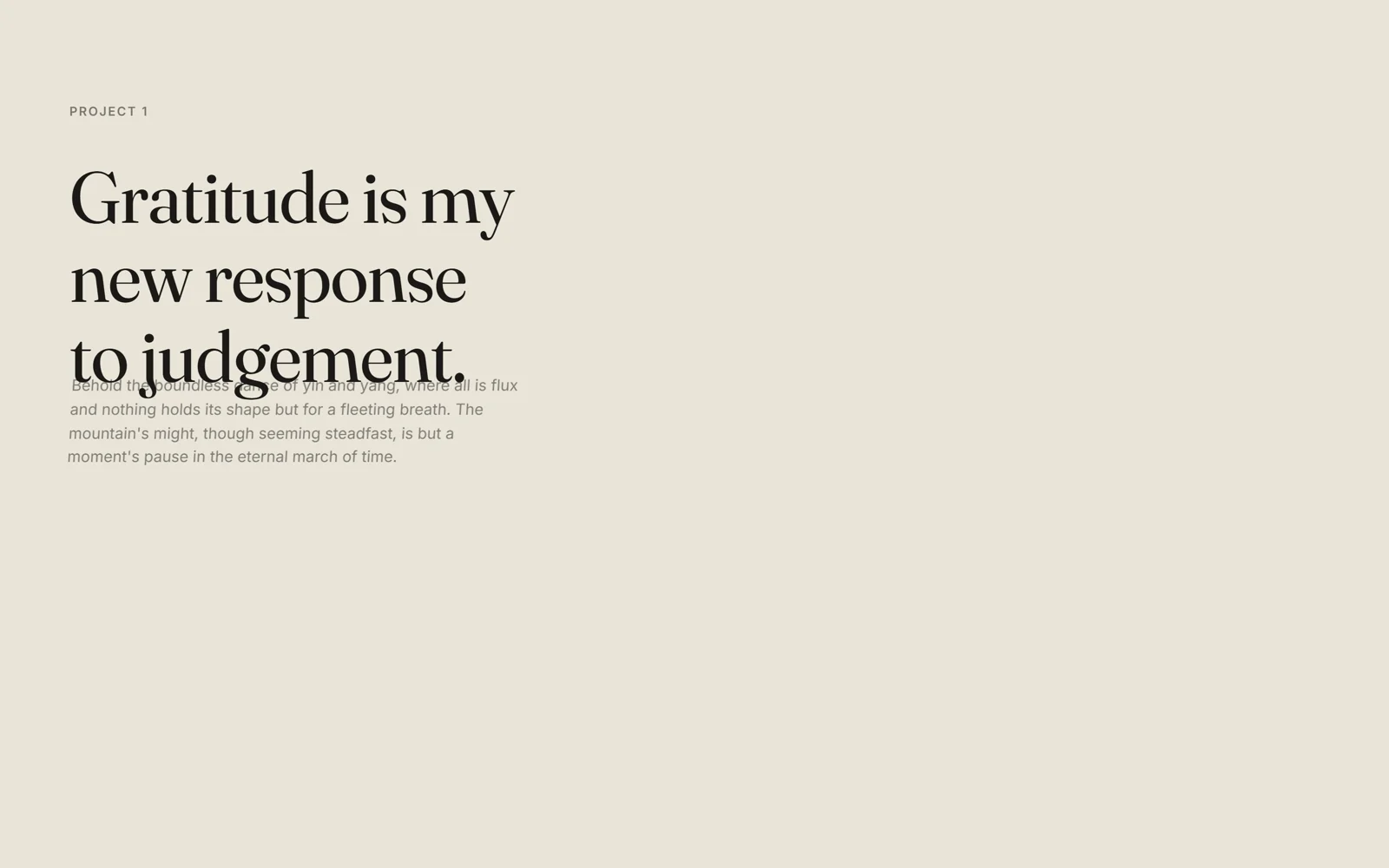
Крупный засечный заголовок в несколько строк. В одном месте, после слова «to» или между «detours» и «and dance», нулевая по ширине картинка. Пока вы скроллите, она раскрывается вширь прямо в тексте: слова расходятся, картинка занимает всю ширину блока, а слово после неё наклоняется. Абзац под заголовком в это время уезжает вверх и гаснет.
Приём простой и красивый: в вёрстке два состояния заголовка («закрыт» и «открыт», класс type--open), а GSAP Flip сам считает путь между ними. Подходит для редакционных страниц, манифестов, страниц проектов и кейсов, где нужна пауза в чтении.
Код
<!-- Pictures come from picsum.photos as placeholders: replace the URLs with your own images. -->
<!DOCTYPE html>
<html lang="en">
<head>
<meta charset="UTF-8">
<meta name="viewport" content="width=device-width, initial-scale=1">
<title>Expanding Image Typography</title>
<link rel="stylesheet" href="https://fonts.googleapis.com/css2?family=Fraunces:ital,opsz,wght@0,9..144,400;1,9..144,400&family=Inter:wght@400;600&display=swap">
<style>
*, *::before, *::after { box-sizing: border-box; }
html, body { margin: 0; }
body { background: #e9e4d8; color: #1b1a17; font-family: "Inter", sans-serif; overflow-x: hidden; }
.content { min-height: 120vh; padding: 12vh 5vw 8vh; display: grid; align-content: start; gap: 2.5rem; }
.content--center { text-align: center; justify-items: center; }
.content--right { justify-items: end; text-align: right; }
.meta { margin: 0; font: 600 .8rem "Inter", sans-serif; letter-spacing: .12em; text-transform: uppercase; opacity: .55; }
.type { margin: 0; font: 400 clamp(2rem, 5.2vw, 5.4rem)/1.1 "Fraunces", serif; letter-spacing: -.02em; }
.block { margin: 0; max-width: 46ch; font-size: 1rem; line-height: 1.55; opacity: .75; }

/* the picture lives inside the headline as an inline element that is 0 wide... */
.expand { display: inline-grid; grid-template-columns: min-content; vertical-align: top; }
.expand--center { display: block; }
.expand__img { display: block; position: relative; width: 0; aspect-ratio: 16 / 9; overflow: hidden; border-radius: 4rem; }
.expand__img-inner { display: block; width: 100vw; aspect-ratio: 16 / 9; background: 50% / cover #8c8472; }
.anim { display: inline-block; white-space: nowrap; }
/* ...and in the "open" state it is full width. We never animate those styles: Flip records both states and animates between them */
.type--open .expand { gap: 1.5rem; }
.type--open .expand__img { width: 100%; }
.type--open .skewed { transform: skewX(-20deg); }
</style>
</head>
<body>
<div class="content">
  <h3 class="meta">Project 1</h3>
  <h2 class="type" data-expand>
    Gratitude is my<br>new response<br>to
    <span class="expand"><span class="expand__img"><span class="expand__img-inner" style="background-image:url(https://picsum.photos/id/1015/1600/900)"></span></span><span class="anim skewed">judgement.</span></span>
  </h2>
  <p class="block">Behold the boundless dance of yin and yang, where all is flux and nothing holds its shape but for a fleeting breath. The mountain's might, though seeming steadfast, is but a moment's pause in the eternal march of time.</p>
</div>
<div class="content content--center">
  <h3 class="meta">Project 2</h3>
  <h2 class="type" data-expand>
    Life's a wild journey;<br>embrace the<br>
    <span class="expand expand--center"><span class="anim">detours </span><span class="expand__img"><span class="expand__img-inner" style="background-image:url(https://picsum.photos/id/1036/1600/900)"></span></span><span class="anim skewed">and dance</span></span>
    <br>under the stars.
  </h2>
  <p class="block">In this dance even the stars, those ancient sentinels of the night sky, are not stationary but in perpetual motion, tracing their arcs in the fabric of the cosmos.</p>
</div>
<div class="content content--right">
  <h3 class="meta">Project 3</h3>
  <h2 class="type" data-expand>
    Let go of the<br>shore and trust<br>the
    <span class="expand"><span class="expand__img"><span class="expand__img-inner" style="background-image:url(https://picsum.photos/id/1039/1600/900)"></span></span><span class="anim skewed">current.</span></span>
  </h2>
  <p class="block">The river's course, ever winding, knows not the morrow, content in its ceaseless journey to the embrace of the vast and fathomless sea.</p>
</div>
<div class="content"><h3 class="meta">The end</h3></div>

<script src="https://cdn.jsdelivr.net/npm/gsap@3.13.0/dist/gsap.min.js"></script>
<script src="https://cdn.jsdelivr.net/npm/gsap@3.13.0/dist/ScrollTrigger.min.js"></script>
<script src="https://cdn.jsdelivr.net/npm/gsap@3.13.0/dist/Flip.min.js"></script>
<script>
// Based on Codrops ImageExpansionTypography (MIT), https://github.com/codrops/ImageExpansionTypography
gsap.registerPlugin(ScrollTrigger, Flip);

window.addEventListener('load', () => {
  document.querySelectorAll('[data-expand]').forEach((headline) => {
    const image = headline.querySelector('.expand__img');
    const words = headline.querySelectorAll('.anim');
    const textBlock = headline.nextElementSibling;

    // 1) switch the headline to its "open" state for a moment and remember where everything is...
    headline.classList.add('type--open');
    const state = Flip.getState([image, words], { props: 'transform' });
    headline.classList.remove('type--open');

    // 2) ...then animate from the closed state to the remembered one, driven by the scroll (scrub)
    Flip.to(state, {
      ease: 'power1.inOut',
      scrollTrigger: { trigger: headline, start: 'clamp(top bottom)', end: '+=135%', scrub: true }
    })
    // 3) the paragraph below drifts up, fades and leans as it leaves
    .to(textBlock, {
      ease: 'sine.inOut', yPercent: -150, opacity: 0.2, skewX: -8,
      scrollTrigger: { trigger: textBlock, start: 'top bottom', end: 'bottom top', scrub: true }
    }, 0);
  });
});
</script>
</body>
</html>