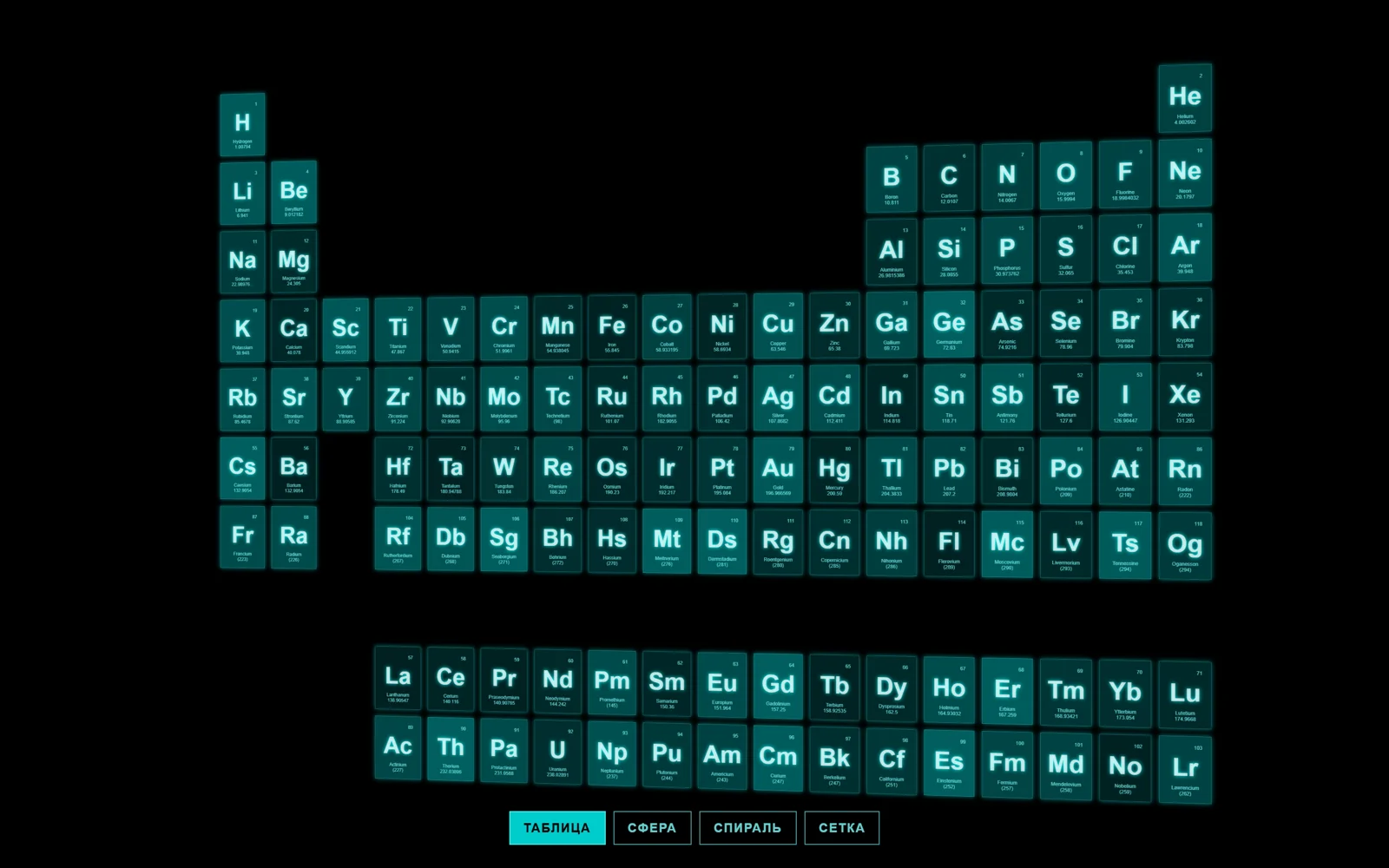
Чёрный экран, на нём таблица Менделеева из 118 полупрозрачных бирюзовых карточек с неоновым свечением: номер, символ, название и атомная масса. Каждые несколько секунд карточки разлетаются и по своим траекториям собираются в новую фигуру — шар, винтовую спираль, объёмную сетку из слоёв, — а потом обратно в таблицу. Внизу кнопки «Таблица», «Сфера», «Спираль», «Сетка» для ручного переключения, камера плавно поворачивается за курсором. Это официальный пример three.js css3d_periodictable: карточки — обычные HTML-элементы, которые CSS3DRenderer расставляет в пространстве через CSS-трансформации, поэтому WebGL не нужен, текст остаётся настоящим текстом, а стили — обычным CSS. В стенде библиотека TWEEN заменена собственной интерполяцией с той же кривой, TrackballControls — мягким поворотом камеры за курсором, добавлены автосмена раскладок, русские подписи кнопок с aria-pressed, подгонка расстояния камеры под ширину экрана и фигуру. Подойдёт для блока «каталог», «команда», «наши клиенты», «портфолио», «база знаний»: замените элементы своими карточками.
Таблица Менделеева, которая собирается в сферу и спираль
118 неоновых HTML-карточек элементов перелетают из таблицы в сферу, спираль и сетку в 3D. Кнопки и автосмена раскладок, без WebGL.
Промпт
Добавь на мою страницу блок «Таблица Менделеева, которая собирается в сферу и спираль» (по мотивам официального примера three.js `css3d_periodictable`, MIT, https://github.com/mrdoob/three.js/blob/dev/examples/css3d_periodictable.html). Ниже готовая страница одним файлом: three.js 0.170.0 и дополнение `CSS3DRenderer` через importmap с jsdelivr, WebGL и картинок нет, карточки — обычные HTML-элементы. Сначала перенеси её как есть, открой через локальный сервер и проверь, что карточки перелетают между раскладками по кнопкам и сами раз в 6 секунд, и только потом подгоняй.

Как устроен код. Данные — строка `TABLE`: элементы разделены `|`, у каждого через пробел символ, название, масса, столбец и строка таблицы. Для каждого элемента создаётся `div.element` (стили карточки в CSS: размер 120×160, полупрозрачный фон со случайной прозрачностью, свечение `box-shadow` и `text-shadow`) и оборачивается в `CSS3DObject`; стартовые позиции случайные. Для каждой раскладки заранее посчитаны цели (`targets`): таблица — по столбцу и строке, сфера — точки, равномерно разложенные по шару (`setFromSphericalCoords`), спираль — по цилиндру (`setFromCylindricalCoords`), сетка — слои 5×5 в глубину; в сфере и спирали карточки смотрят наружу (`lookAt`). `transform(layout)` запоминает для каждой карточки старт и цель и длительность от `DURATION` до двух `DURATION`, а `updateTweens` каждый кадр двигает позицию и поворот по кривой `easeInOutExpo` (как `Exponential.InOut` в TWEEN). Автосмена: раз в `AUTO_EVERY` мс следующая раскладка, после клика по кнопке пауза `IDLE_AFTER_INPUT`. Камера ходит по сфере вокруг центра: угол задают курсор и медленный синус, расстояние плавно подстраивается так, чтобы ширина текущей фигуры (`FIT_WIDTH`) влезала в экран.

Что менять: данные и разметку карточки (вместо элементов — товары, сотрудники, логотипы клиентов, статьи; поменяй строку `TABLE` и шаблон `innerHTML`, а для таблицы задай свои столбец и строку), цвета и свечение в CSS (`.element`, `.symbol`, кнопки), размер карточек (тогда поправь шаги 140 и 180 в таблице и радиусы 800 и 900 сферы и спирали), набор раскладок `LAYOUTS` и кнопки в `#menu`, скорость `DURATION`, частоту `AUTO_EVERY`, силу поворота камеры (0.5 и 0.3 в цикле). Свою раскладку легко добавить: заполни `targets.<имя>` объектами `Object3D` с позицией и поворотом и добавь кнопку с `data-layout`.

Если проект на React: контейнер `#stage` и меню — в JSX, код из `<script>` в `useEffect` с пустым списком зависимостей, контейнер через `ref`. При размонтировании останови цикл (`cancelAnimationFrame` по сохранённому id), удали `renderer.domElement` из контейнера и сними слушатели `pointermove`, `pointerleave`, `resize` и клики кнопок; кнопки удобнее сделать React-обработчиками, которые вызывают `transform`. Карточки в React не рендери: их создаёт и двигает `CSS3DRenderer`, иначе React перезапишет `style.transform`. Не убирай `perspective`, который выставляет рендерер, не ставь `overflow: hidden` и `transform` на родителей `#stage` (сломается 3D) и оставь ветку `prefers-reduced-motion`: без неё карточки летают долго и сами, с ней — быстрые переходы только по кнопкам и камера без автоповорота.
Покажи, где на моём сайте этот блок смотрится лучше всего, и предложи, какие мои данные показать вместо элементов.
Код скопируется вместе с промптом
Код
<!DOCTYPE html>
<html lang="ru">
<head>
<meta charset="UTF-8">
<meta name="viewport" content="width=device-width, initial-scale=1">
<title>CSS3D Periodic Table</title>
<link rel="icon" href="data:,">
<script type="importmap">{ "imports": {
  "three": "https://cdn.jsdelivr.net/npm/three@0.170.0/build/three.module.js",
  "three/addons/": "https://cdn.jsdelivr.net/npm/three@0.170.0/examples/jsm/"
} }</script>
<style>
html, body { margin: 0; height: 100%; background: #000; overflow: hidden; font-family: Helvetica, Arial, sans-serif; }
#stage { position: fixed; inset: 0; touch-action: none; }
.element {
  width: 120px; height: 160px; text-align: center; cursor: default;
  box-shadow: 0 0 12px rgba(0, 255, 255, 0.5);
  border: 1px solid rgba(127, 255, 255, 0.25);
}
.element:hover { box-shadow: 0 0 12px rgba(0, 255, 255, 0.75); border-color: rgba(127, 255, 255, 0.75); }
.element .number { position: absolute; top: 20px; right: 20px; font-size: 12px; color: rgba(127, 255, 255, 0.75); }
.element .symbol {
  position: absolute; top: 40px; left: 0; right: 0; font-size: 60px; font-weight: bold;
  color: rgba(255, 255, 255, 0.75); text-shadow: 0 0 10px rgba(0, 255, 255, 0.95);
}
.element .details { position: absolute; bottom: 15px; left: 0; right: 0; font-size: 12px; color: rgba(127, 255, 255, 0.75); }
#menu {
  position: fixed; left: 0; right: 0; bottom: 24px; display: flex; justify-content: center;
  flex-wrap: wrap; gap: 8px; padding: 0 16px;
}
#menu button {
  font: 600 13px/1 Helvetica, Arial, sans-serif; letter-spacing: 0.08em; text-transform: uppercase;
  color: rgba(127, 255, 255, 0.8); background: rgba(0, 0, 0, 0.4);
  border: 1px solid rgba(127, 255, 255, 0.6); padding: 10px 14px; cursor: pointer;
}
#menu button:hover { background: rgba(0, 255, 255, 0.25); }
#menu button[aria-pressed="true"] { color: #000; background: rgba(0, 255, 255, 0.8); }
#menu button:focus-visible { outline: 2px solid #8ff; outline-offset: 2px; }
@media (max-width: 480px) { #menu { gap: 6px; } #menu button { font-size: 12px; padding: 10px; letter-spacing: 0.04em; } }
</style>
</head>
<body>
<div id="stage"></div>
<nav id="menu" aria-label="Раскладка">
  <button type="button" data-layout="table">Таблица</button>
  <button type="button" data-layout="sphere">Сфера</button>
  <button type="button" data-layout="helix">Спираль</button>
  <button type="button" data-layout="grid">Сетка</button>
</nav>
<script type="module">
// Based on the three.js example css3d_periodictable, Copyright © 2010–2026 three.js authors, MIT
// https://github.com/mrdoob/three.js/blob/dev/examples/css3d_periodictable.html
import * as THREE from 'three';
import { CSS3DRenderer, CSS3DObject } from 'three/addons/renderers/CSS3DRenderer.js';

// symbol name mass column row, elements separated by "|"
const TABLE = (
  'H Hydrogen 1.00794 1 1|He Helium 4.002602 18 1|Li Lithium 6.941 1 2|Be Beryllium 9.012182 2 2|' +
  'B Boron 10.811 13 2|C Carbon 12.0107 14 2|N Nitrogen 14.0067 15 2|O Oxygen 15.9994 16 2|' +
  'F Fluorine 18.9984032 17 2|Ne Neon 20.1797 18 2|Na Sodium 22.98976... 1 3|Mg Magnesium 24.305 2 3|' +
  'Al Aluminium 26.9815386 13 3|Si Silicon 28.0855 14 3|P Phosphorus 30.973762 15 3|S Sulfur 32.065 16 3|' +
  'Cl Chlorine 35.453 17 3|Ar Argon 39.948 18 3|K Potassium 39.948 1 4|Ca Calcium 40.078 2 4|' +
  'Sc Scandium 44.955912 3 4|Ti Titanium 47.867 4 4|V Vanadium 50.9415 5 4|Cr Chromium 51.9961 6 4|' +
  'Mn Manganese 54.938045 7 4|Fe Iron 55.845 8 4|Co Cobalt 58.933195 9 4|Ni Nickel 58.6934 10 4|' +
  'Cu Copper 63.546 11 4|Zn Zinc 65.38 12 4|Ga Gallium 69.723 13 4|Ge Germanium 72.63 14 4|' +
  'As Arsenic 74.9216 15 4|Se Selenium 78.96 16 4|Br Bromine 79.904 17 4|Kr Krypton 83.798 18 4|' +
  'Rb Rubidium 85.4678 1 5|Sr Strontium 87.62 2 5|Y Yttrium 88.90585 3 5|Zr Zirconium 91.224 4 5|' +
  'Nb Niobium 92.90628 5 5|Mo Molybdenum 95.96 6 5|Tc Technetium (98) 7 5|Ru Ruthenium 101.07 8 5|' +
  'Rh Rhodium 102.9055 9 5|Pd Palladium 106.42 10 5|Ag Silver 107.8682 11 5|Cd Cadmium 112.411 12 5|' +
  'In Indium 114.818 13 5|Sn Tin 118.71 14 5|Sb Antimony 121.76 15 5|Te Tellurium 127.6 16 5|' +
  'I Iodine 126.90447 17 5|Xe Xenon 131.293 18 5|Cs Caesium 132.9054 1 6|Ba Barium 132.9054 2 6|' +
  'La Lanthanum 138.90547 4 9|Ce Cerium 140.116 5 9|Pr Praseodymium 140.90765 6 9|' +
  'Nd Neodymium 144.242 7 9|Pm Promethium (145) 8 9|Sm Samarium 150.36 9 9|Eu Europium 151.964 10 9|' +
  'Gd Gadolinium 157.25 11 9|Tb Terbium 158.92535 12 9|Dy Dysprosium 162.5 13 9|' +
  'Ho Holmium 164.93032 14 9|Er Erbium 167.259 15 9|Tm Thulium 168.93421 16 9|Yb Ytterbium 173.054 17 9|' +
  'Lu Lutetium 174.9668 18 9|Hf Hafnium 178.49 4 6|Ta Tantalum 180.94788 5 6|W Tungsten 183.84 6 6|' +
  'Re Rhenium 186.207 7 6|Os Osmium 190.23 8 6|Ir Iridium 192.217 9 6|Pt Platinum 195.084 10 6|' +
  'Au Gold 196.966569 11 6|Hg Mercury 200.59 12 6|Tl Thallium 204.3833 13 6|Pb Lead 207.2 14 6|' +
  'Bi Bismuth 208.9804 15 6|Po Polonium (209) 16 6|At Astatine (210) 17 6|Rn Radon (222) 18 6|' +
  'Fr Francium (223) 1 7|Ra Radium (226) 2 7|Ac Actinium (227) 4 10|Th Thorium 232.03806 5 10|' +
  'Pa Protactinium 231.0588 6 10|U Uranium 238.02891 7 10|Np Neptunium (237) 8 10|' +
  'Pu Plutonium (244) 9 10|Am Americium (243) 10 10|Cm Curium (247) 11 10|Bk Berkelium (247) 12 10|' +
  'Cf Californium (251) 13 10|Es Einstenium (252) 14 10|Fm Fermium (257) 15 10|' +
  'Md Mendelevium (258) 16 10|No Nobelium (259) 17 10|Lr Lawrencium (262) 18 10|' +
  'Rf Rutherfordium (267) 4 7|Db Dubnium (268) 5 7|Sg Seaborgium (271) 6 7|Bh Bohrium (272) 7 7|' +
  'Hs Hassium (270) 8 7|Mt Meitnerium (276) 9 7|Ds Darmstadium (281) 10 7|Rg Roentgenium (280) 11 7|' +
  'Cn Copernicium (285) 12 7|Nh Nihonium (286) 13 7|Fl Flerovium (289) 14 7|Mc Moscovium (290) 15 7|' +
  'Lv Livermorium (293) 16 7|Ts Tennessine (294) 17 7|Og Oganesson (294) 18 7'
).split('|').map((s) => s.split(' '));

const LAYOUTS = ['table', 'sphere', 'helix', 'grid'];
const DURATION = 2000;        // ms; each card takes DURATION..2*DURATION, like the original
const AUTO_EVERY = 6000;      // ms between automatic layout switches when nobody touches the page
const IDLE_AFTER_INPUT = 12000;
const FIT_WIDTH = { table: 2900, sphere: 1900, helix: 2100, grid: 2200 };   // world units to fit into the screen width
const reduceMotion = matchMedia('(prefers-reduced-motion: reduce)').matches;

const camera = new THREE.PerspectiveCamera(40, innerWidth / innerHeight, 1, 20000);
const scene = new THREE.Scene();
const objects = [];
const targets = { table: [], sphere: [], helix: [], grid: [] };

TABLE.forEach(([symbol, name, mass, col, row], i) => {
  const el = document.createElement('div');
  el.className = 'element';
  el.style.backgroundColor = `rgba(0,127,127,${(Math.random() * 0.5 + 0.25).toFixed(2)})`;
  el.innerHTML = `<div class="number">${i + 1}</div><div class="symbol">${symbol}</div>` +
    `<div class="details">${name}<br>${mass}</div>`;
  const obj = new CSS3DObject(el);
  obj.position.set(Math.random() * 4000 - 2000, Math.random() * 4000 - 2000, Math.random() * 4000 - 2000);
  scene.add(obj);
  objects.push(obj);

  const t = new THREE.Object3D();
  t.position.set(col * 140 - 1330, -row * 180 + 990, 0);
  targets.table.push(t);
});

const v = new THREE.Vector3();
objects.forEach((_, i, { length: l }) => {
  // sphere: points spread evenly over a sphere, cards face outwards
  const phi = Math.acos(-1 + (2 * i) / l);
  const s = new THREE.Object3D();
  s.position.setFromSphericalCoords(800, phi, Math.sqrt(l * Math.PI) * phi);
  s.lookAt(v.copy(s.position).multiplyScalar(2));
  targets.sphere.push(s);
  // helix: a cylinder spiral going down
  const h = new THREE.Object3D();
  h.position.setFromCylindricalCoords(900, i * 0.175 + Math.PI, -(i * 8) + 450);
  h.lookAt(v.set(h.position.x * 2, h.position.y, h.position.z * 2));
  targets.helix.push(h);
  // grid: 5×5 layers going into the depth
  const g = new THREE.Object3D();
  g.position.set((i % 5) * 400 - 800, -(Math.floor(i / 5) % 5) * 400 + 800, Math.floor(i / 25) * 1000 - 2000);
  targets.grid.push(g);
});

const renderer = new CSS3DRenderer();
renderer.setSize(innerWidth, innerHeight);
document.getElementById('stage').appendChild(renderer.domElement);

// Simple tween instead of TWEEN.js: every card flies from its current pose to the target
const easeInOutExpo = (k) => k === 0 ? 0 : k === 1 ? 1 :
  k < 0.5 ? Math.pow(2, 20 * k - 10) / 2 : (2 - Math.pow(2, -20 * k + 10)) / 2;
let tweens = [];
let current = 'table';
const buttons = [...document.querySelectorAll('#menu button')];

function transform(layout, duration = DURATION) {
  current = layout;
  buttons.forEach((b) => b.setAttribute('aria-pressed', String(b.dataset.layout === layout)));
  const now = performance.now();
  const base = reduceMotion ? 400 : duration;
  tweens = objects.map((obj, i) => ({
    obj,
    fromP: obj.position.clone(),
    fromR: new THREE.Vector3(obj.rotation.x, obj.rotation.y, obj.rotation.z),
    toP: targets[layout][i].position,
    toR: targets[layout][i].rotation,
    start: now,
    duration: Math.random() * base + base
  }));
}

function updateTweens(now) {
  for (const tw of tweens) {
    const k = easeInOutExpo(Math.min((now - tw.start) / tw.duration, 1));
    tw.obj.position.lerpVectors(tw.fromP, tw.toP, k);
    tw.obj.rotation.set(
      tw.fromR.x + (tw.toR.x - tw.fromR.x) * k,
      tw.fromR.y + (tw.toR.y - tw.fromR.y) * k,
      tw.fromR.z + (tw.toR.z - tw.fromR.z) * k
    );
  }
}

let lastInput = -1e9, lastSwitch = performance.now();
buttons.forEach((b) => b.addEventListener('click', () => {
  lastInput = performance.now();
  transform(b.dataset.layout);
}));

// Pointer: the camera orbits a little towards the cursor (replaces TrackballControls)
const look = new THREE.Vector2(), lookTarget = new THREE.Vector2();
addEventListener('pointermove', (e) => {
  lookTarget.set((e.clientX / innerWidth) * 2 - 1, (e.clientY / innerHeight) * 2 - 1);
});
document.documentElement.addEventListener('pointerleave', () => lookTarget.set(0, 0));

// Camera distance that fits the current layout into the screen width, never closer than 3000
const fitDistance = () => Math.max(3000, FIT_WIDTH[current] / 2 / (Math.tan(THREE.MathUtils.degToRad(20)) * camera.aspect));
let distance = 3000;
function resize() {
  camera.aspect = innerWidth / innerHeight;
  camera.updateProjectionMatrix();
  distance = fitDistance();
  renderer.setSize(innerWidth, innerHeight);
}
resize();
addEventListener('resize', resize);

// Intro: cards fly in from random positions quickly so the table is assembled within a second or two
transform('table', 600);

let t = 0, prev = performance.now();
function animate(now) {
  requestAnimationFrame(animate);
  t += reduceMotion ? 0 : (now - prev) / 1000;
  prev = now;
  // Auto demo: next layout every AUTO_EVERY ms, paused for a while after a button click
  if (!reduceMotion && now - lastSwitch > AUTO_EVERY && now - lastInput > IDLE_AFTER_INPUT) {
    lastSwitch = now;
    transform(LAYOUTS[(LAYOUTS.indexOf(current) + 1) % LAYOUTS.length]);
  }
  if (now - lastInput < IDLE_AFTER_INPUT) lastSwitch = now;
  updateTweens(now);
  look.lerp(lookTarget, 0.05);
  distance += (fitDistance() - distance) * (reduceMotion ? 1 : 0.03);
  const yaw = look.x * 0.5 + Math.sin(t * 0.25) * 0.25;
  const pitch = look.y * 0.3;
  camera.position.set(Math.sin(yaw) * Math.cos(pitch), Math.sin(pitch), Math.cos(yaw) * Math.cos(pitch)).multiplyScalar(distance);
  camera.lookAt(0, 0, 0);
  renderer.render(scene, camera);
}
requestAnimationFrame(animate);
</script>
</body>
</html>
Похожие
Мини-дашборд из трёх карточек с живыми графиками
React · Tailwind · Motion
Отзывы в бегущих колонках
HTML/CSS · Tailwind
Бенто-сетка карточек
React · Tailwind