Эффекты и шейдерыСветлый3DЯркийТипографикаБесплатно
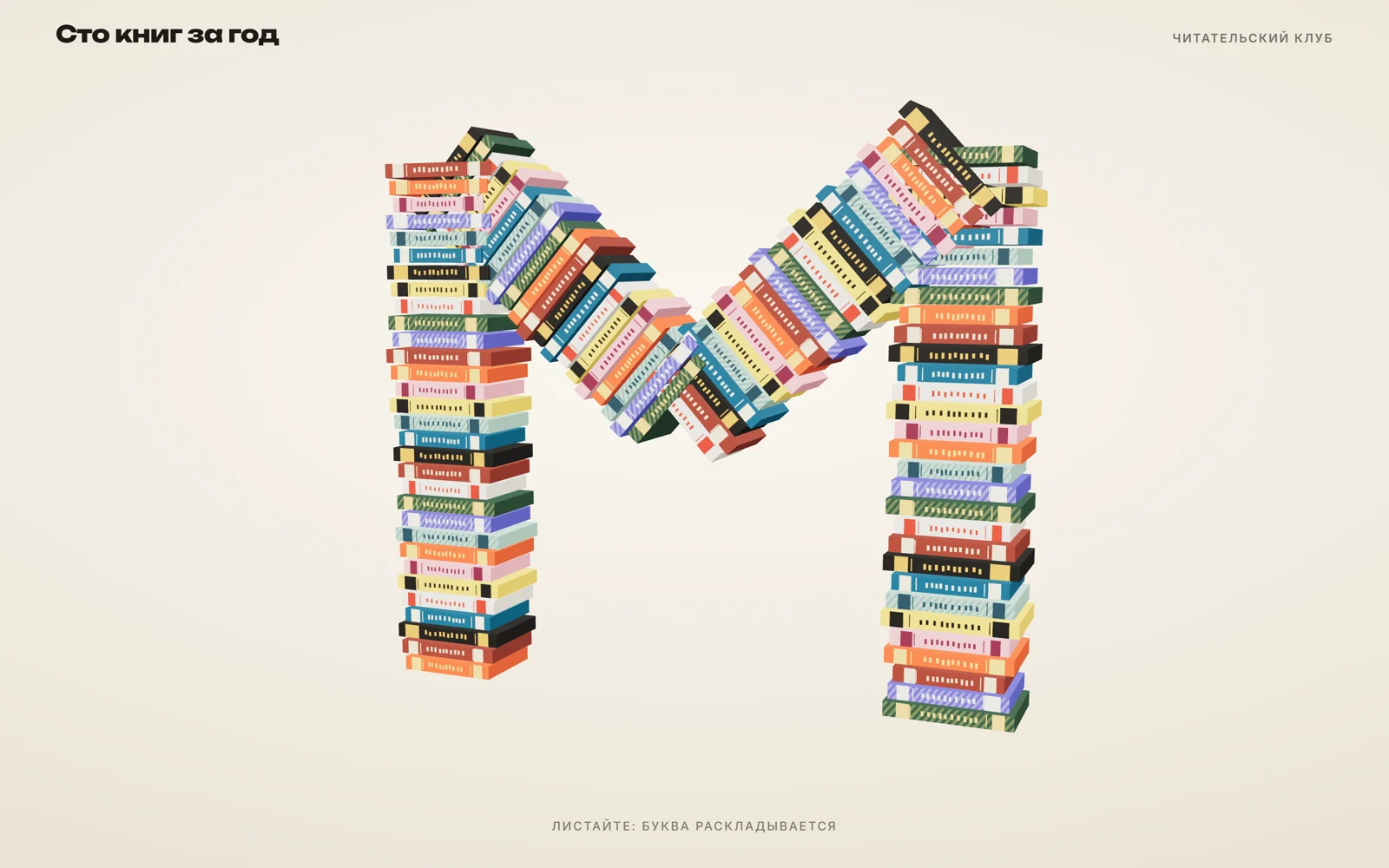
Буква из книжных корешков, которая раскладывается в кольцо
Сотня цветных корешков сложена зигзагом в букву М и при прокрутке раскладывается в кольцо. Камера медленно облетает ленту.
Промпт
Добавь на мою страницу эффект «Буква из книжных корешков» (Сергей Дургалян, MIT). Ниже готовая страница на three.js 0.170.0 (jsdelivr, import map). Сначала перенеси её как есть и проверь: из разноцветных корешков сложена буква М, камера медленно её облетает, колесо мыши или свайп раскладывает буквы в кольцо с переворотом корешков, обратная прокрутка складывает обратно, без ввода всё повторяется само. Потом меняй.

Как устроен код. Буква задана ломаной `LETTER` (точки штрихов). Код считает длину ломаной `L` и для любой точки на ней находит координаты и угол (`onLetter`), а для кольца той же длины — `onRing`. Вдоль ломаной через `STEP` расставлено около сотни брусков `BoxGeometry`: толщина вдоль линии, высота поперёк, глубина к зрителю. Передняя и задняя грань получают текстуру корешка из `spineTexture` (полосы, тиснёные линии, «буквы» названия на canvas), остальные грани — цвет обложки. Цвета берутся из `PALETTE`. Прокрутка не листает страницу: колесо, свайп и стрелки меняют `target` от 0 до 1, к нему плавно тянется `progress`. Для каждого корешка `k = smooth(progress * 1.6 − s / L * 0.6)`: чем дальше корешок по ленте, тем позже он трогается. В середине пути корешок выдвигается вперёд и переворачивается вокруг своей линии (`rotation.order = 'ZXY'`). Камера ходит по дуге и смотрит в центр, курсор её сдвигает. Через 2,5 секунды без ввода включается автодемо. При `prefers-reduced-motion` камера стоит, а лента переходит без плавности.

Что менять: форму буквы в `LETTER` (для W переверни М по вертикали, для Z или N задай свои три-четыре точки; ширина и высота около 4), плотность в `STEP`, цвета в `PALETTE`, рисунок корешка в `spineTexture`, вторую фигуру вместо кольца в `onRing` (например, прямая полка: `x = s − L / 2`, `y = −1`, угол 0). Камера сама отъезжает, чтобы фигура помещалась на телефоне.

Если на странице есть обычная прокрутка, привяжи `target` к ней: оберни сцену в блок высотой 300vh с `position: sticky` и считай `target = scrollY / (высота блока − innerHeight)`, обработчики `wheel` и `touchmove` убери. Если проект на React: вынеси сцену в компонент с `useRef` на canvas, создание three.js делай в `useEffect`, в очистке вызывай `renderer.setAnimationLoop(null)`, `renderer.dispose()`, освободи текстуры и сними слушатели. Для сотен корешков и больше переходи на `InstancedMesh`.
Предложи букву и палитру под мой продукт и во что лента должна раскладываться вместо кольца.
Код скопируется вместе с промптом
Из сотни тонких книжных корешков сложена большая буква М: лента идёт зигзагом вверх, вниз, вверх и снова вниз. Корешки разного цвета, с полосками, тиснёными линиями и «названиями». Камера медленно облетает букву. При прокрутке корешки по очереди переворачиваются и выстраиваются в ровное кольцо, а при обратной прокрутке снова складываются в букву.
Все картинки нарисованы кодом: десять вариантов корешка рисуются на canvas 64×256 при загрузке страницы, никаких фото и моделей. Каждый корешок знает своё место на линии буквы и на кольце, а прокрутка плавно переводит его из одного положения в другое с небольшим запаздыванием по длине ленты. Поэтому кажется, что лента разворачивается, как гармошка. Подходит для книжного клуба, издательства, библиотеки, курса или любого лендинга, где есть «много всего» и это хочется показать одной фигурой. Приём подсмотрен на oddlymade.webflow.io.
Код
<!-- MIT License. Copyright (c) 2026 Sergei Durgalian, learn.create-products.com/design. Free to use, copy and modify with this notice kept. -->
<!DOCTYPE html>
<html lang="ru">
<head>
<meta charset="UTF-8">
<meta name="viewport" content="width=device-width, initial-scale=1">
<title>Book Spine Zigzag</title>
<link rel="stylesheet" href="https://fonts.googleapis.com/css2?family=Unbounded:wght@800&family=Inter:wght@500;600&display=swap">
<style>
*, *::before, *::after { box-sizing: border-box; }
html, body { margin: 0; height: 100%; }
body { overflow: hidden; color: #1d1b18; font-family: "Inter", sans-serif; touch-action: none;
  background: radial-gradient(120% 90% at 50% 40%, #faf7f1 0%, #ece5d8 70%, #e2d8c6 100%); }
canvas#gl { position: fixed; inset: 0; width: 100%; height: 100%; display: block; }
.head { position: fixed; top: 0; left: 0; right: 0; display: flex; justify-content: space-between; align-items: baseline;
  gap: 16px; padding: 22px 4vw; pointer-events: none; }
.head b { font: 800 clamp(1rem, 2.2vw, 1.5rem)/1.1 "Unbounded", sans-serif; letter-spacing: -0.02em; }
.head span { font-size: .78rem; font-weight: 600; letter-spacing: .12em; text-transform: uppercase; opacity: .6; }
.hint { position: fixed; left: 0; right: 0; bottom: 4vh; text-align: center; font-size: .78rem; letter-spacing: .14em;
  text-transform: uppercase; opacity: .55; pointer-events: none; }
</style>
</head>
<body>
<canvas id="gl" role="img" aria-label="Буква М, сложенная из сотни разноцветных книжных корешков; при прокрутке раскладывается в кольцо" tabindex="0"></canvas>
<header class="head"><b>Сто книг за год</b><span>Читательский клуб</span></header>
<div class="hint">Листайте: буква раскладывается</div>

<script type="importmap">{ "imports": {
  "three": "https://cdn.jsdelivr.net/npm/three@0.170.0/build/three.module.js",
  "three/addons/": "https://cdn.jsdelivr.net/npm/three@0.170.0/examples/jsm/"
} }</script>
<script type="module">
// A ribbon of ~100 thin "book spines" laid along the strokes of a letter.
// Every spine knows its arc length s on the path; scroll morphs it from the letter to a ring,
// with a staggered flip so the ribbon seems to fold and unfold like an accordion.
import * as THREE from 'three';
import { RoomEnvironment } from 'three/addons/environments/RoomEnvironment.js';

const reduce = matchMedia('(prefers-reduced-motion: reduce)').matches;
const LETTER = [[-2, -2], [-2, 2], [0, 0.2], [2, 2], [2, -2]];   // stroke points of "М": edit for W, N, Z…
const STEP = 0.13;                                                   // spine thickness + gap
const PALETTE = [['#e4572e', '#f3c969'], ['#17607d', '#f2e8cf'], ['#2e4d3a', '#e9c46a'], ['#f2a7b5', '#7b2d43'],
  ['#1d1b18', '#d9a441'], ['#5b5fc7', '#f4efe4'], ['#f6d04d', '#1d1b18'], ['#8a3b2e', '#efd9b4'],
  ['#9fc6b7', '#264653'], ['#e9e3d5', '#c0392b']];

// --- path helpers: total length and point/tangent at arc length s
const segs = [];
let L = 0;
for (let i = 0; i < LETTER.length - 1; i++) {
  const [ax, ay] = LETTER[i], [bx, by] = LETTER[i + 1], len = Math.hypot(bx - ax, by - ay);
  segs.push({ ax, ay, dx: (bx - ax) / len, dy: (by - ay) / len, len, from: L }); L += len;
}
function onLetter(s) {
  const g = segs.find((q) => s <= q.from + q.len) || segs[segs.length - 1], u = s - g.from;
  return { x: g.ax + g.dx * u, y: g.ay + g.dy * u, a: Math.atan2(g.dy, g.dx) };
}
const R = L / (Math.PI * 2);                       // ring with the same length as the letter
function onRing(s) {
  const th = Math.PI / 2 - (s / L) * Math.PI * 2;  // start at the top, go clockwise
  return { x: Math.cos(th) * R, y: Math.sin(th) * R, a: th - Math.PI / 2 };
}

// --- procedural spine textures: bands, foil lines and fake title blocks drawn on canvas
function spineTexture([base, ink], seed) {
  const c = document.createElement('canvas'); c.width = 64; c.height = 256;
  const g = c.getContext('2d');
  let r = seed * 9301 + 49297; const rnd = () => ((r = (r * 9301 + 49297) % 233280) / 233280);
  g.fillStyle = base; g.fillRect(0, 0, 64, 256);
  if (seed % 3 === 0) {                              // striped cloth cover
    g.fillStyle = ink; g.globalAlpha = 0.28;
    for (let y = -64; y < 256; y += 14) { g.beginPath(); g.moveTo(0, y); g.lineTo(64, y + 24); g.lineTo(64, y + 31); g.lineTo(0, y + 7); g.fill(); }
    g.globalAlpha = 1;
  }
  g.fillStyle = ink;
  g.fillRect(0, 18, 64, 20 + rnd() * 18);           // top band
  g.fillRect(0, 214 - rnd() * 12, 64, 26);          // bottom band
  g.fillRect(6, 52, 52, 2); g.fillRect(6, 200, 52, 2); // foil lines
  for (let y = 70; y < 180; y += 9 + rnd() * 5) g.fillRect(20 + rnd() * 6, y, 18 + rnd() * 6, 5);  // "title" letters
  const t = new THREE.CanvasTexture(c); t.colorSpace = THREE.SRGBColorSpace; t.anisotropy = 4; return t;
}
const kinds = PALETTE.map((p, i) => {
  const cover = new THREE.MeshStandardMaterial({ color: p[0], roughness: 0.75 });
  const spine = new THREE.MeshStandardMaterial({ map: spineTexture(p, i + 1), roughness: 0.6 });
  // BoxGeometry face order: +x, -x, +y, -y, +z, -z -> spine texture front and back, plain cloth elsewhere
  return [cover, cover, cover, cover, spine, spine];
});

// --- scene
const canvas = document.getElementById('gl');
const renderer = new THREE.WebGLRenderer({ canvas, antialias: true, alpha: true });
renderer.setPixelRatio(Math.min(devicePixelRatio, 2));
renderer.toneMapping = THREE.ACESFilmicToneMapping;
const scene = new THREE.Scene();
scene.environment = new THREE.PMREMGenerator(renderer).fromScene(new RoomEnvironment(), 0.04).texture;
scene.environmentIntensity = 0.6;
const sun = new THREE.DirectionalLight('#fff6e8', 2.4); sun.position.set(3, 5, 6); scene.add(sun);
scene.add(new THREE.HemisphereLight('#ffffff', '#b8a98f', 0.7));
const camera = new THREE.PerspectiveCamera(35, 1, 0.1, 100);

const N = Math.floor(L / STEP);
const geo = new THREE.BoxGeometry(STEP * 0.82, 0.9, 0.62);
const books = [];
for (let i = 0; i < N; i++) {
  const mesh = new THREE.Mesh(geo, kinds[(i * 7 + (i >> 2)) % kinds.length]);
  const s = (i + 0.5) * STEP;
  mesh.userData = { s, a: onLetter(s), b: onRing(s), h: 0.85 + ((i * 37) % 11) / 50 };  // slightly different heights
  mesh.scale.y = mesh.userData.h;
  mesh.rotation.order = 'ZXY';                     // flip around the spine's own path direction
  scene.add(mesh); books.push(mesh);
}

// --- input: virtual scroll progress (wheel / touch / keys), pointer nudges the orbit
let target = 0, progress = 0, lastInput = -1e9, px = 0, py = 0;
const nudge = (d) => { target = Math.min(1, Math.max(0, target + d)); lastInput = performance.now(); };
addEventListener('wheel', (e) => nudge(e.deltaY * 0.0011), { passive: true });
let touchY = null;
addEventListener('touchstart', (e) => { touchY = e.touches[0].clientY; }, { passive: true });
addEventListener('touchmove', (e) => { const y = e.touches[0].clientY; nudge((touchY - y) * 0.003); touchY = y; }, { passive: true });
canvas.addEventListener('keydown', (e) => {
  if (['ArrowDown', 'PageDown', ' '].includes(e.key)) nudge(0.12);
  if (['ArrowUp', 'PageUp'].includes(e.key)) nudge(-0.12);
});
addEventListener('pointermove', (e) => { px = e.clientX / innerWidth - 0.5; py = e.clientY / innerHeight - 0.5; lastInput = performance.now(); }, { passive: true });

let dist = 12;
function resize() {
  renderer.setSize(innerWidth, innerHeight, false);
  camera.aspect = innerWidth / innerHeight;
  const t = Math.tan(THREE.MathUtils.degToRad(camera.fov / 2));
  dist = Math.max(6.4 / (2 * t), 6.0 / (2 * t * camera.aspect));   // letter + ring fit on any screen
  camera.updateProjectionMatrix();
}
addEventListener('resize', resize); resize();

const smooth = (x) => { x = Math.min(1, Math.max(0, x)); return x * x * (3 - 2 * x); };
const clock = new THREE.Clock();
renderer.setAnimationLoop(() => {
  const t = clock.getElapsedTime();
  if (performance.now() - lastInput > 2500 && !reduce) {          // autodemo: hold the letter ~1.8 s, then unfold and fold every 7 s
    target = t < 1.8 ? 0 : 0.5 - 0.5 * Math.cos((t - 1.8) * Math.PI * 2 / 7);
    px = Math.sin(t * 0.3) * 0.2; py = Math.sin(t * 0.4) * 0.1;
  }
  progress += (target - progress) * (reduce ? 1 : 0.06);

  books.forEach((m, i) => {
    const { a, b, s } = m.userData;
    const k = smooth(progress * 1.6 - (s / L) * 0.6);              // staggered: the ribbon unfolds from one end
    const lift = Math.sin(k * Math.PI);                           // mid-fold: spines jump forward and flip
    let da = b.a - a.a; da = Math.atan2(Math.sin(da), Math.cos(da));
    m.position.set(a.x + (b.x - a.x) * k, a.y + (b.y - a.y) * k, lift * 0.9 + (reduce ? 0 : Math.sin(t * 1.4 + i * 0.25) * 0.03));
    m.rotation.set(lift * Math.PI, 0, a.a + da * k);
  });

  const orbit = reduce ? 0.35 : Math.sin(t * 0.25) * 0.6 + px * 0.8;
  camera.position.set(Math.sin(orbit) * dist, (reduce ? 1 : 1.2 + Math.sin(t * 0.2) * 0.8) - py * 3, Math.cos(orbit) * dist);
  camera.lookAt(0, 0, 0);
  renderer.render(scene, camera);
});
</script>
</body>
</html>