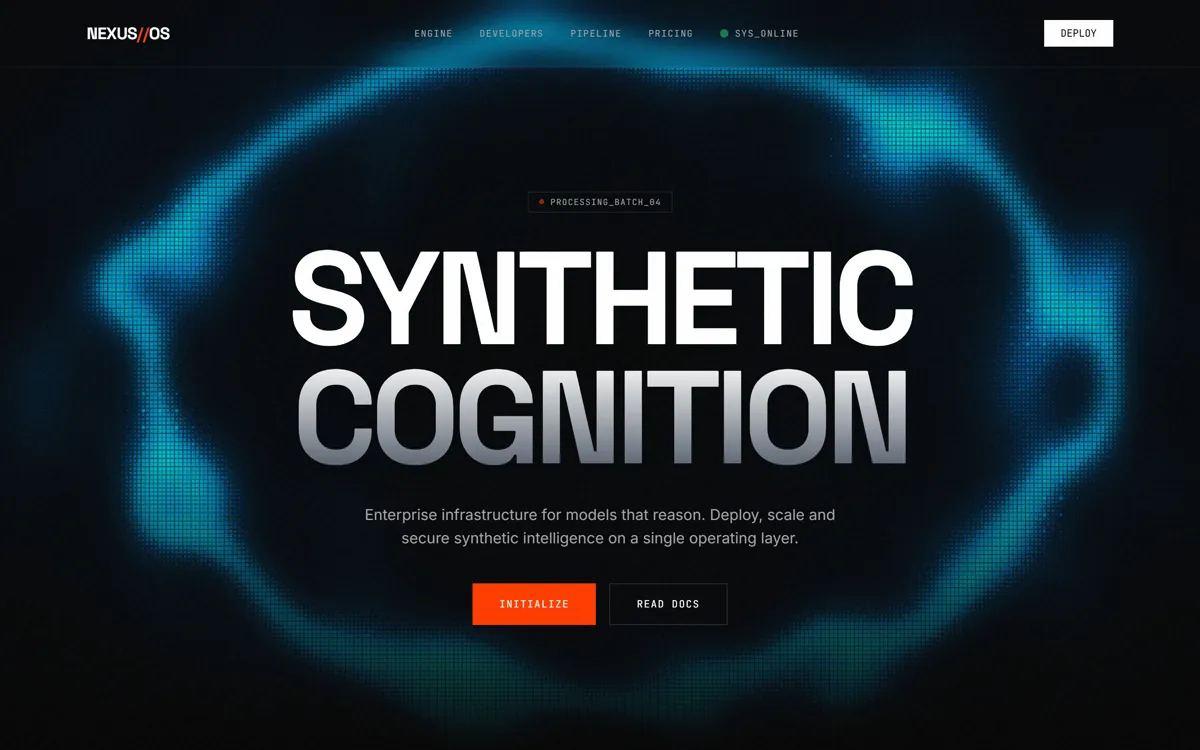
Recreate the website "NEXUS // OS" with high visual fidelity as a Tailwind CSS and GSAP-based site.

The result must match the supplied reference website, not a reinterpretation.

Preserve source quirks:
- Double slash in branding "NEXUS//OS".
- Hexadecimal "Enclave" strings are hardcoded and animate in a reverse vertical marquee.
- The counter for Uptime starts at 90.00 and animates to 99.99 upon scroll.
- Section skewing effect is applied only to elements with the `.skew-target` class, not the whole body.

CRITICAL FIDELITY CONSTRAINTS
- Background is pure `#050505`. Do not use standard dark-mode grays.
- Use `mix-blend-screen` for the Hero H1 and `mix-blend-luminosity` for the Neural Engine image.
- The noise overlay must be present globally at 4% opacity using the specific SVG filter data URI.
- Asset URLs must be exact; do not substitute with placeholders.

TECH STACK / DEPENDENCIES
- Tailwind CSS (CDN)
- GSAP 3.12.2 (Core + ScrollTrigger)
- Lenis Smooth Scroll 1.0.29
- Lucide Icons (CDN)
- Unicorn Studio JS (v1.4.29) for the 3D background layer.

GLOBAL STYLE
- Fonts: 'Space Grotesk' (Display), 'Inter' (Sans), 'JetBrains Mono' (Mono).
- Colors: Accent: `#FF3B00` (Safety Orange), Surface: `#0F0F0F`.
- Selection: `bg-accent text-white`.

ASSET MAP
- Hero Image: https://hoirqrkdgbmvpwutwuwj.supabase.co/storage/v1/object/public/assets/assets/61d6ed66-a853-4d7e-b477-0127a02a7694_1600w.webp
- 3D Background Project ID: `NMlvqnkICwYYJ6lYb064` via Unicorn Studio.

VECTOR / ICON SHAPES
- Use Lucide classes: `menu`, `cpu`, `lock`, `activity`, `x`.
- Custom SVG in Edge Nodes section: Viewbox same as container, two `<line>` elements with `stroke="rgba(255,255,255,0.1)"` and `stroke-width="0.5"` connecting pulse points.

MEDIA BEHAVIOR
- The Processor image in the Neural Engine card has a `group-hover:scale-105` transition over 700ms.
- The scan-line is a `50px` height gradient animating via the `scan` keyframe from `-20%` to `120%` top position.

LAYER STACK / POSITIONING MAP
- LAYER -50: Fixed Backdrop (`#050505`).
- LAYER -10: Unicorn Studio 3D Canvas (Fixed, 80% alpha mask via CSS linear-gradient mask).
- LAYER 9000: Noise Overlay (Fixed inset-0, pointer-events-none).
- LAYER 50: Nav (Fixed, backdrop-blur-md, border-b white/5).
- LAYER 40: Mobile Menu Overlay (Fixed inset-0, z-40).
- SECTION LAYERS: Most sections use `.skew-target` for GSAP-driven skew transforms.

SECTION 1 - NAVIGATION
- H-20, max-w-7xl, flex justify-between.
- Logo: "NEXUS" (white) + "//" (accent) + "OS" (white).
- Desktop: Links in JetBrains Mono, 10px status indicator with green pulse.

SECTION 2 - HERO
- Max-w-5xl, text-center. H1: "SYNTHETIC COGNITION" using `Space Grotesk`, leading-[0.9]. "COGNITION" has a white-to-gray-600 gradient.
- Scramble effect on H1 text on entry.

SECTION 3 - LOGO MARQUEE
- Border-y white/5, py-8. Masked on left/right edges with `linear-gradient(to right, transparent, black 10%, black 90%, transparent)`.
- Items: ORBITAL, SYNTHETICS, HYPERION, VERTEX, QUANTUM, NVIDIA.

SECTION 4 - BENTO GRID (Neural Engine)
- 4x3 Grid (desktop), auto-rows (mobile).
- Features: Vector Synthesis (H100 image), Uptime (99.99 counter), Enclave (Hex code scroll), Throughput (accent bar chart), Threat Shield (Red pulse), Context (Gradient progress bar), Edge Nodes (Dot grid with pulsing dots).

SECTION 5 - DEVELOPER EXPERIENCE
- 2-Column layout. Left: Feature list. Right: Code terminal.
- Terminal: `#0a0a0a`, white/10 border, JetBrains Mono text. Pulse cursor `_` in accent color.

SECTION 6 - PIPELINE (Sticky)
- Left Column: Sticky `top-24`, aspect-square. Features a central node with `PROCESSING` text and two orbiting rings with offset rotation speeds (`spin-slow` and `reverse-spin`).
- Right Column: Scrollable text steps (01-03). Steps transition from `opacity-30` to `opacity-100` as they enter the center of the viewport via GSAP.

SECTION 7 - PRICING
- 3-column grid. Center card is elevated (`-translate-y-4` on desktop) with accent border and "Popular" badge.

GLOBAL ANIMATION / INTERACTION RULES
- ScrambleText class: Handles character randomization (`!<>-_\/[]{}—=+*^?#________`) for elements with `.scramble-text`.
- Liquid Scroll Skew: Apply `skewY` (clamped -5deg to 5deg) based on Lenis velocity to `.skew-target` elements.
- Spotlight Effect: JS updates `--mouse-x` and `--mouse-y` for `.spotlight-card` hover gradients.
- Magnetic Buttons: `.btn-magnetic` elements follow cursor by 30% of distance via GSAP.

COMMON MISTAKES TO AVOID
- Do not use standard scroll behavior; Lenis is required for the skew effect to look fluid.
- Do not forget the `mix-blend-screen` on the Hero text; it causes the background 3D elements to show through the white text.
- Do not normalize the `Processing_Batch_04` badge; it must be font-mono and 10px.

IMPLEMENTATION REQUIREMENTS
- Build as the primary screen.
- Use original URLs for the Unicorn Studio script and Supabase assets.
- Maintain exact stacking contexts for the noise and 3D background layers.
Промпт на английском — ИИ-инструменты понимают его лучше
Лендинг платформы «синтетического интеллекта» в духе технического терминала. На чёрном фоне крупный заголовок SYNTHETIC COGNITION, который собирается из случайных символов, оранжевый акцент, бегущая строка партнёров и бенто-сетка возможностей: счётчик аптайма от 90.00 до 99.99, шестнадцатеричные строки, столбчатая диаграмма, пульсирующие узлы. Секции слегка наклоняются при быстром скролле (Lenis + GSAP), карточки подсвечиваются за курсором, кнопки «липнут» к нему, а цена в центре приподнята.
Подойдёт для лендингов AI-, DevOps- и инфраструктурных продуктов, где нужен строгий «инженерный» образ.
Как получить такой же результат
Запускайте в Claude Code или в чате с артефактами; результат один HTML с Tailwind, GSAP, Lenis и Lucide через CDN.
Объёмный фон строится на сервисе Unicorn Studio по идентификатору проекта. Мы подключили скрипт той версии, что указана в промпте, и получили мягкое свечение, которое следует за курсором. Для своего проекта создайте сцену в Unicorn Studio и подставьте её id в data-us-project.
Адреса CDN в промпте даны только по названию библиотек. Проверьте, что Claude взял рабочие ссылки: у Lenis и Lucide конкретные версии из промпта на некоторых CDN не открываются, нужен другой путь к файлу.
Фотография процессора в карточке грузится по ссылке из промпта. Замените её на свою картинку или попросите сгенерировать изометрический рендер чипа.
Название, счётчики и цены поменяйте под свой продукт; не трогайте двойную косую в логотипе, если хотите сохранить стиль.