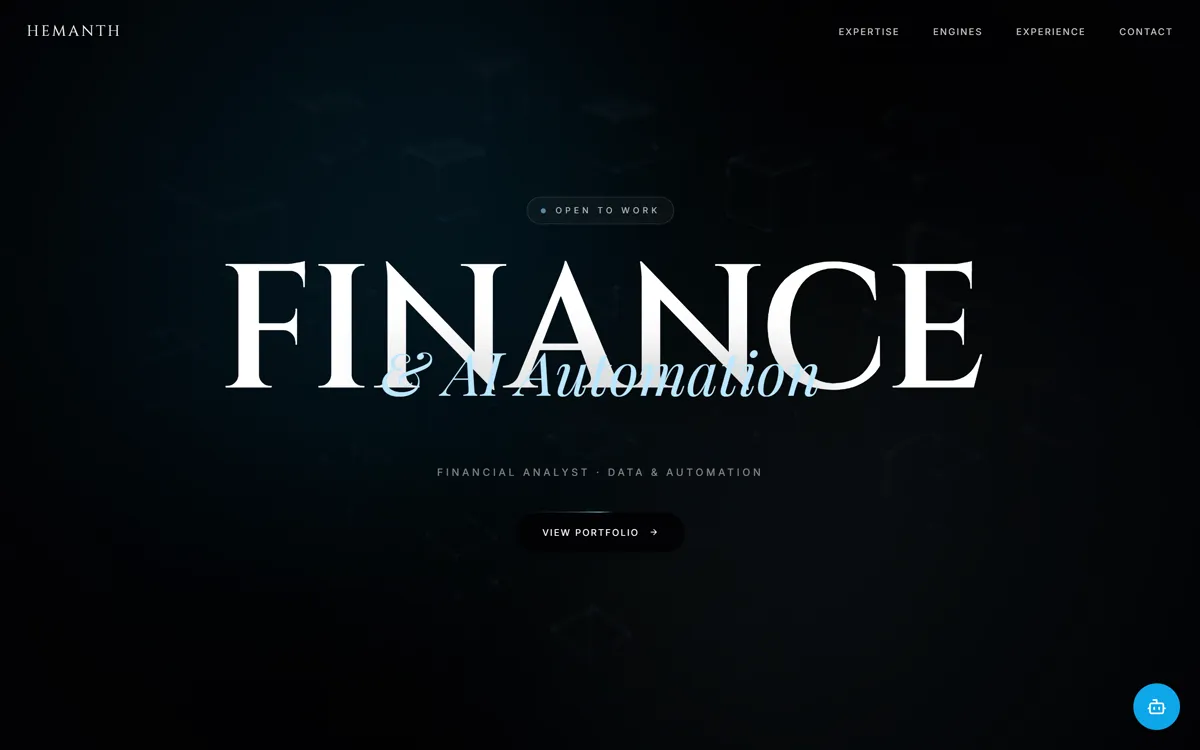
Чёрное кинематографичное портфолио: огромное слово FINANCE на зернистом фоне, аврора, капсульная шапка и стеклянные карточки.
Промпт
Recreate the website "Finance & AI Portfolio Landing Page Template" with high visual fidelity as a Tailwind CSS and Vanilla JavaScript site.

The result must match the supplied reference website, not a cleaned-up reinterpretation.

Preserve source quirks:
- The scaling of the hero text "FINANCE" uses a specific `scale-y-105` transform.
- Navigation uses a `mix-blend-difference` mode that switches to `mix-blend-normal` only on scroll.
- The "Open to Work" badge uses a custom character spacing of `tracking-[0.4em]`.
- The footer background logo "HEMANTH" uses a very low opacity (`text-white/[0.02]`) and is strictly decorative.

CRITICAL FIDELITY CONSTRAINTS
- Background textures must use the specific SVG-based noise data-URL filter provided in the CSS config.
- No standard scrollbars: use the custom 6px width scrollbar with `#333` thumb and `#7DD3FC` hover state.
- Every section transition must use the `reveal-on-scroll` class with an IntersectionObserver that triggers `animate-reveal-up`.
- Asset URLs must be exactly as specified in the ASSET MAP.

TECH STACK / DEPENDENCIES
- Tailwind CSS (v3.x via CDN)
- Iconify (3.1.0) for icons
- Lucide Icons (via unpkg)
- Google Fonts: Cinzel (400-800), Inter (200-600), Playfair Display (Italic & Regular)
- Configuration: Custom tailwind config for `animation: slow-pan, aurora, marquee, hero-enter` and custom colors `accent: #0EA5E9` range and `obsidian: #020204`.

GLOBAL STYLE
- Body Background: `#020204` (Obsidian)
- Text Color: `#e5e5e5` (Neutral)
- Cinema Grain: Fixed overlay at `z-9999` using `bg-noise` and `mix-blend-overlay` at 4% opacity.

ASSET MAP
- Hero BG: https://images.unsplash.com/photo-1639322537228-f710d846310a?q=80&w=2600&auto=format&fit=crop
- Service Image 1: https://images.unsplash.com/photo-1551288049-bebda4e38f71?q=80&w=1600&auto=format&fit=crop
- Service Image 2: https://images.unsplash.com/photo-1633412802994-5c058f151b66?q=80&w=1600&auto=format&fit=crop
- Service Image 3: https://images.unsplash.com/photo-1504868584819-f8e8b4b6d7e3?q=80&w=1600&auto=format&fit=crop
- Project Card 1: https://images.unsplash.com/photo-1642543492481-44e81e3914a7?q=80&w=1200&auto=format&fit=crop
- Project Card 2: https://images.unsplash.com/photo-1611974765270-ca12586343bb?q=80&w=1200&auto=format&fit=crop
- Project Card 3: https://images.unsplash.com/photo-1642790106117-e829e14a795f?q=80&w=1200&auto=format&fit=crop

VECTOR / ICON SHAPES
- Use `lucide:menu`, `lucide:arrow-right`, `lucide:map-pin`, `lucide:linkedin`, `lucide:bot`, `lucide:sparkles`, `lucide:x`, `lucide:send`, `lucide:award`, `lucide:bar-chart-2`, `lucide:cpu`, `lucide:pie-chart`.

MEDIA BEHAVIOR
- Background Image in Hero: `filter brightness-[0.4] contrast-125 grayscale-[80%] blur-[2px]` and `animate-slow-pan`.
- Service Images: Absolute position, opacity 0 to 100 transition via `setServiceImage(id)` script. Image 1 starts at `opacity-100`.
- Project Images: `filter saturate-[0.8]` on Card 1, Card 2 is default, Card 3 is `filter grayscale contrast-125`.

LAYER STACK / POSITIONING MAP
- Nav: `fixed top-0` (z-50). Transitions from 100% width to `rounded-full` capsule on scroll.
- Hero Content: `relative z-30` over background layers.
- Hero Background Layers:
  1. Base Color (#020204)
  2. Slow-pan Image
  3. Aurora Blur Divs (-top-30% left, -bottom-30% right)
  4. Radial Gradient Mask (z-20)
  5. Noise Filter Overlay
- Chatbot Widget: `fixed bottom-6 right-6` (z-60).

SECTION 1 - HERO
- Layout: 100vh center flex.
- Heading: "FINANCE" in `font-cinzel` text-[14vw]. Absolute overlay text "& AI Automation" in `font-serif italic` text-[5vw].
- Button: "View Portfolio" with a `conic-gradient` border animation (`beam-spin 3s`).

SECTION 2 - TECH MARQUEE
- Layout: Bordered row, `overflow-hidden`.
- Animation: `animate-marquee` 25s linear.
- Content: Alternating fonts (Serif vs Sans) for tool names (Power BI, Alteryx, Python, etc.).

SECTION 3 - TECHNICAL EXPERTISE
- Layout: Two-column grid (large screens). Left: Sticky container `h-[700px]` with image cross-fading. Right: Scrolling cards.
- Interaction: Hovering cards calls `setServiceImage(id)` to update the sticky image.

SECTION 4 - FINANCIAL INTELLIGENCE ENGINES
- Layout: 3-column grid of project cards.
- Card Style: Glassmorphism (`bg-white/[0.03] backdrop-blur-md`). Hover effect: Image `scale-105`, title text-color change to `accent-300`.

SECTION 5 - EXPERIENCE
- Layout: 3-column vertical layout on desktop.
- Card Detail: Large Serif numbers (01, 02, 03) at 30% opacity. Details reveal on hover via `translate-y-4` to `translate-y-0`.

SECTION 6 - CERTIFICATIONS
- Layout: Max-w-4xl, centered. Two columns: "Official" and "Job Simulations".
- Style: Thin vertical divider line (`w-px h-8`).

SECTION 7 - FOOTER & CONTACT
- Layout: 2-column grid for contact info and form.
- Form: Transparent inputs with `border-b` only. White button with `accent-100` hover.
- Footer: Massive background text "HEMANTH" behind links.

GLOBAL ANIMATION / INTERACTION RULES
- Nav Transition: When `scrollY > 50`, compress to capsule (`rounded-full py-2 px-8`), add `bg-black/80` and `backdrop-blur-xl`.
- Chatbot Toggle: `toggleChat()` function toggles `invisible/opacity-0` and `visible/opacity-100` with `scale-95` to `scale-100` transition.
- Scroll Reveal: `IntersectionObserver` adds `animate-reveal-up` when 5% of element is visible.

COMMON MISTAKES TO AVOID
- Do not use solid backgrounds for hero gradients; use the radial gradient mask to create the circular focal point.
- Do not forget the `mix-blend-difference` on the initial nav state.
- Do not miss the `saturate-0 contrast-125` filter on the first service image.

IMPLEMENTATION REQUIREMENTS
- Use original asset URLs.
- Use provided Tailwind configuration for all animations and fonts.
- Ensure the chat widget is hidden on mobile (`hidden md:block`).
- Recreate exact spacing, especially the `tracking-cinematic` (0.3em) and `tracking-editorial` (0.15em) values.
Промпт на английском — ИИ-инструменты понимают его лучше
Портфолио финансового аналитика, который автоматизирует отчётность с помощью AI. На первом экране гигантское слово FINANCE в шрифте Cinzel, поверх него курсивом «& AI Automation», медленно плывущий приглушённый фон и мягкие голубые «северные сияния». Шапка в начале прозрачная, а при прокрутке сжимается в стеклянную капсулу. Дальше: бегущая строка с инструментами, секция навыков с липкой картинкой, которая меняется при наведении на карточки, три карточки проектов, опыт и контактная форма. Подойдёт финансистам, аналитикам и консультантам, которым нужен строгий премиальный сайт-визитка.
Как получить такой же результат
Запускайте промпт в Claude как есть: он просит Tailwind через CDN и обычный JavaScript, так что результатом станет один HTML-файл без сборки. Откройте его в Chrome или Edge.
Бесплатные фото в промпте даны ссылками Unsplash, поэтому картинки подтянутся сами. У нас одна из трёх карточек проектов не загрузилась (Unsplash иногда отдаёт ошибку): замените ссылку на свою фотографию или попросите Claude подставить другую.
Тексты промпт почти не задаёт: только названия секций и пару фраз. Нужные вам абзацы про услуги, проекты и опыт Claude придумает сам, поэтому добавьте в запрос свои цифры и названия, иначе получится «общий» текст.
Слово «HEMANTH» в подвале и в логотипе это имя автора шаблона. Попросите Claude заменить его на ваше имя целиком, а не только в шапке.
Бегущая строка с инструментами (Power BI, Alteryx, Python) легко меняется под вашу область: просто перечислите свои инструменты.
Сжатие шапки в капсулу срабатывает при прокрутке больше 50 пикселей. Если капсула у вас не появляется, попросите Claude переключать классы шапки по scrollY > 50, как в промпте.